

Protoarc EM01 NL Wireless Bluetooth Trackball Mouse Adjustable Angle
Description
| Network Connectivity Technology | Bluetooth, USB |
| Product Features | Ergonomic Design, Portable, Rechargeable, Wireless |
| Movement Detection | Optical |
| Button Quantity | 6 |
| Hand Orientation | Right |
| Compatible Devices | Laptop, Personal Computer |
| Operating System | Windows, Android, Mac OS |
| Battery Average Life | 30 days |
| Number of Batteries | 1 Lithium Ion batteries required. |
| Hardware Platform | Personal Computer |
| Power Source | Battery Powered |
| Mouse Maximum Sensitivity | 1600 Dots per Inch |
| Range | 10 |
| Colour | Gray Roll |
| Style Name | Modern |
| Theme | Video Game |
| Enclosure Material | Plastic |
| Product Finish Type | Smooth |
| Brand Name | ProtoArc |
| Model Name | EM01 NL |
| Antenna Location | Business, Home, Office, Personal |
| Model Number | EM01 NL |
| Country of Origin | China |
| Included Components | A Type C Charging Cable, A USB Receiver, A User Manual, An Ergonomic Trackball Mouse |
| Are Batteries Included? | No |
| Are Batteries Required | Yes |
| Manufacturer | ProtoArc |
| Manufacturer Part Number | Protoarc B0CWTY6Z99 |
| Item Weight | 0.35 Kilograms |
| Unit Count | 1.0 count |
| Brand | ProtoArc |
| Connectivity technology | Bluetooth, USB |
| Special feature | Ergonomic Design, Portable, Rechargeable, Wireless |
| Movement detection technology | Optical |
Product Description
The video showcases the product in use.The video guides you through product setup.The video shows the product being unpacked.EM01 NL Trackball Mouse
Note When using the trackball for the first time, slight thumb soreness is normal as it's a muscle memory rebuilding process. We suggest spending 1-2 weeks getting used to it. Many users find this reduces wrist pressure and pain from long - term mouse use and increases comfort.
Note: All buttons are not programmable. Backward/forward buttons are not compatible with the Mac OS system
Clean the Trackball
When you use the trackball mouse for a period of time, you need to clean the trackball and inside the hole to ensure that the trackball is always smooth.
Adjustable DPI
5 DPI levels (200/400/800/1200/1600 DPI) allows you to change the cursor sensitivity easily for more precise tracking. Smooth frosted surface and quiet clicks can bring a better user experience and free your worry about bothering others and keep you stay focused while working.
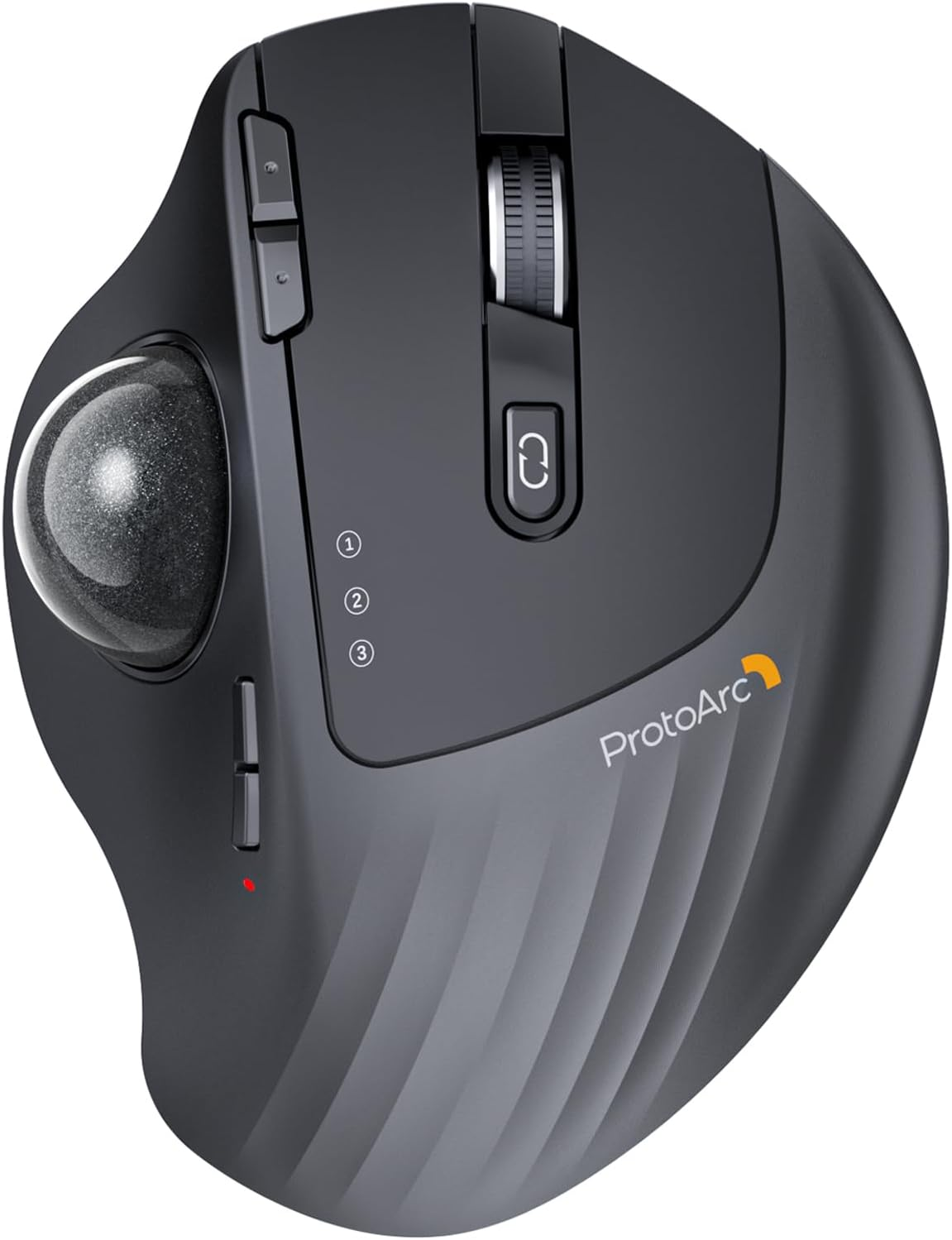
- Ergonomic Thumb Mouse: Track precisely with great cursor control on any surface and easy thumb-operated trackball. The trackball cannot be used in the same way as a regular mouse. You no longer need to move your arm for the movement of the cursor. It will effectively reduce fatigue and strain for your wrist and arm
- Adujustable Angle Design: Unique adjustable hinge allows you to customize the trackball angle from 0 to 20 degrees according to your needs for a more natural, comfortable hand position and less muscle strain during long working hours
- Rechargerable & Adjustable DPI: The Bluetooth Trackball Mouse built-in 900mAh lithium battery. No need to change batteries; battery life lasts up to 1 month per full recharge. 5 DPI levels (200/400/800/1200/1600 DPI) allows you to change the cursor sensitivity easily and track more smoothly over a variety of surfaces. While excellent for daily tasks, it is not optimized for competitive gaming.
- Bluetooth & 2.4G Wireless Connection:PLUG and PLAY. This trackball mouse has triple connection modes and comes with a USB receiver dongle. You can control three devices at the same time, switch freely between Android, tablet and Mac with just one button. Compatible with Windows, Android, Mac OS PC Laptop Desktop etc; however, forward/backward buttons are not compatible with Mac OS.
- Optimal for Tight Workspaces: Because the trackball doesn't move, it’s excellent for tight workspaces and busy desks and fits in seamlessly alongside your computer and keyboard or laptop. It features a standard scroll wheel for easy navigation, though all buttons are not programmable.
- MAINTENANCE & CLEANING: After using the trackball for a period of time, please clean the trackball and the three white rollers inside the hole to ensure smooth tracking performance. Note: When the computer is just started or a heavy application is running, it may temporarily cause the cursor to lag.
- GETTING USED TO YOUR TRACKBALL: Are you new to a trackball mouse? 1. Be patient and give yourself an adaptation period to get used to the unique thumb-operated style. 2. Experiment with different hinge angles to find what is most comfortable for your wrist. 3. If you need assistance with setup or usage, please contact our customer service.
ABOUT US
We offer the best prices around on high quality products. Our E-store includes media such as books, movies, music and games while offering electronics, toys, sporting apparel, clothing, tools, general home, garden items and more.
SHIPPING
We are always working hard to ensure your package arrives as soon as possible. Please understand that some factors like weather, high postal traffic, and the performance of shipping companies are outside of our control.
RETURNS
We offer a 30-Day Return Policy on items which you are not completely satisfied with. You have the option for a full-refund or an exchange of the item. No returns are available on items shipped outside of the UK.
PAYMENT
We accept PayPal.
CONTACT US
This page content is yet to come
Please ad us to your favorite seller and visit again later
Thank You
CUSTOMER SATISFACTION
We try our very best to make sure every customer is completely satisfied. If there's a problem, message us! We're happy to help.