📱 FlexiStand Pro · Adjustable Desktop Phone & Tablet Stand
 Adjustable angle · Universal fit
 Sturdy · Non-slip · Secure
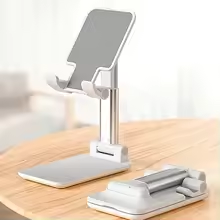 For phones & tablets · Foldable
Hands-free viewing at the perfect angle — for work, streaming, and video calls
The FlexiStand Pro Desktop Phone Stand is the ultimate hands-free solution for your smartphone or tablet. With an adjustable angle, you can customise the viewing position for video calls, streaming movies, following recipes, or using your device as a secondary monitor. The universal design fits all smartphones and tablets — iPhone, iPad, Samsung Galaxy, Xiaomi, Google Pixel, and more. The foldable, lightweight construction makes it easy to toss in your bag for travel, while the non-slip padding keeps your device secure. Perfect for home office, kitchen counter, bedside table, or airplane tray table. Available in multiple colours.
Why this stand beats bulky docks and sticky holders
Adjustable Viewing Angle
Customise the angle for optimal viewing — reduce neck strain during long video calls or binge-watching sessions.
Universal Compatibility
Fits all smartphones (4-7 inches) and tablets (up to 11 inches). Works with or without a case.
Foldable & Portable
Collapses flat for travel. Weighs almost nothing — perfect for carry-on bags, backpacks, and purses.
Designed for stability and convenience
Multiple viewing angles — from nearly flat to upright. Perfect for typing, watching, or video calls.
Fits phones 4-7 inches and tablets up to 11 inches. Works with most cases (up to 12mm thick).
Rubber grips on base and cradle prevent slipping — your device stays put on any surface.
Collapses to a flat, compact size. Easy to store or slip into a laptop sleeve.
Made from durable ABS plastic + metal hinges. Holds devices securely without wobbling.
Minimalist aesthetic complements any desk or home decor.
Small stand, big difference — ergonomic comfort for daily device use
Why propping your phone against a coffee mug is a bad idea
We've all done it — leaned your phone against a book, a coffee mug, or a random object to watch a video. The problem? It falls over constantly, the angle is never right, and you're still looking down at an angle that strains your neck. The FlexiStand Pro solves all of that. The adjustable hinge lets you set the perfect viewing angle — from nearly flat for typing, to steep for video calls. The non-slip pads keep your device in place, even when you're tapping the screen. The stand works in both portrait and landscape orientation. It's compatible with phones in cases (up to 12mm thick) and tablets up to 11 inches. When you're done, the stand folds flat — small enough to slip into a laptop sleeve, backpack pocket, or glove compartment. Use it at your desk for Zoom calls, in the kitchen for hands-free recipe viewing, on an airplane tray table for in-flight movies, or on your nightstand as a clock/charging stand. It's the last phone stand you'll ever need.
✔️ Fits: iPhone (all models), Samsung Galaxy, Google Pixel, Xiaomi, iPad (mini/Air), Kindle, and more
✔️ Material: ABS plastic + metal hinges + rubber pads
✔️ Folded size: Approx. 11 x 6 x 1 cm
Fold · Adjust · Set
Perfect angle, every time
Product Specifications
| Product name | Adjustable Desktop Phone/Tablet Stand | |||||||||||||
|---|---|---|---|---|---|---|---|---|---|---|---|---|---|---|
| Material | ABS plastic + metal hinges + silicone non-slip pads | |||||||||||||
| Compatible devices | Smartphones (4-7 inches), tablets (up to 11 inches), e-readers | |||||||||||||
| Orientation | Portrait and landscape | Angle adjustment | Multiple adjustable angles (0° to 70° approx.) | Foldable | Yes — collapses flat for travel | Weight | Ultra-lightweight (approx. 60g / 2.1 oz) | Colours | Multiple colours available (select at checkout) |
📘 How to use — set up in seconds
Flip open the stand to your desired angle. The hinges will lock into place.
Set your phone or tablet in the cradle. The non-slip pads will hold it securely.
For typing, use a shallower angle. For video calls, use a steeper angle.
When not in use, fold the stand flat and store in a bag or drawer.
💡 Pro tip: For the most stable setup, place the stand on a flat, level surface. The rubber feet prevent slipping on desks, tables, and countertops.
✨ Pro tips for maximum stability and convenience
- Use with a case: The stand works with most phone cases up to 12mm thick. If your case is very thick, test first.
- For video calls: Adjust the angle so the camera is at eye level — most flattering and professional.
- For streaming: Landscape orientation works best for movies and TV shows.
- For reading or recipes: A steeper angle (60-70°) is best for hands-free reading in the kitchen.
- Travel tip: Keep the stand in your backpack or carry-on — it's TSA-friendly and perfect for hotel rooms.