| Brand | eufy Security |
|---|---|
| Special Feature | Fingerprint,Smart Lock,Waterproof,Wi-fi |
| Lock Type | Keypad |
| Item dimensions L x W x H | 6.5 x 2.64 x 1.03 inches |
| Recommended Uses For Product | Security |
| Style | Fingerprint Retrofit Smart Lock |
| Color | Silver |
| Number of Pieces | 1 |
| Included Components | Lock :2*screw caps、4*adapters、4*CR123A batteries、1*mounting plate;Keypad:2*screws、2*anchoring、1*keypad mount、1*keypad 3M sticker、2*AA batteries、1*eufy pin |
| Controller Type | iOS |
| Shape | Rectangular |
| Item Weight | 0.77 Pounds |
| Control Method | Remote |
| Connectivity Protocol | Bluetooth, Wi-Fi |
| UPC | 194644104993 |
| Manufacturer | Eufy |
| Part Number | T8504 |
| Item Weight | 12.3 ounces |
| Product Dimensions | 6.5 x 2.64 x 1.03 inches |
| Item model number | T8504 |
| Batteries | 4 Lithium Ion batteries required. (included) |
| Item Package Quantity | 1 |
| Special Features | Fingerprint,Smart Lock,Waterproof,Wi-fi |
| Batteries Included? | Yes |
| Batteries Required? | Yes |
| Battery Cell Type | Lithium |
eufy Security WiFi E130 +Wireless Fingerprint Keypad Smart Lock silver T8504121
Smart Lock with Fingerprint
| Brand | eufy Security |
| Special Feature | Fingerprint,Smart Lock,Waterproof,Wi-fi |
| Lock Type | Keypad |
| Item dimensions L x W x H | 6.5 x 2.64 x 1.03 inches |
| Recommended Uses For Product | Security |
About this item
- Ideal for Renters and Landlords: Easily install Retrofit Smart Locks in 10 minutes. They fit over your existing deadbolt on the inside of your door. The outside doesn’t change—giving access with the original keys—which you won’t need to use anymore.
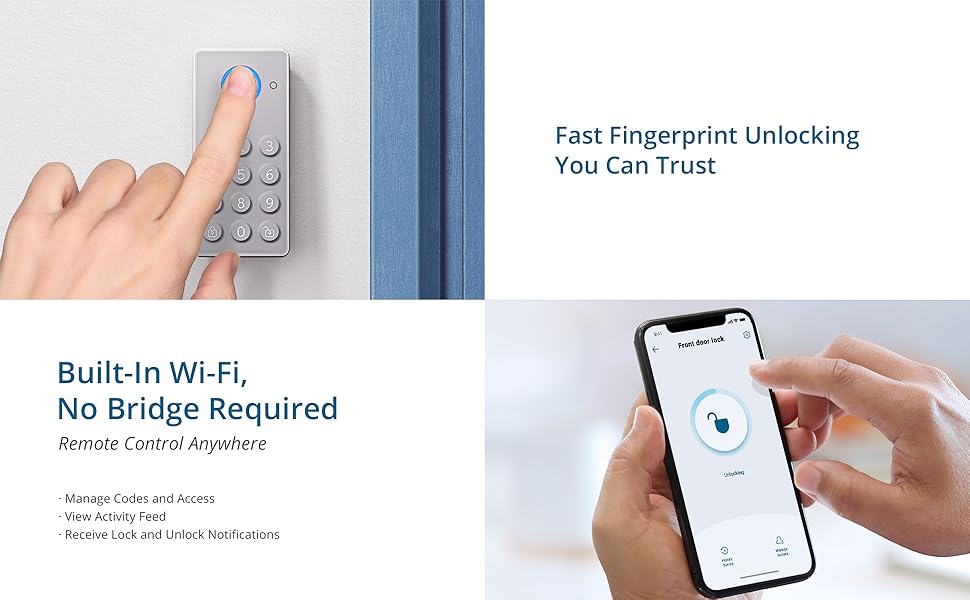
- 1-Second Fingerprint Unlocking: Recognizes your fingerprint in just 0.3 seconds and unlocks your door in 1 second. No waiting, no worries.
- Remote Control, Anytime, Anywhere: Unlock Smart Lock anywhere, anytime, right from your phone via the eufy Security app.
- 6 Ways to Unlock: Along with Auto Unlock and fingerprint unlocking, you can control your lock remotely via the app, by voice, with the included wireless keypad, and it can still be opened with the original keys.
- Advanced Security: Retrofit Smart Lock stores your in-app data locally using a bank-grade AES128 encryption chip, rather than in the cloud, to keep your personal information safe and private.
From the brand


At
eufy Security, privacy and protection are our top priorities. Both are
integral to our daily operations, and to implementing measures that
ensure your data is always safe.
From
your newborn crying for mom, to your victory dance after a game, your
personal moments are yours. We are committed to products and services
that keep your data private and secure.
That’s just the start of our commitment to protect you, your family, and your privacy.


At eufy Security, privacy and protection are our top priorities. Both are integral to our daily operations, and to implementing measures that ensure your data is always safe.
From your newborn crying for mom, to your victory dance after a game, your personal moments are yours. We are committed to products and services that keep your data private and secure.
That’s just the start of our commitment to protect you, your family, and your privacy.
Product Description
Introducing eufy Security Retrofit Smart Lock E130 (R20)

Fits your existing deadbolt.
eufy Retrofit Smart Locks fit over your existing deadbolt on the inside of your door.
The
outside doesn’t change—giving access with the original keys—which you
won’t need anymore. Control your lock remotely with smart controls, even
for rental properties.
If you move, it's easy to remove without damaging the door or walls.
eufy Retrofit Smart Locks fit over your existing deadbolt on the inside of your door.
The outside doesn’t change—giving access with the original keys—which you won’t need anymore. Control your lock remotely with smart controls, even for rental properties.
If you move, it's easy to remove without damaging the door or walls.
Fast Fingerprint Unlocking You Can Trust
|
|
|
|
|---|
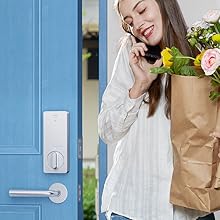
No Hands Required
Auto Unlock senses when you’re coming and unlocks the door (iOS only, geofencing must be enabled).
Auto Unlock senses when you’re coming and unlocks the door (iOS only, geofencing must be enabled). |
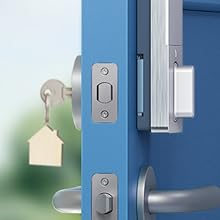
Your Original Keys
eufy Retrofit Smart Locks don't change the deadbolt, so you can still use your original keys.
eufy Retrofit Smart Locks don't change the deadbolt, so you can still use your original keys. |
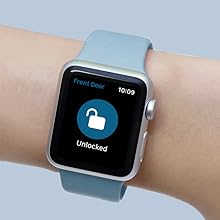
Compatible with Apple Watch
Easily and conveniently open your door hands-free with your Apple Watch.
Make Sure eufy Wi-Fi Smart Lock Retrofit Touch R20 is Right for You

Frequently Asked Questions
Q: Does Smart Lock R10/R20 support Alexa and the Google Assistant?
A: Yes, both Alexa and the Google Assistant are supported.
Q: Which deadbolts are compatible with these locks?
A:
They are compatible with most single cylinder deadbolts. They are not
currently compatible with mortise locks, double cylinder deadbolts (key
hole on both outside and inside of the door), medeco, multi-lock, or
single-sided deadbolts. We do not recommend using with a deadbolt that
is already difficult to lock and unlock.
Q:How long will the batteries last?
A:
With normal amounts of use (10 locking and unlocking events per day),
the battery is expected to last about 180 days. You will receive a
notification in the app if the battery is lower than 10%.
Q: How many passcodes and fingerprints can the lock store?
A: It can store up to 100 passcodes and 50 fingerprints from multiple users.
Q: How can I create a new passcode or register a fingerprint?
A:
1. Go to your lock's section in the eufy Security app and connect to
your lock. 2. Tap "Manage Access" at the bottom right of the screen. 3.
Tap "Add Access" and follow the instructions to add passcodes or
fingerprints for your family and friends.
Q: How does the auto lock function work?
A:
As long as you have enabled the auto lock function in the lock's
settings section, when the built-in sensor detects that your door is in a
fully closed position, it will trigger the smart lock to automatically
lock your door. If the door remains unlocked for an extended time, 3
minutes by default, it will be automatically locked.
Q: Where can I see my lock and unlock events?
A:
1. Go to your lock's section in the eufy Security app and connect to
your lock. 2. Tap "Lock Events" at the bottom left of the screen.
Note
Eufy Wi-Fi Smart Lock only connects to 2.4GHz networks.
In
the unlikely event the thumbturn on the inside section of your lock
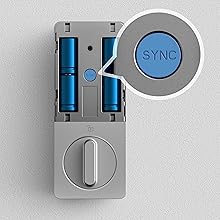
fails to work, simply double click the sync button and your door will
unlock.
*Latest model number: E130 (Previously R20). No difference between Retrofit Smart Lock E130 and R20.
Product information
Technical Details
Easily and conveniently open your door hands-free with your Apple Watch. Make Sure eufy Wi-Fi Smart Lock Retrofit Touch R20 is Right for YouFrequently Asked Questions
Q: Does Smart Lock R10/R20 support Alexa and the Google Assistant? A: Yes, both Alexa and the Google Assistant are supported. Q: Which deadbolts are compatible with these locks? A: They are compatible with most single cylinder deadbolts. They are not currently compatible with mortise locks, double cylinder deadbolts (key hole on both outside and inside of the door), medeco, multi-lock, or single-sided deadbolts. We do not recommend using with a deadbolt that is already difficult to lock and unlock. Q:How long will the batteries last? A: With normal amounts of use (10 locking and unlocking events per day), the battery is expected to last about 180 days. You will receive a notification in the app if the battery is lower than 10%. Q: How many passcodes and fingerprints can the lock store? A: It can store up to 100 passcodes and 50 fingerprints from multiple users. Q: How can I create a new passcode or register a fingerprint? A: 1. Go to your lock's section in the eufy Security app and connect to your lock. 2. Tap "Manage Access" at the bottom right of the screen. 3. Tap "Add Access" and follow the instructions to add passcodes or fingerprints for your family and friends. Q: How does the auto lock function work? A: As long as you have enabled the auto lock function in the lock's settings section, when the built-in sensor detects that your door is in a fully closed position, it will trigger the smart lock to automatically lock your door. If the door remains unlocked for an extended time, 3 minutes by default, it will be automatically locked. Q: Where can I see my lock and unlock events? A: 1. Go to your lock's section in the eufy Security app and connect to your lock. 2. Tap "Lock Events" at the bottom left of the screen. Note Eufy Wi-Fi Smart Lock only connects to 2.4GHz networks. In the unlikely event the thumbturn on the inside section of your lock fails to work, simply double click the sync button and your door will unlock. *Latest model number: E130 (Previously R20). No difference between Retrofit Smart Lock E130 and R20. Product informationTechnical Details
|
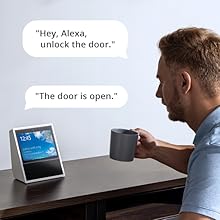
Compatible with Alexa and the Google Assistant
Hands full? Someone at the door? Use Alexa or the Google Assistant to unlock your front door completely hands-free.
Hands full? Someone at the door? Use Alexa or the Google Assistant to unlock your front door completely hands-free. |
|
|
|
|
|---|
Built-In Redundancy
In
the unlikely event the thumbturn on the inside section of your lock
fails to work, an easy backup method exists to unlock your door. Simply
double click the sync button and your door will unlock. You can also
unlock with the eufy Security app, Alexa, and the Google Voice Assistant
from inside your home.
In the unlikely event the thumbturn on the inside section of your lock fails to work, an easy backup method exists to unlock your door. Simply double click the sync button and your door will unlock. You can also unlock with the eufy Security app, Alexa, and the Google Voice Assistant from inside your home. |
Batteries Last Longer
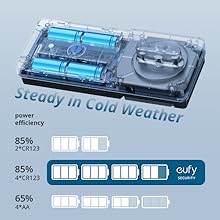
Specially developed built-in Wi-Fi has low power consumption, so the battery lasts about 180 days.
CR123 Batteries maintain high performance at low temperature.
Specially developed built-in Wi-Fi has low power consumption, so the battery lasts about 180 days. CR123 Batteries maintain high performance at low temperature. |
Auto Locks When You Forget
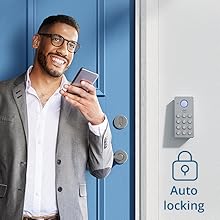
A
built-in sensor detects when your door is closed and locks it
automatically behind you, keeping your home secure even when you’re in a
hurry or if your hands are full.
A built-in sensor detects when your door is closed and locks it automatically behind you, keeping your home secure even when you’re in a hurry or if your hands are full. |
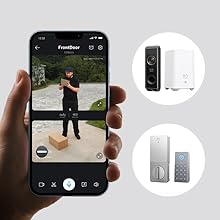
Works with eufy Video Doorbell
A combo for advanced front door security and control. See who's at your door and unlock it, all from the same place.
A combo for advanced front door security and control. See who's at your door and unlock it, all from the same place. |