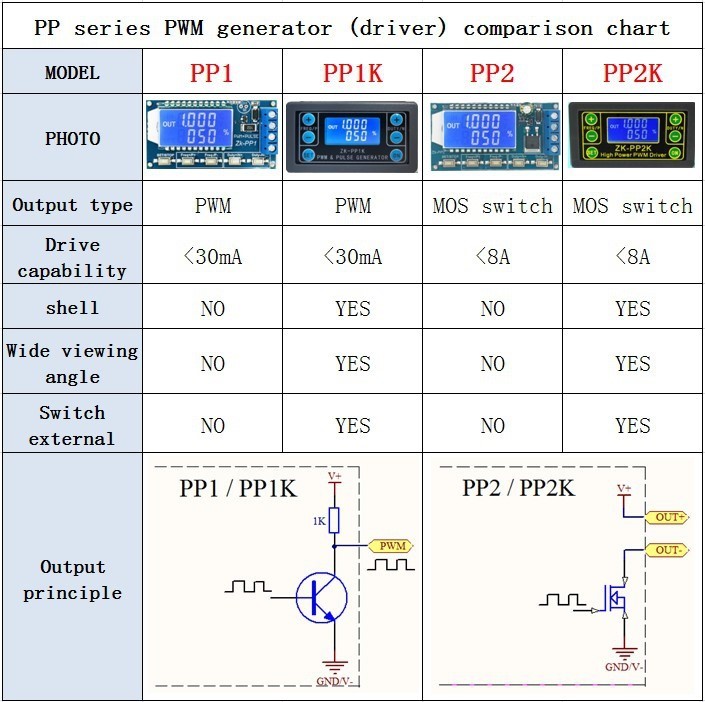
This series of products are PWM and pulse signal
Ge n e r a t o r. T h e r e a r e P W M m o d e a n d p u l s e
mode.Only one mode can be used at a time, but the
two modes can be switched at any time.
1.PWM signal generator, square wave rectangular
wave signal generator
2. Used to generate a square wave rectangular wave
signal, which is supplied to a DC motor or a stepper
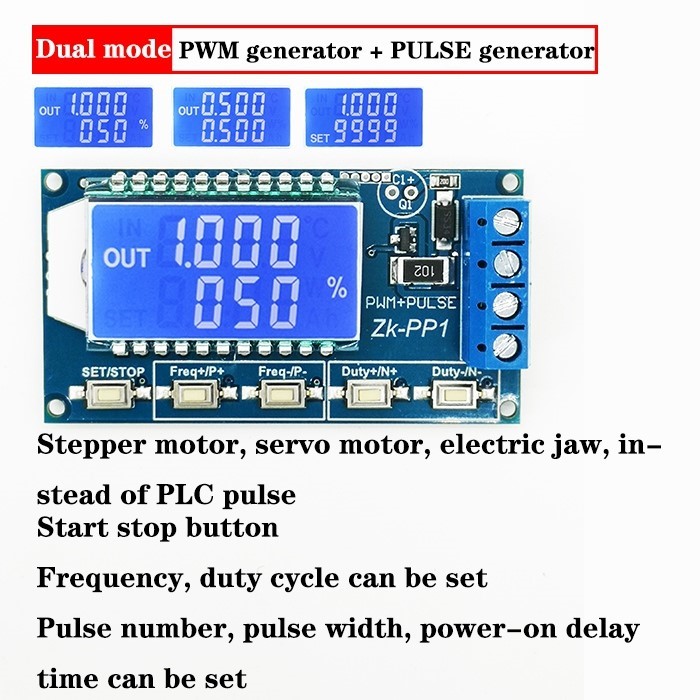
motor driver; Stepper motor, servo motor, electric
gripper, robot arm
3. ZK-PP1 and ZK-PPIK can combine the driver to
realize dimming, speed regulation, control solenoid
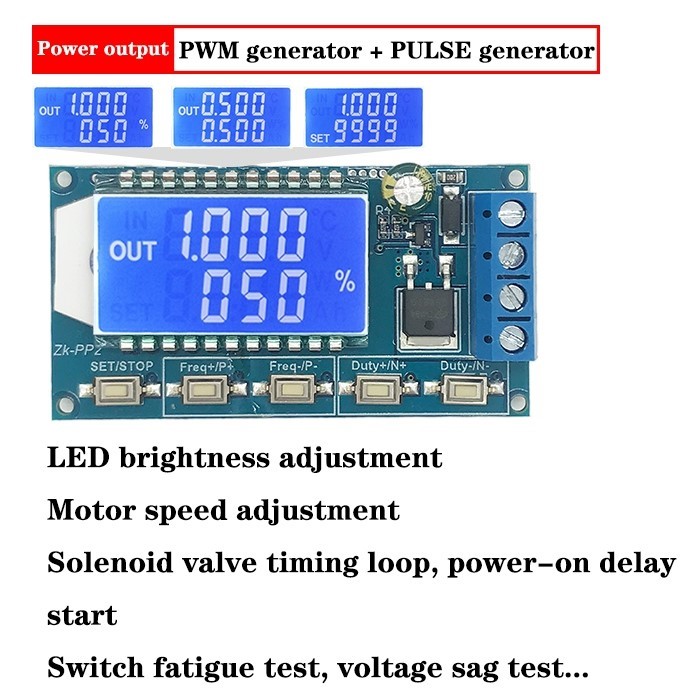
valve, etc. ZK-PP2 and ZK-PP2K is possible to
directly drive loads such as electric lights, motors,
and solenoid valves.
1.1 Two modes can be selected:
PWM mode - frequency (continuous), duty cycle, Pulse number is not adjustable, continue to send waveform;PULSE mode - positive pulse width time, negative pulse width time, delayed start time, and adjustable number of pulses.
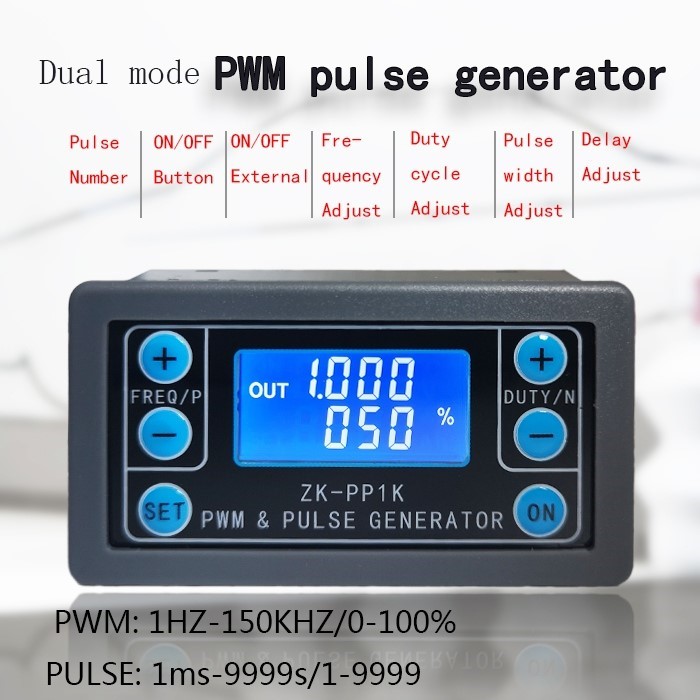
1.2 With start-stop button(ZK-PP1K and ZK-PP2K external switch can also be used to control output signal ON/OFF).
1.3 Wide voltage input 3.3-30V, with anti-reverse protection, 5.08mm terminal wiring
PWM & PULSE SIGNAL GENERATOR ZK-PP SERIES
2.1 Working voltage: 3.3V~30V, with anti-reverse protection.
2.2 Frequency range: 1Hz~150KHz, accuracy about 1%.
2.3 duty cycle range: 0-100%, 1% stepping.
2.4 number of pulses: 1-9999, or infinite (display '----' stands for infinity).
2.5 delay output time: 0.000s-9999s, the minimum can be set 1ms.
2.6 positive and negative pulse width length: 0.000s9999s, the minimum can be set 1ms.
2.7 signal loading capacity:
ZK-PP1 :less than 30mA.
ZK-PP2 :less than 8A.
ZK-PP1K:less than 30mA.
ZK-PP2K:less than 8A.
2.8 Output signal amplitude: amplitude is equal to the
supply voltage.
2.9 Product size:
ZK-PP1 :60mm*32mm*10mm
ZK-PP2 :60mm*32mm*10mm
ZK-PP1K:79mm*43mm*30mm
ZK-PP2K:79mm*43mm*30mm
2.10 Product Weight:
ZK-PP1 :18g
ZK-PP2 :20g
ZK-PP1K:40g
ZK-PP2K:42g
2.11 Packing: Anti-static bag
4.2 Mode Overview
note:ZK-PP1,ZK-PP2 and ZK-PP1K have the same mode.
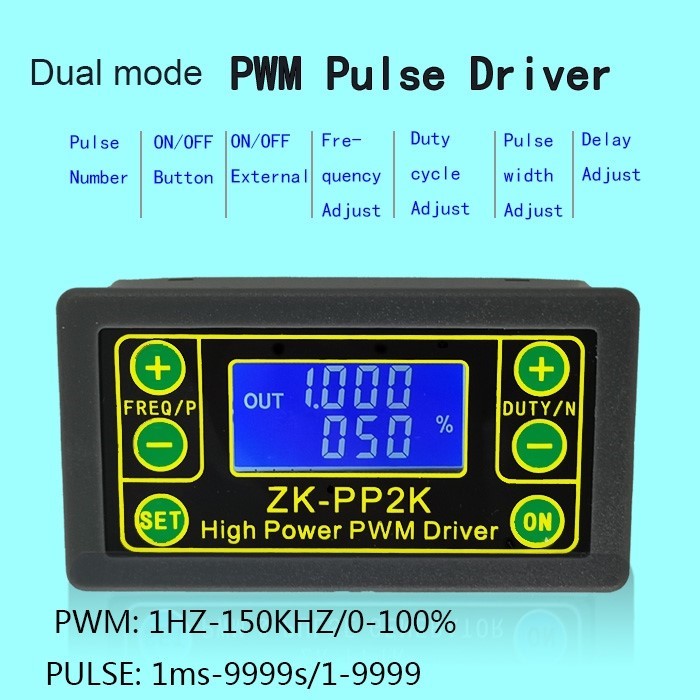
4.2.1 PWM mode (display has "%" for PWM mode) The factory default mode is PWM mode, FREQ+ and FREQ-key set frequency, DUTY+ and DUTY-
button set duty cycle; short press ON button control signal output or stop, stop output is 0, the screen displays “OUT”mark as There is output, otherwise it stops output; the default factory frequency is 1KHZ and the duty cycle is 50%.
If you want to switch to PULSE mode, long press the SET button (more than 6 seconds), do not release, you will see the screen change, "%" disappears, it is PULSE mode.
4.2.2 PULSE mode (No "%" on the right side of the display is PULSE mode)
The line above the LCD screen displays the positive pulse width time. The P+ and P- buttons set the parameter. The line below the LCD screen displays the negative pulse width time. The N+ and N- buttons set the parameter. Press the ON button to control the signal output or stop. When the output is stopped, the output is 0. The screen displays “OUT” for output, otherwise it stops output; the default factory positive pulse width is 0.5 seconds and the negative pulse width is 0.5 seconds.
Pulse number and delay time setting - In PULSE mode, press and hold the SET button for 2 seconds and then release, enter the pulse number and delay time setting interface, the screen displays SET, it will be turned off and cleared after entering. ;P+ and P- seconds, the number of pulses is infinite (display ---); then press SET button 2 In seconds, it will automatically return to the pulse interface, press the ON button, after the delay setting time, start to issue the set number of pulses. If the number of pulses is sent, it will automatically output 0. If the period is not sent, pressing the ON button will turn off. The output pulse is turned off and cleared, and the set number of pulses is issued each time it is started. After the number of pulses is sent, the display 'OUT' automatically disappears.
4.4 Application Example
4.4.1 PWM output 20KHZ, 60% duty cycle: Select PWM mode, the frequency is set to 20.00, and the duty ratio is set to 060%.
4.4.2 The output is turned on for 0.6 seconds and turned off for 0.2 seconds. Infinite loop: select PULSE mode, the positive pulse width is set to 0.600, the negative pulse width is set to 0.200, the delay time is set to 0.000, and the number of pulses is set to --- -.
4.4.3 Power on or press the start button, delay 5 seconds, then the output is turned on for 0.6 seconds, off 0.2 seconds, infinite loop: select PULSE mode, positive pulse width is set to 0.600, negative pulse width is set to 0.200, delay The time is set to 5.000 and the number of pulses is set to ----.
4.4.4 Power on or press the start button, delay 5 seconds, then output high level 10ms low level 10ms pulse 100: select PULSE mode, positive pulse width is set to 0.010, negative pulse width is set to 0.010, delay The time is set to 5.000 and the number of pulses is set to 0100.
4.4.5 Power-on delay for 10 seconds, then permanently output signal: select PULSE mode, the positive pulse width is set to a number greater than 0, the negative pulse width is set to 0, the delay time is set to 10.00 seconds, and the pulse number is infinite.
(----).
4.4.6 Other applications can explore or consult customer service