Without speaker
Without battery
*Please turn to the end for answers to common usage questions


How to install Q2 TV Stick?
1: Connect one end of our standard HDMI cable to the HDMI port of the TV Stick, and the other end to the HDMI port of the TV
2: Use a 5V, 2A power plug to connect the TV stick to a 100-240V power supply, and fully insert the infrared signal receiving line into the infrared port of the TV stick.
3: Wait for the machine to automatically start, open the network settings, connect to the network, and you can surf the Internet normally.
Please be sure to connect the HD cable to the TV Stick first, and then connect the power adapter to the TV Stick.
Incorrect connection may cause problems such as screen freeze, distortion, and insufficient signal.
Direction for use

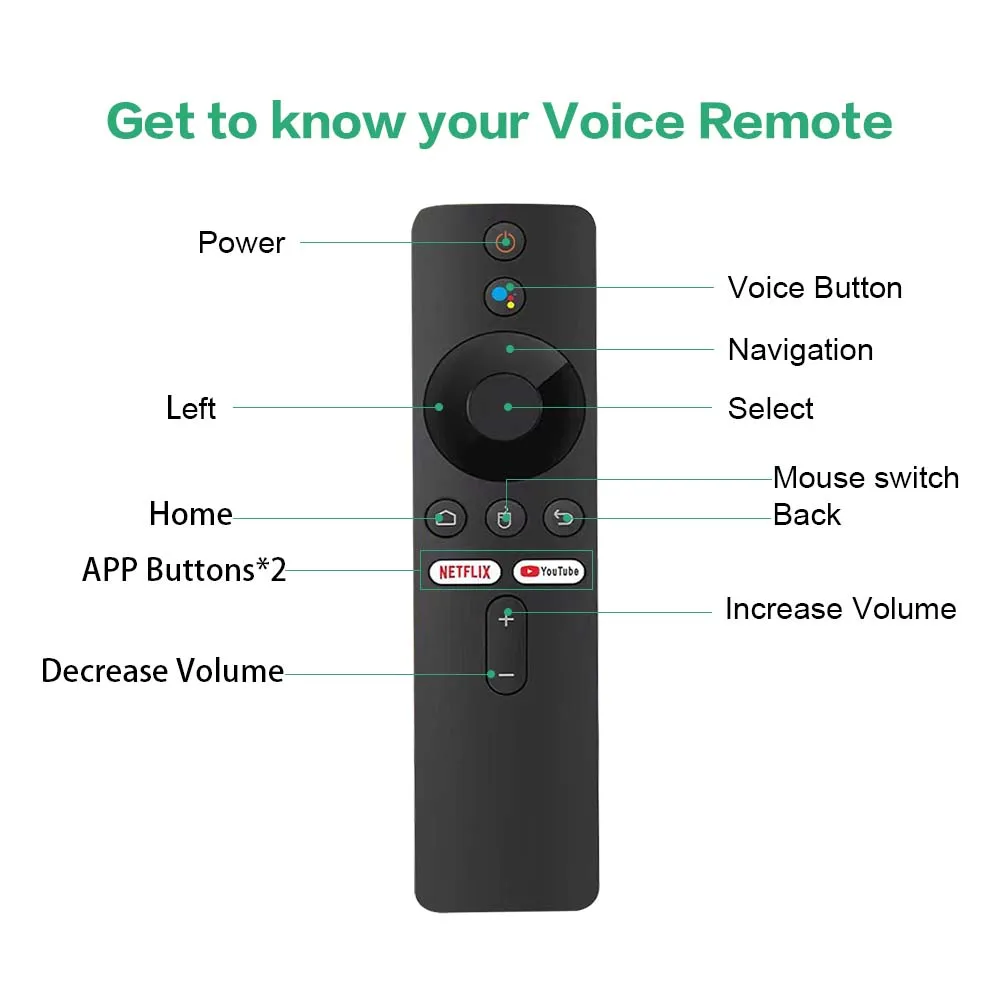
🔥Bluetooth Voice Remote: Q2 Android TV Stick comes with an improved Bluetooth remote control. Unlike ordinary infrared remote controls, the latest Bluetooth remote control doesn't require focused aiming for each click. You can navigate directly to the application list or open some supported applications with one click, which is quite convenient.


🔥2GB RAM 16GB ROM: With 16GB ROM, Q2 TV stick can install more applications. Powered by the faster Allwinner H313 chip, it delivers a fluid experience and near-instantaneous responsiveness in most daily tasks.

【Mirroring Cast & 1*USB2.0】TV stick support Mirroring Cast, wonderful multi-screen interaction, support mobile phones, tablets and more. Put videos and photos on the big screen of your TV and share beautiful moments.


What's in the TV stick
1*Mortal Q2 TV stick
1*USB power cable
1*infrared signal receiving cable
1*HDMI cable
1*Voice remote control
1*manual
1*Packaging Box