Features:
- All metal body with a total of weight 9kg.
- Laser and power independent switch.
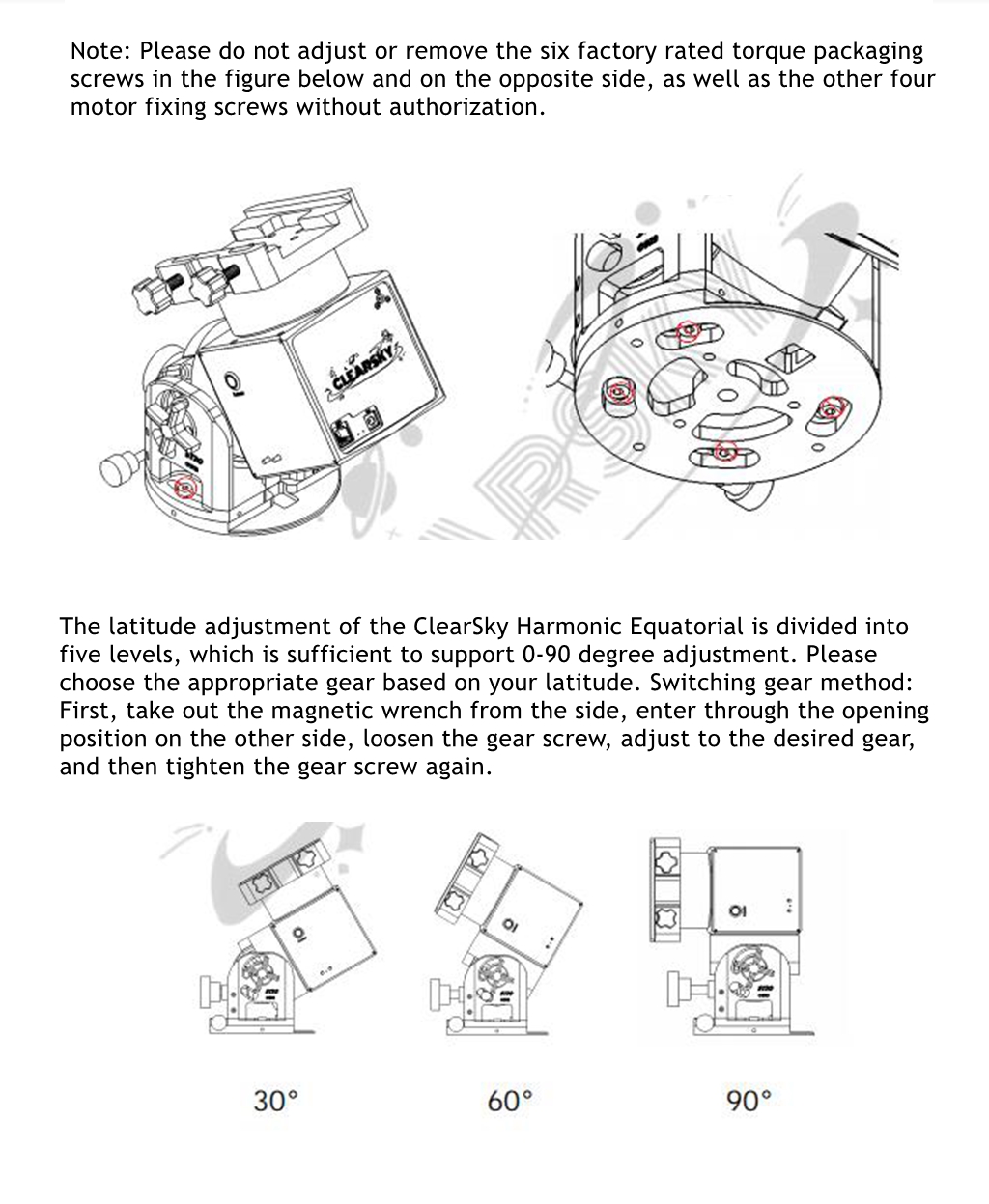
- Patented mechanical limit function.
- Native dual specification dovetail groove, dovetail groove wiring design, integrated power management & data management, eliminates your wiring troubles.
- Mature synchronous belt transmission structure, customized low backlash harmonics, with guaranteed accuracy.
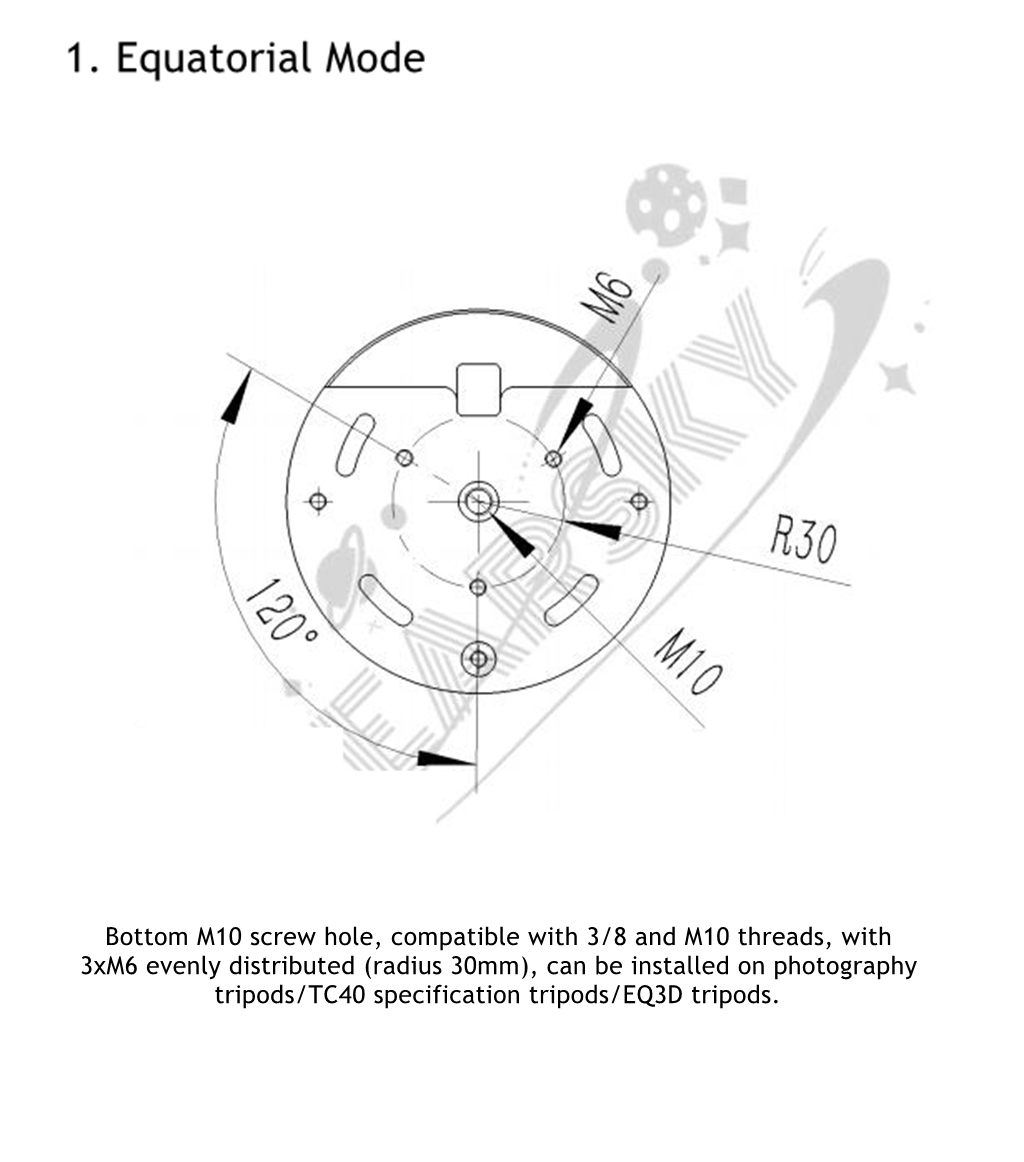
- It can be connected by 3xM6 or 3/8 screws.
Specification:
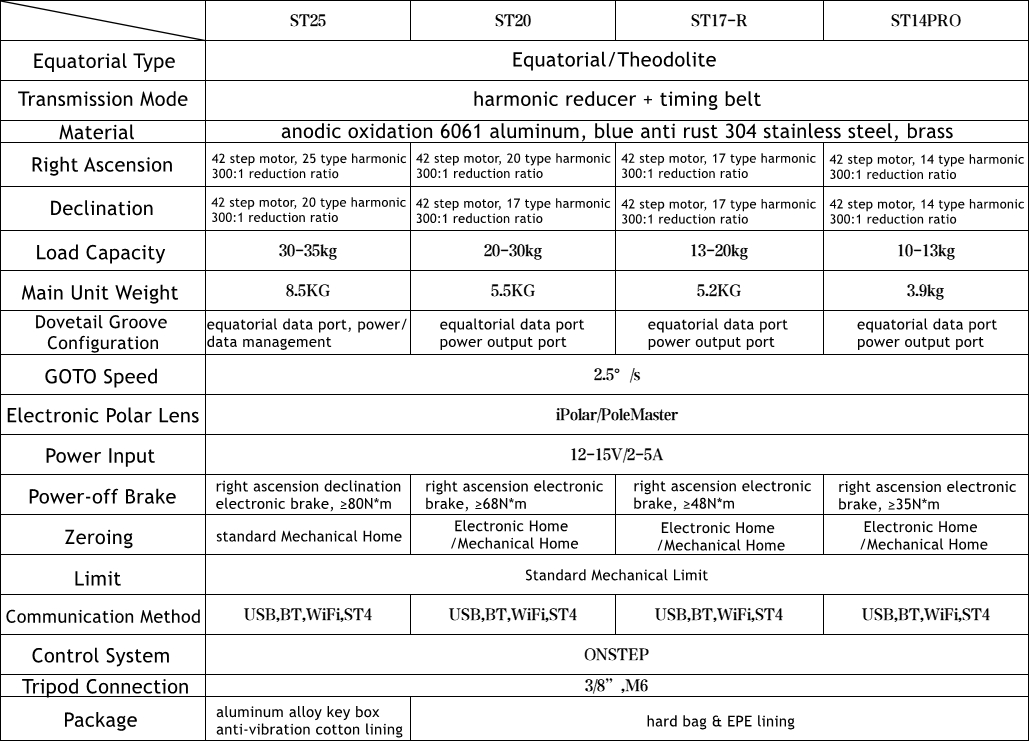
- Transmission mode: harmonic reducer + timing belt
- Material: anodic oxidation 6061 aluminum
- Right ascension: 42 step motor, 25-type harmonic, 300:1 reduction ratio
- Declination: 42 step motor, 20-type harmonic, 300:1 reduction ratio
- Load: 30 - 35kg
- Main unit weight: 8.5kg
- GOTO speed: 2.5°/s
- Electronic polar lens: iPolar /PoleMaster
- Power input: 12 - 15V/2 - 5A
- Power-off brake: right-ascension declination electronic brake, ≥80N*m
- Zeroing: Mechanical Home
- Limit: mechanical limit
- Communication method: USB, BT, WiFi, ST4
- Control system: for ONSTEP
- Tripod connection: 3/8”, M6, TC40
Package Included:
- 1 x ST25 Pro Equatorial
- 1 x Electronic Polar Lens 3M Sticker
- 1 x 1M Male to Male Power Cable (DC5.5 - 2.1MM)
- 1 x Type-C USB Data Cable
- 1 x Storage Bag
- 1 x User Manual
Note:
- Regardless of the reason, customers need to undertake the after-sales postage incurred for returning the product to China.
Connections:
- Power Cord Connection:
1. Insert one end of the dual male power cord into the DC interface on the front panel of the equatorial meter.
2. Connect the other end of the dual male power cord to the DC power interface, press the equatorial switch, and turn on the power. The power indicator light of the Electronic Home version of the equatorial is normally on in blue and stops tracking (you need to manually turn on the tracking function). The Mechanical Home version of the equatorial will search for the zero position by itself after starting up, and will be in a stop tracking state after zeroing.
- Connect Astronomical Devices such as Computers or ASIAIR:
1. Insert the USB Type-A end of the USB data cable into the USB Type-A interface of a computer or astronomical device such as ASIAIR.
2. Insert the USB Type-B end of the USB data cable into the USB port on the front panel of the equatorial.
- For ASIAIR Connection:
Application download: Search for "ASIAIR" in various mobile app stores to download and install.
1. Wired connection:
â Connect the USB 2.0 port of ASIAIR to the USB port of the equatorial, which needs to be powered on.
â¡ Open the ASIAIR mobile app and select serial port connection on the equatorial page. It is recommended to choose OnStep equatorial (Onstep Electronic for Mechanical Home version) and confirm that the serial port baud rate is 9600.
2. Wireless connection:
â Open the box, select OnStep's WiFi for WiFi bridging (Password: password).
â¡ Select OnStep for the equatorial connection option (if it is unable to connect, choose another OnStep).
⢠Click on the connection method to change it to network, and enter 192.168.0.1 in the IP field and 9999 in the port field.
FAQ:
1. Why doesn't the equatorial rotate when ASIAIR is aligned with the polar axis?
- Reason: When ASIAIR is connected to OnStep equatorial, there is a probability that there will be no response (no rotation) to the polar axis when controlling the rotation of the equatorial.
- Solution 1: Change the equatorial driver connection starting with OnStep name in the ASIAIR equatorial tab and try again.
- Solution 2: Restart the ZWO box.
2. Why is the GOTO orientation not set accurately? (Completely out of the target's sky zone, even with the telescope pointing towards the ground.)
- Reason: The Electronic Home version equatorial was not turned on at the correct zero position, resulting in the subsequent GOTO position being misaligned.
- Solution: Manually set the equatorial to the correct zero position, and then restart the equatorial.
3. What do the status of the indicator lights represent?
- Red light status on: power on
- Blue light status 1, constantly flashing: in tracking.
- Blue light status 2, indicator light-off: tracking is off (encountering limit)/GOTO in progress.
2. We ship to your eBay or Paypal address. Please make sure your eBay and Paypal address is correct before you pay.
2. For remote regions of DHL/FedEx..., extra shipping costs might be charged. Usually it costs about 30USD-50USD. We will contact you if shipping company informed us your address belongs to remote area. Thanks for your understanding.
2. Please check with your country's customs office and inform us what/how much should declare before shipping.
2. If you are dissatisfied for any reason, please don't be quick to leave us neutral or negative feedback. We work hard to make sure EVERY CUSTOMER 100% SATISFIED and resolve any problem for you and always leave positive feedback to all our customers.