2024 LAUNCH X431 ELITE OBD2 SCANNER Fit For BMW / MINI /Rolls Royce from 1996 to 2023

ALL IN ONE BI-DIRECTIONAL DIAGNOSTIC TOOL Fit For BMW / MINI /Rolls Royce
Do you love your car? Do you want to keep driving it as long as you can?
- There are few things your car will require of you to maintain its longevity - changing your oil, replacing air filters and other general service tasks. Many people wonder though, whether those task mentioned is a simple DIY process or has to be done by an expert technician. We say: you can definitely handle the replacement on your own via our professional LAUNCH X431 Elite diagnostic scanner tool! Except for auto repair shop, here is another choice for you to learn about your car condition deeply. One CRE Elite professional scan tool may equal you register or maintain once in the shop, but definitely more economical than twice and more, can save maintenance Time and Money for you.
Why Is The LAUNCH X431 Elite for BMW Diagnostic Scanner Tool Is So Powerful And Reliable?
- Work on BMW, MINI and Rolls Royce from 1996 to 2023. Compatible with global OBDI / OBDII / EOBD. (20PIN needs to purchase additional adapter)
- Full System Diagnostic+ Bidirectional Control (Active Test) + All Services Functions + ECU Coding + Relearn + Calibration + Adaptation + Matching + Initialization... The vast majority of BMW/MINI/RR Cars supported.
- OE-LEVEL Advanced Automotive Diagnostic Tool .
- Wifi Connection : update software online and perform remote diagnosis, search fault codes online , watch repair videos on youtube, ect.
- Graphic Data Display: display live data in text, graph & analog for easy and intuitive data review.
- LAUNCH X431 Elite for BMW automatic scan tool is based on Android 6.0, 2GB running storage, 16G Ram. It can speed up data transfer and diagnostics time.
- LAUNCH X431 Elite for BMW Bidirectional scanner has same OE-Level functions as LAUNCH X431 Series.
Some Tips:
- Recently, some customers mentioned that: In addition to the scanning feature, you'll have to pay 39.95 dollar per feature. No, you don't need. Go to Diagnose>Automatically Search. All functions displayed under the Automatically Search menu are functions that LAUNCH X431 Elite for BMW OBD2 Scanner can support for your vehicle.
- Don't purchase any software in the Mall. If you need, please consult us before ordering.
- Special services, bidirectional control, coding/program and ect. these functions vary from vehicle model, reach us via kingbolen05 @ hotmail.com to check compatibility before ordering.
- If you you receive an used product, this may be because Amazon warehouse re-list the product returned by the previous customer. Don't worry! Send the picture of the product you received to us via kingbolen05 @ hotmail.com, and then we will re-ship a new product to you.

LAUNCH X431 Elite for BMW OBD2 Scanner has Changed the Car Diagnostic Ways.
LAUNCH X431 Elite for BMW automotive scanner can scan 120+ modules same LAUNCH X431 Series like ECM(engine), TCM(Transmission), ABS, SRS(Airbag), Brake System, BCM(Body Control Module), EPS(Eletronic Power Steering), HVAC(Heat, Ventilation and Air Conditioning), TPMS(Tire Pressure Monitor System Reset), Radio, EPB and so on to perform OE level diagnostics to read and clear codes, view live data stream, perform active tests, and retrieve ECU information, allows you to get a faster and more accurate test result on all electronic systems.
LAUNCH X431 Elite for BMW Scanner Diagnostic Tool provides more powerful features, bring you a new experience.
[Health Report Share & Print ] ALL MODULE Diagnosis Health Report Share & Print – ALL MODULE Diagnosis automatic diagnostic scanning tool enables diagnostic technicians to generate diagnostic reports before and after car diagnosis and repair service, so that the diagnostic reports can be printed out or sent to customers through the Internet and compared or shared with customers.
[Plug and Play] Plug the diagnostic cable into the vehicle's DLC port, the screen of LAUNCH X431 Elite for BMW will automatically light up and turn on. It is very convenient.
[Diagnostic History] This car diagnostic scanner records the every details of diagnostic session, provides a quick access to the tested vehicles, and enables users to choose to view the test report or resume from the last operation, without the necessity of starting from scratch, you can record/ review/ playback live data anytime.
[Diagnostic Report] Once the diagnostic process is successfully finished, a diagnostic report will be automatically generated and sent to your mailbox. You can download it, and then print it to share it with others.
[Diagnostic Feedback] LAUNCH TECH’s engineers will help you troubleshoot problems. Customized exclusive beta version software for your car can be obtained here. After submitting online feedback, you can send us the device SN and vehicle brand, model and year via kingbolen05 @ hotmail.com, and we will expedite and follow up on the issue for you.
[Screen Snapshot] Snapshot graphing shows you any failures or glitches at a glance, you can share it via email to ask for help.
[4 in 1 Live Data Stream] There are 3 ways to view the data, you can choose the one that suits you best. Value–it is the default mode that displays the parameters in texts and shows them in list format. Graph–displays the parameters in waveform graphs. Combine–this is the most used in graph merge status for data comparison. In this case, different items are marked in different colors. (Combine up to 4 options)You can also record the data stream and playback the data.
[Supported 11 Languages] English, French, Spanish, German, Russian, Italian, Portuguese, Japanese, Korean, Chinese Traditional, Polski. If you feel more comfortable with your native language, you can switch back and forth as necessary without encountering any sort of language barrier.
[DCT Lookup] DTC Lookup is used to search for definitions of DTCs stored in the DTC library and for code breaker information, and Code Breaker is used to provide descriptions of DTCs and helpful tips to deal with DTCs.It is useful for technicians to find the root cause of trouble code faster, saving diagnosis and repair time.
[Single Serie Diagnostic Tool] LAUNCH X431 Elite for BMW Scan Tool suitable for series car like BMW / MINI / Rolls Royce OBDII cars from 1996-2023 (20PIN needs to purchase additional adapter).

CONTINUOUSLY GROWING WITH UPDATES, which usually only be available from Car Dealer Level Scanners or much more Expensive Professional Tools
LAUNCH X431 Elite for BMW OBD2 Scanner supports All Special Functions without any charge in lifetime, and continuously growing.The way to execute special function is go to "Diagnose" menu, rather than "Reset" menu. You will get all reset functions if you enter the "Diagnose"> Automatically Search> Special Function. DON'T option the "Reset" menu. DON'T purchase Any Special Functions in the Mall.
For example, connecting your car, the way to do battery registration/replacement should be go to: Diagnose> Automatically Search> Special Functions> Register battery change. *Note:Special functions are vary from vehicle models. check compatibility before ordering via kingbolen05 @ hotmail.com.
- Injector Coding : Code new injector numbers to replace the previous one when fitting the new injectors or after the replacement is completed.
- Oil Lamp Reset : Close the oil service light, reset service mileage & service interval after replacing the engine oil, and the next maintenance calculation cycle is entered.
- BMS Reset (Battery Register/ Battery Maintenance) : Use the power management system, the battery needs to be re-matched after the battery is replaced, so that the car computer can recognize the new battery.
- EPB Reset (Electronic Parking Brake Reset) : After replacing the brake pads, you need to reset the position of the brake pads before installing the new brake pads to close the warning light.
- ABS Bleeding : When changing a new brake fluid, there is a high possibility that air will enter the brake fluid pipeline. In the traditional way, one person steps on the brake and another person changes the operating fluid. This function can perform the brake operation, and only one person is required to change the brake fluid.
- Tire Pressure Monitor System (TPMS) Reset: When replacing TPMS sensors or the signal from the sensor is lost it can quickly look up the tire sensor from the vehicle’s ECU, reset tire pressure and turn off the tire pressure MIL.
- SAS Reset (Steering Angle Calibration Reset) : Learn to correct the angle and solve the problem of the steering angle of the steering wheel
- ETS Reset (Electronic Throttle Position Learn/Throttle Matching) : After the engine has been working for a long time, there will be serious carbon deposits in the throttle, which will affect the intake. After cleaning or replacing the throttle, the throttle opening cannot match the original ECU. This is to allow the ECU to enter Throttle learning status, let the ECU re-match the throttle opening.
- GEAR Reset (Gear Learning) : The vehicle has a crankshaft position sensor. This sensor collects the 58-tooth signal of the flywheel to determine the top dead center ignition time of a cylinder (reference signal). If this sensor is replaced, the reference will be lost, and gear signal learning is necessary.
- AFS Reset (Adaptive Frontlighting System) : It can detects the ambient light and then decides whether to turn on the headlights automatically. It can also adjust the headlights in time by monitoring the speed of the vehicle and the posture of the body.
More hot service functions: 11.Intelligent Cruise Control 12.Engine Power Balance Moonitoring 13.Motor Angle Calibration 14. Head Light Fitting 15.Seat Matching/Calibration 16.Door and Window Initialization Study/Calibration 17.Sunroof Initialization 18.Air Suspension Matching 19.Gearbox Matching 20.Injector Calibration 21.Multimedia Video Reset 22.Cluster Reset 23.Tire Change Reset 25. Coolant Bleed 26.NOx Sensor Reset 27. Stop/Start Reset 28. Transport Mode 29. Adblue Reset 30. A/F 31. troubleshoot A/C, 32. CO adjustment 33. Mix-up Checks 34. Clear adaptations 35. Consumption calculation 36. Teach in transmission 38. Rate of rotation sensor 39. Disengage gear 40.Deactivate transport-lock function 41. Exhaust-gas recirculation 42.Final ABS /ASC check 43.Idle speed 44. Injector rate adjustment 45. Limitation Delivery 47.MFL and air conditioning 48. Mechatronics adjustment 49.Oil level check 50.Self-learning cycle, and etc.More and more function will be kept growing and optimized constantly. One LAUNCH X431 Elite for bmw obd2 scanner code reader is enough for professional diagnosis.
2024 LAUNCH X431 ELITE OBD2 SCANNER Fits For BMW/MINI/Rolls Royce with BI-DIRECTIONAL CONTROL (ACTIVE TEST)

Poweful Bi-Directional Control -- Precisely Locate the Issue to Reduce your Unnecessary Maintenance Costs
As A Must Have Scanner fit For BMW/MINI/Rolls Royce, LAUNCH X431 Elite for BMW automotive diagnostic scan tool inherits the LAUNCH X431 Series' powerful Bi-directional Control, making it the more cost-effective(cost less 300 bucks than other bidirectional scan tool).
Featuring bi-directional control, LAUNCH X431 Elite for BMW bidirectional scan tool , can output the commands to ECUs to perform specific tests for checking actuator's working status. Through active tests (also called actuator tests), this LAUNCH X431 Elite bi-directional scan tool can precisely locate the car problems, letting you quickly know whether a specific system, component, or subsystem is functioning properly or not, which help you locate faults in the shortest time without disassembling the vehicle, saving time on troubleshooting and reducing your unnecessary maintenance costs. Making car repairs a breeze.
For Example:
- If a fuel pump is not working and leads to ignition failure, it could be a faulty pump, wiring, relay, or command. By turning the fuel pump on and off via this LAUNCH X431 Elite bidirectional scanner, you can quickly determine whether it’s a wiring, relay, or pump issue without removing any parts. Than you may do not need to spend lot of moneys to repair because of a little of problems.
Here are some commonly-used tests Include:
- Turn ON/OFF Headlamp, Turn ON/OFF Cooling Fan, Turn the Fuel Pump ON/OFF, Turn the Wiper ON/OFF;
- Switch the interior lights ON/OFF, Lock/Unlock Door, Roll Window up/down, Open/Close the Sunroof;
- Modulate Throttle, Activate Cooling System, Injector Buzz Test, Disable/Enable Transport Mode;
- Air Suspension Height Calibration / Seat Matching / Head light Fitting / Door and Window Initialization Study/ Sunroof Initialization/ All Wheel Drive - Calibration/ Camera Calibration and lots of features waiting for you!
*Note: The available tests depend on the control module under test and the vehicle itself. Send VIN to check compatibility before ordering via kingbolen05@ hotmail.com. These tests will activate or disable a part, to check that the part is working properly. Make sure the part to be t-ested is in good condition and properly installed.
2024 LAUNCH X431 ELITE OBD2 SCANNER Fits For BMW/MINI/Rolls Royce with ADVANCED ECU CODING

ECU CODING Customize Your Car Easily !
ECU Coding: Every automobile actuator has a record code in ECU, which is the basis for automobile computer to mobilize their work. LAUNCH X431 Elite for BMW OBD2 Scanner is equipped with advanced ECU coding function same as X431 for addressing the following issues :
- After you change the bad actuators or certain parts, you need to use this function to make a new code and recognize the new actuators.
- ECU coding enables multiple car systems to recognize each other and then the actuators can start to work.
- Unlock hidden features,deactivate annoying features.
There are tons of ECU CODING functions for BMW vehicles you need, such as:
1.Acoustical confirmation 2.Active Rear Spoiler 3.SiriusXM coding 4. Digital speedometer coding
5.Start & Stop button coding 6. Remote window control unlocking 7.Acoustic pedestrian protection
8.Active Cruise Control 9. Air conditioning setting memory 10.Automatic Air Recirculation
11.Ambient lighting brightness And More .....
Note: ECU Coding is not universally compatible with all vehicles! Please provide us VIN number/year/model via kingbolen05 @ hotmail.com to check compatibility first.
|
|
|
|
|---|---|---|
FAST AUTO VIN SCAN & DTC LOOKUP
|
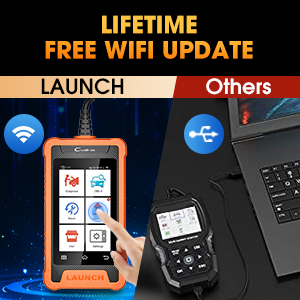
LIFETIME FREE WiFi UPDATELAUNCH X431 Elite for bmw obd2 scanner provides Lifetime FREE Update. NO extra Fees! Save you hundreds bucks subscription fees per year. One-click WiFi Update. Don't need any annoying SD cards, cables or PC. Never need to worry about it will be outdated. All features and vehicle models are constantly being updated. You can get the latest and more functions, more compatible car models with update. |
BATTERY RESGISTRATION ToolLAUNCH X431 Elite for BMW obd2 scanenr diagnostic tool is an excellent battery registration tool! It supports 3 types of battery replacement: 1.the same battery type & capacity; 2.the same battery type, but different capacity; 3.different battery type (Exclusive) -- It is the only one scanner on the market to support battery replacement of different battery types. How to do battery registration with this scanner? Connecting your car, go to: Diagnose> Automatically Search >Special Functions> Register battery replacement. This is a step by step process: remove the old battery - install the new battery - enter the new battery 12-digit code or select battery parameters according to system prompts. |


|
|
|
|
|---|---|---|
4-IN-1 LIVE DATA STREAM GRAPHINGLAUNCH X431 Elite for bmw obd2 scanner code reader can clearly display real-time data in text and graph, allows you to view multiple graphs simultaneously or merge 4 graphs in one for comparison. You’ll easily focus on any symtom-specific or suspicious data parameters. Review Freeze Frame Data + Historical Record , helping you further check potential problems of the vehicle. |
SHARE & PRINT DIAGNOSTIC REPORTLAUNCH X431 Elite for BMW diagnostic scan tool, can automatically generate a diagnostic report to list the detailed inspection result once the scan is complete. You can transmit the health reports via E-mail to share or send for save its in PDF format. Or connect the PC to print it for your clients. For car workshop, if you want customers to see your workshop information on the diagnostic report to gain the trust of your customers? Just set the workshop information in the settings. |
TIMELY ONLINE FEEDBACKFeel confused about certain diagnostic problems? LAUNCH X431 Elite for BMW obd2 scanner, allows you to submit online feedback of your diagnostic problems to LAUNCH for analysis and troubleshooting. You can submit the detailed failure description to get valuable solutions. Want to get fast feedback results? Send the SN of scanner to us via Kingbolen05 @ hotmail. com after submitting the online feedback, we will expedite the results back for you. |


