


Voltage: DC12V
Main Instruction:
Switch the modes between cool and heat;
Control temperature by setting the temperature setting value and the difference value;
Temperature calibration;
efrigerating control output delay protection;
Alarm when temperature exceeds temperature limit or when sensor error.
Specification and Size:
Front panel size: 75(L) x 34.5(W) (mm)
Mounting size: 71(L) x 29(W) (mm)
Product size: 75(L) x 34.5(W) x 85(D) (mm)
sensor length: Im (include the probe)
Technical Parameters:
Temperature measuring range: 50°C~99°C
Resolution: 0.1°C
Accuracy: +1°C(-50°C~70°C)
sensor error delay: l minute
Power supply: 12V DC, 50/60Hz
Power consumption: <3W
Sensor: NTC sensor (IPC)
Relay contact capacity: Cool(10A/250VAC); Heat(10A/250VAC)
Ambient temperature: 0°C~60°C
Storage temperature: -30°C~75°C
Relative humidity: 20-85% (No condensate)
Panel instruction:

Indicator light status instruction:
Key operation instructruction:
1. View parameter method
When the controller is working normally, press and release the “▲” button once, Display the temperature set value, press and immediately release the “▼” button once to display the temperature difference set value, 2 seconds Return to normal temperature display state
2. Set the parameter method
When the controller is working normally, press and hold the “S” button for more than 3 seconds to enter the modified parameter mode, “Set The indicator light is on, and the digital tube displays the code "F1" of the first menu item.
Press “▲” or “▼” to scroll up or down the menu item and display the menu code, press “S”
The key displays the parameter setting value of the current menu. Hold down the “S” key and press and hold “▲” or “ the key can be adjusted up or down and the parameter setting value of the current menu is displayed, while holding down "S" and "▲"
The key or “▼” key can quickly up or down and display the parameter settings of the current menu.
After the completion, press and release the power button to save the parameter modification and return to the normal temperature display state.
If there is no key operation within 0 seconds, the parameter modification will not be saved and return to the normal display state.
“Er” is displayed if an error occurs while saving the parameter, and returns to the normal display state after 3 seconds.
3.Repair system data
When the machine is powered on, first check whether the parameter setting is normal. If the check is wrong, it will display “ER”. Pressing any key at this time will restore the default parameter settings and work normally. It is recommended to reset the parameters at this time.
Operation instruction:
Under controller normal working status, press and hold “ ” key for 3s can turn off the controller; Under controller “off” status, press and hold “ ” key for 3s can turn on the controller.
Under the controller normal working status, screen displays the current temperature value; also the controller can also switch the working mode between heating and cooling.
Controller starts refrigerating with cool indicator light on when the measuring temperature ≥ temperature set value + difference value, and the refrigerating relay is connected; The “Cool” indicator light flashes, it indicates the refrigerating equipment is under compressor delay protect status; when the measuring temperature ≤ temperature set value, the Cool indicator light on, and refrigerating relay disconnects.
System starts heating when the measuring temperature value ≤ the temperature set value-difference value, and the “Heat” indicator light on, and the heat relay connects; When the measuring temperature ≥ temperature set value, the “Heat” indicator light is off, and the heat relay disconnects.
Menu instruction:
Error description:
Alarm when sensor error: Controller activate the sensor error alarm mode when sensor open circuit or short circuit, all the running status is closed off with the buzzer alarms, and the nixie tube displays “EE”,Press any key can cancel alarm sound, system back to display the normal temperature when the error and the fault is cleared.
Alarm when the measuring temperature exceeds temperature measuring range: Controller activates the error alarm function
when the measuring temperature exceeds the temperature measuring range, all the running status is closed off with the buzzer alarms, and the nixie tube displays “HH”,Press any key can cancel alarm sound, system back to display the normal temperature when the error and the fault is cleared.
Safety Regulations:
★Danger:
1. Strictly distinguish the sensor down-lead, power wire and output relay interface from one another, and prohibit wrong connections or overloading the relay.
2. Dangers: Prohibit connecting the wire terminals without electricity cut-off.
★Warning:
Prohibit using the machine under the environment of over damp, high temp., strong electromagnetism interference or strong corrosion.
★Notice:
1. The power supply should conform to the voltage value indicated in the instruction.
2. To avoid the interference, the sensor down-lead and power wire should be kept a distance.
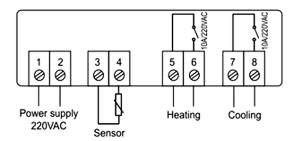
Wiring Diagram:
Package Included:
1 x Digital STC-3000 DC12V Temperature Controller Thermostat With Probe Sensor
Main Instruction:
Switch the modes between cool and heat;
Control temperature by setting the temperature setting value and the difference value;
Temperature calibration;
efrigerating control output delay protection;
Alarm when temperature exceeds temperature limit or when sensor error.
Specification and Size:
Front panel size: 75(L) x 34.5(W) (mm)
Mounting size: 71(L) x 29(W) (mm)
Product size: 75(L) x 34.5(W) x 85(D) (mm)
sensor length: Im (include the probe)
Technical Parameters:
Temperature measuring range: 50°C~99°C
Resolution: 0.1°C
Accuracy: +1°C(-50°C~70°C)
sensor error delay: l minute
Power supply: 12V DC, 50/60Hz
Power consumption: <3W
Sensor: NTC sensor (IPC)
Relay contact capacity: Cool(10A/250VAC); Heat(10A/250VAC)
Ambient temperature: 0°C~60°C
Storage temperature: -30°C~75°C
Relative humidity: 20-85% (No condensate)
Panel instruction:
Indicator light status instruction:
|
Indicator light |
Function |
Note |
|
Cool indicator light |
On: Refrigeration starts; |
Cool、Heat indicator light can not be "on" status simultaneously |
|
Heat indicator light |
On: heating starts; |
|
|
Set indicator light |
On: parameter setting status |
|
Key operation instructruction:
1. View parameter method
When the controller is working normally, press and release the “▲” button once, Display the temperature set value, press and immediately release the “▼” button once to display the temperature difference set value, 2 seconds Return to normal temperature display state
2. Set the parameter method
When the controller is working normally, press and hold the “S” button for more than 3 seconds to enter the modified parameter mode, “Set The indicator light is on, and the digital tube displays the code "F1" of the first menu item.
Press “▲” or “▼” to scroll up or down the menu item and display the menu code, press “S”
The key displays the parameter setting value of the current menu. Hold down the “S” key and press and hold “▲” or “ the key can be adjusted up or down and the parameter setting value of the current menu is displayed, while holding down "S" and "▲"
The key or “▼” key can quickly up or down and display the parameter settings of the current menu.
After the completion, press and release the power button to save the parameter modification and return to the normal temperature display state.
If there is no key operation within 0 seconds, the parameter modification will not be saved and return to the normal display state.
“Er” is displayed if an error occurs while saving the parameter, and returns to the normal display state after 3 seconds.
3.Repair system data
When the machine is powered on, first check whether the parameter setting is normal. If the check is wrong, it will display “ER”. Pressing any key at this time will restore the default parameter settings and work normally. It is recommended to reset the parameters at this time.
Operation instruction:
Under controller normal working status, press and hold “ ” key for 3s can turn off the controller; Under controller “off” status, press and hold “ ” key for 3s can turn on the controller.
Under the controller normal working status, screen displays the current temperature value; also the controller can also switch the working mode between heating and cooling.
Controller starts refrigerating with cool indicator light on when the measuring temperature ≥ temperature set value + difference value, and the refrigerating relay is connected; The “Cool” indicator light flashes, it indicates the refrigerating equipment is under compressor delay protect status; when the measuring temperature ≤ temperature set value, the Cool indicator light on, and refrigerating relay disconnects.
System starts heating when the measuring temperature value ≤ the temperature set value-difference value, and the “Heat” indicator light on, and the heat relay connects; When the measuring temperature ≥ temperature set value, the “Heat” indicator light is off, and the heat relay disconnects.
Menu instruction:
| Code | Function | Set Range | Default | Note |
| F1 | Temperature set value | -50~99°C | 10°C | |
| F2 | Difference set value | 1~10°C | 3°C | |
| F3 | Compressor delay time | 1~10 minutes | 3minutes | |
| F4 | Temperature calibration value | -10°C~10°C | 0°C | |
| F5 | Fainthearted /Celsius switching | Set range | 0/1 |
Error description:
Alarm when sensor error: Controller activate the sensor error alarm mode when sensor open circuit or short circuit, all the running status is closed off with the buzzer alarms, and the nixie tube displays “EE”,Press any key can cancel alarm sound, system back to display the normal temperature when the error and the fault is cleared.
Alarm when the measuring temperature exceeds temperature measuring range: Controller activates the error alarm function
when the measuring temperature exceeds the temperature measuring range, all the running status is closed off with the buzzer alarms, and the nixie tube displays “HH”,Press any key can cancel alarm sound, system back to display the normal temperature when the error and the fault is cleared.
Safety Regulations:
★Danger:
1. Strictly distinguish the sensor down-lead, power wire and output relay interface from one another, and prohibit wrong connections or overloading the relay.
2. Dangers: Prohibit connecting the wire terminals without electricity cut-off.
★Warning:
Prohibit using the machine under the environment of over damp, high temp., strong electromagnetism interference or strong corrosion.
★Notice:
1. The power supply should conform to the voltage value indicated in the instruction.
2. To avoid the interference, the sensor down-lead and power wire should be kept a distance.
Wiring Diagram:
Package Included:
1 x Digital STC-3000 DC12V Temperature Controller Thermostat With Probe Sensor