Item Description:
Model: 9300-8I
Chip: SAS3008
Slot: PCI Express x8
Specification:
● Lifecycle: Active
● Host Bus Type: x8 lane PCI Express® 3.0
● Physical Dimensions: Low profile (2.6" x 6.0")
● Devices Supported: 1024 Non-RAID SAS/SATA devices
● Fusion MPT Support: Fusion MPT™ 2.5
● Internal Connectors: 2 Mini-SAS HD SFF8643
● Internal Ports: 8
● Operating Temperature: 0°C to 55°C
● Operating Voltage (V): +12V +/-8%, 3.3V +/-9%
● OS Support: Microsoft Windows, Linux (SuSE , Red Hat), Solaris, VMware , FreeBSD See the downloads page for details on versions The HBA supports Solaris 10 and Oracle® provides a built in driver; installation of an LSI driver is not required.
● PCI Power: 13W
● Cable Support: Passive Copper
● I/O Controller: LSI SAS3008
● MTBF: > 2,800,000 hours
● Operating Humidity: 5% to 90% Non-condensing
● Brackets: Full height and low profile vented
● Regulatory Certifications: Australia/New Zealand (AS/NZS 3548), Canada (ICES-003), EMC: Class B-US (CFR 47, P15B), Europe (EN55022/EN55024), Japan (V-3/02.04), Korea (N-B 2-0001-404), RoHS, Safety: EN60950, WEEE
● Data Transfer Rates: 12Gb/s SAS-3 Compliant
To install the LSI® 12Gb/s SAS HBA, follow these steps:
1. Unpack the HBA, and inspect it for damage. Unpack the HBA in a static-free environment. Remove the HBA from the antistatic bag, and carefully inspect the device for damage. If you notice any damage, contact LSI or your reseller support representative.
ATTENTION: To avoid the risk of data loss, make a backup of your data before changing your system configuration.
2. Prepare the computer. Turn off the computer, and disconnect the power cord from the rear of the power supply.
CAUTION: Disconnect the computer from the power supply and from any networks to which you will install the HBA, or you risk damaging the system or experiencing electrical shock.
3. Remove the cover from the chassis.
4. Check the mounting bracket on the HBA (system-dependent). If required for your system, replace the full-height mounting bracket that ships on the HBA with the low-profile bracket supplied. Complete step a through step d to attach the short bracket.
a.Use a #1 Phillips® screwdriver that is ESD safe to remove the two Phillips screws that connect the full-profile bracket to the board. Unscrew the two screws located at the top and bottom edges of the board. Avoid touching any other board components with the screwdriver or the bracket.
CAUTION: Damaging the screw can void the warranty. To prevent damage to the screw, center the screwdriver in the top of the screw.
b.Remove the full-profile bracket from the HBA. Do not damage the board.
c.Place the HBA on top of the low-profile bracket. Position the bracket so that the screw holes in the tabs align with the openings in the board.
d.Use a #1 Phillips torque screwdriver, that is ESD safe, set to a maximum torque of 4.8 ± 0.5 inch-pounds. Replace the two Phillips head screws removed in step a.
CAUTION: Exceeding these torque specifications can damage the board, connectors, or screws, and can void the warranty on the HBA.
5. Insert the HBA into an available PCIe® slot. Locate an empty x8 PCIe slot. Remove the blank bracket panel on the rear of the computer that aligns with the empty PCIe slot. Save this bracket screw, if applicable. Align the HBA to a PCIe slot. Press down gently, but firmly, to seat the HBA correctly in the slot. The following figure shows how to insert the HBA into a PCIe slot.(As the Pic)
NOTE: The shape, size, and locations of the components on your HBA and its bracket might vary from this illustration. The HBA requires a x8 PCIe slot.
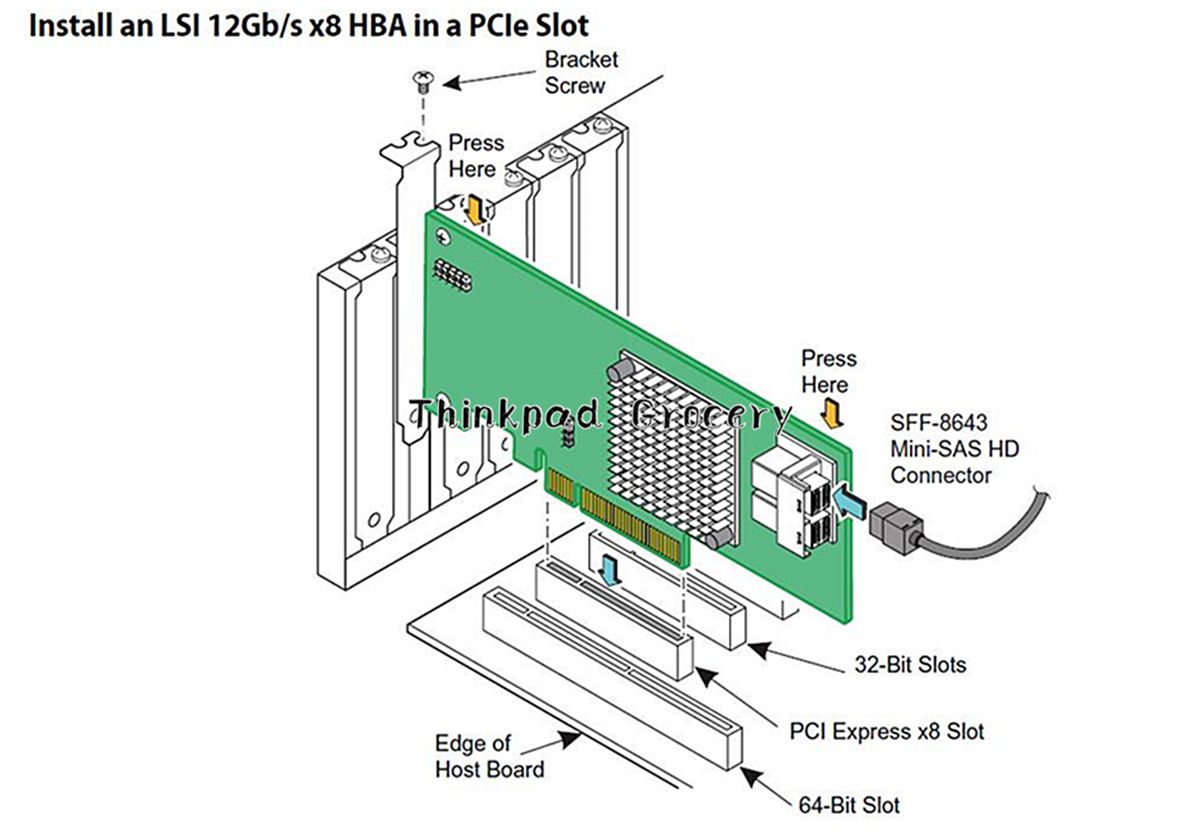
6. Secure the HBA bracket to the system's chassis. Install the bracket screw, if applicable, or engage the system retention mechanism to secure the HBA to the system's chassis.
7. Connect SAS cables between the HBA and the SAS backplane or any other SATA or SAS device. The LSI 12Gb/s SAS HBA has two SFF-8643, internal x4, mini-SAS HD connectors. Use cables with an internal mini-SAS HD connector on one end (to connect to the HBA) and the appropriate connector on the other end to attach to the backplane or SAS/SATA devices.
8. Replace the cover and any power cords, and power up the system. Replace the chassis's cover, reconnect any power cords, and reconnect any network cables. Turn on the power.
(1)(2)(3)(4)(5)(6)(7)(8)The hardware installation of your LSI 12Gb/s SAS HBA is complete.
Our Policies
Warranty Policy
·We place unique irremovable product identifiers on our items to insure warranty. Removal or tampering with these identifiers may void your warranty and return/refund capability.
Payment Policy
· We accept payment by PayPal.
· Immediate payment is required.
Shipping Policy
· We ship the goods within 3 business day.
· Ship to eBay confirmed address ONLY
· Shipping to USA, Australia, UK, RU: Ship via USPS First Class Mail. ETA 8 to 15 business days.
· International Shipping: Ship via China Postal Service Airmail. ETA 15 to 30 business days.
· International Shipping: Ship via DHL/UPS/EMS Express. ETA 3 to 8 business days.
· You may sometimes experience longer delivery time due to customs-related delays. Please let us know. ( No service on Sundays and public holidays). Buyers are responsible for any international customs and duties that may apply.
Return Policy
·Buyer pays return shipping.We guarantee that all of the products will be full tested before shipping and use proper package, but we still can't guarantee the absence of DOA. We can't control the package on the way to buyers. Please read eBay return policy on the top of this page. Our goods can be returned within 30 days, and the buyer will pay the return shipping cost. We do not guarantee compatibility if buyer never asked us, so please remember to ask us about compatibility before placing your order if you are not sure.
Feedback
· We guarantee you a five star shopping experience with us. If you are not satisfied with your purchase experience, please contact us within 30 days of receipt to return it for a refund or exchange.
· If our product does not work properly for you and you want to exchange another one or get a refund, please confirm with our customer service at first and list the detailed problems of the product.
· Please don't open case via ebay or paypal.
·We keep our promises that we will provide you with the best solution within 24 hours.
|
|