- 【High Quality Materials】:ABS plastic;Safe simulation design,no odor and sturdy and not break easily;An interesting piggy bank specially designed for children.(Applicable Batteries: 3 * 1.5V AA Batteries (not included).)
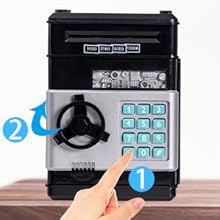
- 【Password Piggy Bank】:Four electronic password protection,if you press the wrong password, it will be issued.Only be opened when you enter the 4 digit correct password,the green light will turn on then you can turn the knob clockwise and open the door.(Default: 0000,Changable passwords as you like).
- 【High-capacity Money Saving Box】:This piggy bank can store 600 pieces of coins or 100 pieces of paper money.Make children to plan to store pocket money,greatly helping children develop a good habit of saving money.
- 【Automatic Paper Money Scroll】:Insert the paper money into the slot on top of kids ATM money bank, it can be rolled into the ATM machine automatically.Easy for kids to use.(But it doesn't work if the paper is too old or too soft) .
- 【A Perfect Gifts】:Kids will love to receive this Cool money saving bank.It's fun and educational and teaches the importance of saving.It's the best gift for your birthday Gift,Christmas Gift,New Year's Gifts,prize, reward, or any other holiday gift.(Recommended for ages 3+ Year Old.)
Do you want to give your kids an unexpected surprise or a perfect gift? This ATM Piggy Bank will be your best choice!

Tow Ways of Saving Money
Cash Entrance,put the paper money on the scroll and it will automatically into the ATM bank machine.Coin Entrance,the coin goes into the top coin entry and it will fall directly into the piggy bank.

High-capacity Money Bank
This piggy bank can store 600 pieces of coins or 100 pieces of paper money.Help your children develop a good habit of saving money.

Two Sound Modes
If the piggy bank is in the BEEPS SOUND mode, you can enter 4 digits in a row. If the piggy bank is in VOICE mode, each input digit will have a VOICE prompt "password please", please enter a number after each prompt.
How to change passwords:

Step 1
Enter four-digit password(default 0000), the green lights. Rotate the knob clockwise to open the door.

Step 2
Hold down the "*" button, the red light flashes.(hold the * button not to loosen,and keep the door open).

Step 3
Enter the new 4-digit password within 15 seconds, then press # button and the light stops flashing.
Step 4
Release the "*" button, change password successfully, close the door.