
- LIVE Version on DVD - No Need To Install.
- Install files included - install on hard drive or run from DVD
- KeePass supports the Advanced Encryption Standard
SHA-256 is used to hash the master key components. No attacks are known yet against SHA-256. The output is transformed using a key derivation function.
Process memory protection: your passwords are encrypted while KeePass is running
Protected in-memory streams: when loading the inner XML format, passwords are
encrypted using a session key.
-
Protection against dictionary and guessing attacks
Why KeePass?
KeePass is a open source password manager, which helps you to manage your passwords in a secure way. You can store all your passwords in one database, which is locked with a master key. So you only have to remember one single master key to unlock the whole database. Database files are encrypted using the best and most secure encryption algorithms currently known (AES-256, ChaCha20 and Twofish).
Multiple User Keys
-
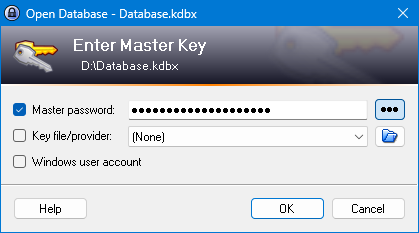
One master password decrypts the complete database.
-
Alternatively you can use key files. Key files provide better security than master passwords in most cases. You only have to carry the key file with you, for example on a floppy disk, USB stick, or you can burn it onto a CD. Of course, you shouldn't lose this disk then.
-
For even more security you can combine the above two methods: the database then requires the key file and the password in order to be unlocked. Even if you lose your key file, the database would remain secure.
-
[2.x] Additionally, you can lock the database to the current Windows user account. The database can then only be opened by the same person who created it.
Portable and No Installation Required, Accessibility
-
KeePass is portable: it can be carried on an USB stick and runs on Windows systems without being installed.
-
Installer packages are available, too, for the ones who like to have shortcuts in their Windows start menu and on the desktop.
-
KeePass doesn't store anything on your system. The program doesn't create any new registry keys and it doesn't create any initialization files (INI) in your Windows directory.
Export To TXT, HTML, XML and CSV Files
-
The XML output can be easily used in other applications.
-
The HTML output uses cascading style sheets (CSS) to format the table, so you can easily change the layout.
-
The CSV output is fully compatible with most other password safes like the commercial closed-source Password Keeper and the closed-source Password Agent, also the CSVs can be imported by spreadsheet applications like Microsofts Excel or OpenOffice's Calc.
-
Many other file formats are supported through KeePass plugins.
Import From Many File Formats
-
KeePass uses the common CSV export format of various passwords safes like Password Keeper and Password Agent. Exports from these programs can be easily imported to your KeePass databases.
-
KeePass can parse and import TXT outputs of CodeWalletPro, a commercial closed-source password safe.
Time Fields and Entry Attachments
-
KeePass supports time fields: creation time, last modification time, last access time and expiration time.
-
You can attach files to password entries (useful to store PGP signature files in KeePass for example).
-
[2.x] KeePass has a powerful internal viewer/editor for text files, images and documents.
Strong Random Password Generator
-
KeePass can generate strong random passwords for you.
-
You can define the possible output characters of the generator (number of characters and type).
-
Random seeding through user input: mouse movement and random keyboard input.
Multi-Language Support
-
KeePass can be translated into other languages very easily.
-
Over 45 different languages are available!
KeePass | Password Safe | Password Manager | Password Locker