- A portable N300 router that creates a private, secure network using any Ethernet connection or WiFi, at home or everywhere you go.
- No longer pay multiple access fees for each device on the road, on a plane, in a hotel, etc.
- Extend your existing WiFi coverage and eliminate dead zones throughout your home.
- Boost the signal of weak public WiFi hotspots.
- Connect wired only devices to the WiFi network.
- Convenient power options: wall-plug, power bank, or from a USB port on a laptop.
- High performance flipout antenna and USB port for storage, printing and smartphone charging
- NETGEAR Genie Dashboard to monitor, control & repair your network
From the manufacturer

Trek Range Extender and Travel Router


With a powerful flip-out antenna, you’ll enjoy increased range whether you use it on the go, or at home. This compact device can be used as a router, range extender, access point or bridge to keep you connected wherever you trek.
Extend, Share and Secure Wi-Fi. Wherever you go
Extend your WiFi and eliminate dead zones in your home – and on the road – with Trek. Securely share your WiFi to all your devices everywhere you go
- Save on Internet access fees
- Add security to public WiFi hotspots
- Create a WiFi hotspot in hotel rooms
- Boost the signal of weak public WiFi hotspots
- Charge your smartphone or tablet
- Easy and compact WiFi router
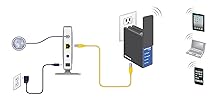
Router mode
Turns an Ethernet connection to a private WiFi hotspot network.
Add firewall protection to public network in a hotel.
Save on Internet access fees. No longer pay multiple access fees.

Extender mode
Extend WiFi throughout your home and even the backyard
Eliminate WiFi dead zones in hard to reach areas
Lower your phone bill by reducing data plan charges

Hotspot mode
Boost the signal of weak public Wi-Fi hotspots
Add firewall protection to public network in a hotel.
Save on Internet access fees. No longer pay multiple access fees.

Bridge mode
Connect wired only devices to the WiFi network

Internet Mode Switch - 3 options
Wired
Set the switch to Wired if you want to connect the Trek to the Internet with an Ethernet cable. For example, set the switch to Wired if you want to use the Trek in router mode or AP mode.
Power off
Set the switch to Power off to turn off the Trek. Make sure the switch is set to Power off before plugging the Trek into an electrical outlet.
Wireless
Set the switch to Wireless to connect the Trek to the Internet with a WiFi connection. For example, set the switch to Wireless if you want to use the Trek in hotspot, extender or bridge mode.