FEATURESDESCRIPTIONSSHIPPINGPAYMENTRETURN POLICYGUIDE 
Cell Phones & PDAs
Clothing, Shoes & Accessories
Computers & Networking
Daypack
Internal Frame Bag
Consumer Electronics
Electronics
Health & Beauty
Watch & Jewelry
Sports Fun Shop
Sports & Outdoor
Sporting Goods
Pet Supplies
Home & Garden

FriendlyNotice

Upon receipt of our items please ensure the order is correct. We rigorously test and check our items to meet the toughest standards prior to shipping, if you encounter any problems please contact us. We will do everything we can to make sure your happy with your order.


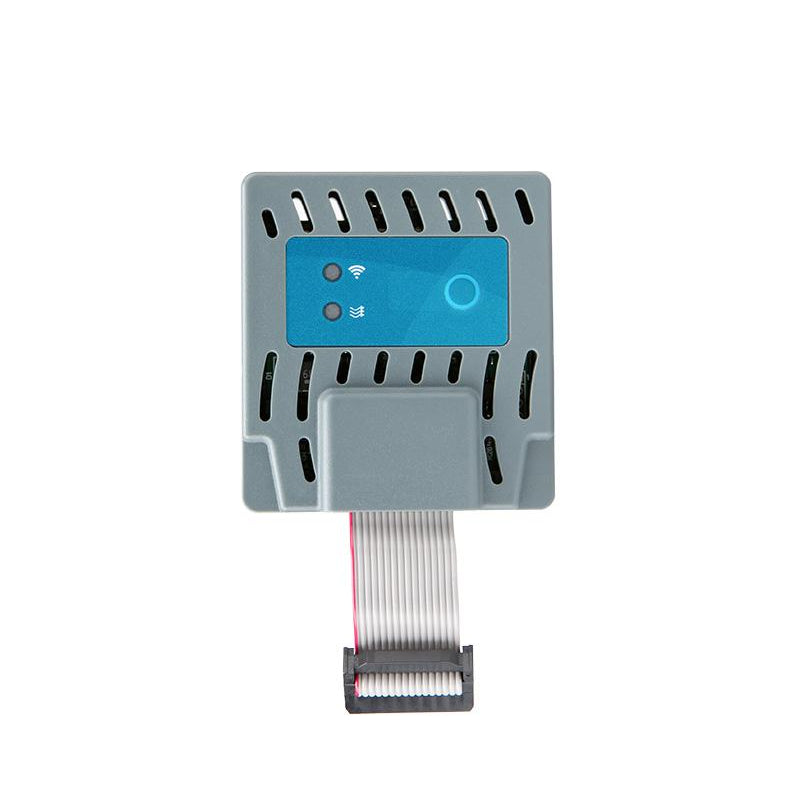
1PC Hunter - PC-WIFI - Pro-C WiFi Module (P2C Model Only)


Descriptions

Hunter - PC-WIFI - Pro-C WiFi Module (P2C Model Only)Hunter? PC-WiFi - Wi-Fi Networking Module for Hunter Pro-C (P2C-400 Controllers)nUpgrade your new or existing Hunter? Pro-C to an internet enabled controller with this handy easy to install kit! (Must be the Hunter P2C from 2024)nThe PC-WIFI Module installs easily on the inside of P2C-400 Series facepacks and lets you connect wirelessly to the internet for remote operation using the Centralus? Irrigation Management Software. Even with the PC-WIFI Module installed, you can continue to use the dial at the facepack to edit programs or run manual stations.nn2.4 GHz (only) Wi-Fi router compatible, 802.11 b/g/n 20 MHznUse Centralus?, a free to use cloud based software developed by Hunter? to control your device anywhere in the world. Centalus is a Web Based App but can be added to the home screen of your phone. (Centralus? - Add to Mobile Home Screen)nResponsive web design configures for your device, allowing the same controls from your smartphone, tablet, or desktopnFrom the user-friendly Centralus dashboard, it is now easier than ever before to add automatic weather adjustments, alarm monitoring, location information, remote operation, and scheduling to P2C controllers.nIdeal for use where you can receive a good quality WiFi signal, always test your WiFi coverage beforehand with a mobile device.?If the strength is too low, the connection will not work, and will need to be moved closer to the router.n*P2C Controller Sold SeparatelynnNOTE: The PC-WIFI Module is?only compatible with 2.4 GHz?Wi-Fi networks; personal WPA/WPA2 security.nImportant: nThis Hunter PC-WiFi Module is only compatible with P2C-400 controllers and the upgradeable P2C Facepack (10032800SP). Please note that older models (PC300/PC300i, PC400/PC400i, PCC600/PCC600i) are not compatible with this module. If you have an older Pro-C model, then you can either;n? Upgrade it with the 10032800SP facepack?(for Pro-C with blue buttons)n? Replace it with the P2C-400?(for Pro-C with green buttons)nnProducts u0026amp; LiteraturennInstallation GuidenCentralus Software BrochurenCentralus? - Add to Mobile Home Screennn

Shipping

  • Option A: ShippingMethodStandard - Shipment will arrive in 1 to 6 business days on average.
  • Unfortunately, we do not offer international shipping services at this time. We currently only ship within the 48 continental US states.
  • If you would like an item to be shipped to a PO Box, Alaska, Hawaii, Puerto Rico or Guam, please contact us before check out to see if this may be accommodated.
  • Payment

  • Option A: Paypal or eChecks via Paypal.
  • Option B: Credit Cards (Visa, MasterCard and American Express) with a US billing address.
  • Return Policy

  • If you are not satisfied, please contact me before leaving feedback so I may have the opportunity to fix any issues.
  • If you would like to return an item, please keep it in original condition and inform us you would like to process a return.
  • Full refunds will be issued for damaged, defective or inaccurately described products.
  • Please notify us within 30 days for defective units, we will have a solution within 24 hours.
  • For exchanges and/or returns other than quality issues, buyer is responsible for return shipping costs.
  • Guide: How to make a best offer?

    1.   Find a listing that accepts Best Offers.
    2.   Click the Make Offer button. You may need to sign in.
    3.   Enter your offer. If you want to include a note to the seller, click the Add your note link.
    4.   Click the Review offer button.
    5.   Review the information and click the Submit offer button.

    Customer service is our passion. If you have any problems or questions, do not hesitate to contact us. We are happy to help!