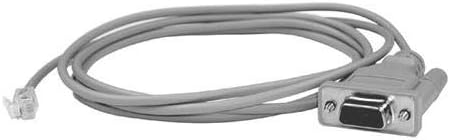
Celestron NexStar RS-232 Cable Grey
Product Details
- Brand: Celestron
- Connector Type: Rs-232
- Cable Type: USB
- Compatible Devices: Laptop, Monitor, PC
- Special Feature: Data Transfer, Downloadable Data
- Compatible Phone Models: pc
- Recommended Uses For Product: Converting serial cables to USB, compatible with specific Celestron cables
- Ethernet cable category: Cat 5
- Color: Grey
- Connector Gender: Male-to-Male
- Shape: Round
- Number of Pins: 9
- Unit Count: 1.0 Count
- Item Weight: 1.76 ounces
- Model Name: 93920
- Specification Met: Electrical Safety, Connectivity, Cable Length Standards
- Indoor/Outdoor Usage: Indoor, Outdoor
- Number of Items: 1
- Customer Package Type: coiled in protective tubing
- Outer Material: Plastic
- Manufacturer: Celestron
- Product Dimensions: 5.7 x 4.9 x 0.9 inches
- Item model number: 93920
- Is Discontinued By Manufacturer: No
- Interface your NexStar telescope with your laptop or PC
- Control telescope by clicking on sky maps on computer monitor
- RS-232 jack on one end of cable, standard serial connector on other
- Certain telescopes allow downloading new data into database
- 62-inch length
The Celestron RS-232 Cable is used to connect your PC or computer to NexStar computerized telescopes via a port in the hand control. The large adapter attaches to the serial port of your computer. If your computer does not have a serial port, you will need a Serial-to-USB Adapter (#18775) so that you can connect the RS-232 Cable via a USB port instead. The other end of the cable terminates in a phone-jack style plug, and simply snaps into the port designed for this you have connected your computer and telescope, you can update your hand control firmware. The latest updates can be found in the Support section of this website.Connecting a computer to your telescope will also allow you to navigate the telescope from your computer screen! There are many software programs available today that will not only display the night sky as it appears on any chosen observing night, but that will allow you to send your telescope to any object on the screen with the click of a button.