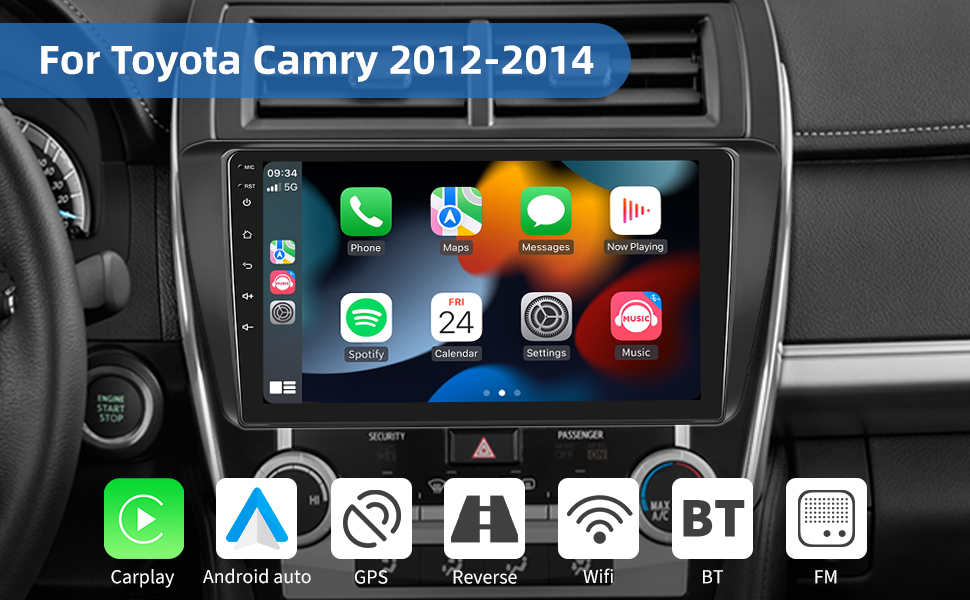


Compatible Vehicles:
- For Toyota Camry 2012-2014
Note:
- The included harness does NOT support the JBL .
- If your car is equipped with JBL function, please contact us to purchase a wiring harness that supports JBL function.
- Designed And Contoured To Match Factory Dashboard
- High-Grade ABS Plastic Structure
- Factory Style Texture Design
- Quick And Easy Installation
- Quality Crafted To Factory's Rigid Specification
- High Quality, ABS Plastic Molded Connector For The Perfect Fit
- Plugs Into The Factory Harness Without Cutting Any Wires
- Includes ISO Extention Trim Ring
- All Necessary Hardware Included
- Showing A Gapless Fit Between The Dash And The Kit
- Vehicle Compatibility Chart May Vary Depending On Vehicle Options, Production Dates, And Install Application. Please Inquire Before Purchase.
- Wire Harness Does Not Work On Vehicles With Premium Factory Sound System.
- Wiring Harness Is NOT Compatible With Premium BOSE, Amplified Sound Systems And Onstar.
- Please Verify Your Vehicle's Original Sound System Specifications Before Purchasing Your Harness.
- The Power Cord And Canbus Of High Configuration Models Are Different.
Split Screen:
- Car radio support shows 2 APPS at same time, easy to switch option
Apple Carplay & Android Auto
Wireless & Wired Apple Carplay
- Wireless Carplay: The wireless & wired Carplay in-vehicle system can closely integrate the user's iOS device and iOS experience with the dashboard system. Users who use Carplay can connect to the car system through a data cable to achieve voice-controlled navigation, make calls, send and receive messages, and listen to music.
Wireless & Wired Android auto
- The wireless & wired Android auto car system can closely integrate the user's Android phone and player, and realize navigation, make calls, send and receive information, listen to music and other operations through data cable connection;
Specification
| Compatible Vehicles | For Toyota Camry 2012-2014 |
| System | Android 11 |
| Screen size | 10.1'' |
| Memory | 2GB (RAM)+32GB (ROM) |
| Screen resolution | 1024*600 |
| Power output | 4*45W |
| Steering wheel control | Support |
| Radio Band | FM/RDS |
| DSP | Support |
| External microphone | Support |
| Split screen | support |
| Factory setting keyword | 8888/ 3368 |
Specifics:
◆Voltage:DC 12V
◆Operating system:Android 13
◆Apple CarPlay: Support Wireless Connection,and Wired Connection
◆Android Auto: Support Wireless Connection,and Wired Connection
◆Screen:10.1" Touch Screen
◆RAM:2G
◆ROM:32G
◆Screen size:10.1 inch 2.5D capacitive touch screen
◆Bluetooth Version:5.0
◆Bluetooth keyword:0000
◆USB: Dual USB 2.0
◆Radio Band: FM,RDS
◆Audio Ouput: 4x45W
◆Resolution: 1024*600Pixel , Support 4K video
◆Audio format:MP3 MP2 AAC OGG FLAC APE WMA WAV RM AC3
◆Video format:AVI 3GP/MP4 MOV MPG MKV WMV RMVB
◆Language:English, Arabic, Russian, Hebrew, Spanish, Italian, French, Thai, German, Japanese, Korean,
Turkish, Czech, Hungarian, Dutch, Polish, Swedish, Ukrainian, Romanian, Greek, Danish,Finnish

1 x Car Stereo
1 x Power Cable
1 x GPS Antenna
1 x Rear Camera
1 x RCA Cable
2 x USB Cable
2 x Mounting Bracket
4 x Screw
1 x Instruction manual

Delivery via UPS from USA warehouse,Fast Shipping & Free Returns.
Tips:
1.Why can't turn on the car radio ?
1.1Please check the Voltage of car radio:12V
1.2When you test this car radio,you can combine the red and yellow wires and connect them to the positive side of the power supply.Black line to negative power supply.
1.3Replace the same type of insurance to test the car radio.
Note: Please must use our power cables to connect our car radio,it is not possible to insert the original car plug directly into our machine.
2.Why the car radio will show "No Signal" when we reversing?
Please check if the camera's line is properly connected to the car radio.
Note:The video port of rear camera must insert the "CAMIN" port of car radio.
3.Why does the camera display "!" and "Can't watch video while driving" when I use USB to watch videos?
Please turn off the "Video Warning" function in the settings,then will be OK.
4.Why can't search FM?
4.1: No radio antenna inserted;
4.2: Please check if the radio antenna is plugged in. Please insert more antennas several times to make it well contacted;
4.3: The signal of your location is not good. Please go to a better place to test again
4.4: The radio antenna on the car is broken/no effect; please replace the radio antenna and test again.
5.Why can't connect the Bluetooth of car radio?
5.1 Open the phone settings interface, open the Bluetooth in the Bluetooth function, search for Bluetooth devices, find the player's Bluetooth model to be paired; if you need a pairing code, enter 0000; if not, try 1234 or 123456.
5.2 Please try to use another mobile phone to test this function.
All methods are correct and still cannot use Bluetooth, Please unplug the plug on the back of the player and plug it in after 3 minute
6.Is it suitable for your car?
a. Check the corresponding model and year of the product and car
b. Compare the installation position of the product with the car that needs to be upgraded
c. Check if the product's power cable interface is suitable for your car (note: not all interfaces of the original car need to be connected)
d. If you still can't judge, please send us the original car radio installation location (front) picture and the original radio back interface picture to us
We only ship to the confirmed address provided by ebay. Please make sure your ebay address matches the shipping address.
All items will be shipped within 24 business hours upon receipt of payment (except Saturday and Sunday).
If you do not receive your item on time, please contact us immediately for further assistance. We will track the shipment and get back to you in 24-48h with a reply.
2.Import duties, taxes and charges are not included in the item price or shipping charges. These charges are the buyer"s responsibility.
3.Insufficient information will delay the order process so pls read the invoice carefully during checkout. Make sure that the shipping information is correct to avoid delays.
2.Please do not open cases without contacting us first. We will solve any problem till your satisfaction.

