




Features:
- System: Android 15.0 Operating system, 2G RAM, 32G ROM, Quad-core
- HD Touch Monitor: 10.1 inch HD capacitive touch screen with resolution 1024*600.
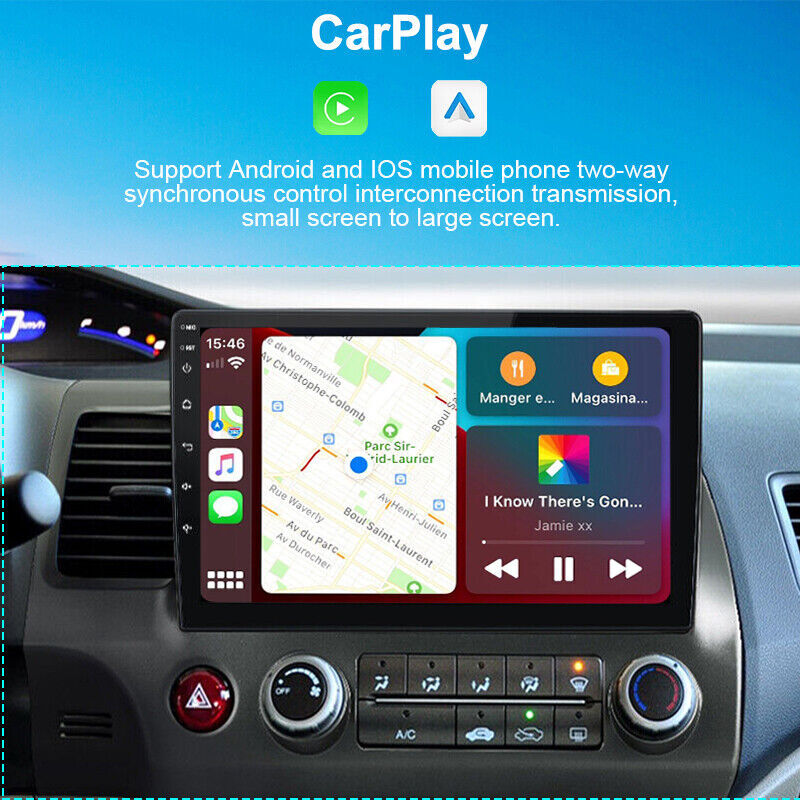
- Wireless CarPlay: Access icons on your iPhone by activating Siri voice controls or touchscreen. Available features include Phone, Music, Maps, Text messages, Radio, Podcasts, Audiobooks. Make your drive more interesting.
- Wired Android Auto: You can access to phone functions with the help of Voice Assistant, including calls, maps, email, music, messages and more while being able to focus on the road.
- GPS Navigation: built-in GPS, you can use online or offline navigation maps. Users are allowed to download apps from the play store.
- WIFI: Built-in WIFI receiver, supports WIFI or hotspot internet connection.
- FM/RDS Radio: Freely select radio stations, listen to real-time radio, weather forecast, news.

Wireless & Wired Apple Carplay
Get rid of the troubles to cable connect and mess. Every single passenger can link his mobile phone freely, sharing more interesting content with each other during the journey. Two connection modes, original data line connection / Bluetooth connection, to realize navigation, work, etc
- Wired Android Auto
Need wired connection, you can charge your phone at the same time. Just connect via original USB cable Your driving journey will no longer be lonely. Work and entertainment are your choice.
- How to Use
- Pair your phone's Bluetooth with Android car stereo (Original Password: 0000), Bluetooth name (CarBT123)
- The Bluetooth page will show "phone audio, media audio", paired successfully (Android had unit's hotspot will auto turn on)
- Auto switch to Zlink APP - Display Carplay/Android Auto interface
- You can use phone maps, send messages, make or answer phone calls, listen to music, and play videos on this car radio screen when connected. Support Siri voice assistant and gogle assistant
Notes:
1. If the Bluetooth cannot pair, please try to connect the car stereo WiFi with your phone hotspot manually. (Go to Car Setting- Android Car Setting -Network - Hotspot Sharing - turn on Hotspot - Show - Hotspot Name - User up to 6.
2. Delete car radio Bluetooth connection records and try to connect it again.

GPS Navigation & WiFi
- Built-in GPS, support online and offline maps,preloaded offline map named "Here Wego".
- When connected to wifi, you can download other offline maps or use online maps wherever you want. You can also download many other apps in the app store, such as youtube, spotify, etc.
|
|
|
|
|---|---|---|
Bluetooth Handsfree Call & Music
|
Mirror Link for Android/iOS
|
Rearview Camera (not included)
|


|
|
|
|
|---|---|---|
FM/RDS Radio
|
Steering Wheel Control
|
9" Large HD Touch Screen
|


Packing List:


1.Why does the car radio show "No signal" "keep black" " Show Nine-Palace Grid Image" ...when we are driving in reverse? (Camera included)
Rear camera resolution needs to be adjusted
In the radio factory setting - factory password 1234 or 8888 - video source setting, select CVBS, please feel free to contact us if you have any issues about it.
2.why does the car radio not turn on?
2.1 Please check the voltage of the car radio: 12V
2.2 When you test this car radio, you can combine the red and yellow wires and connect them to the positive side of the power supply.Black wire to negative power supply.
2.3 Replace the same type of insurance to test the car radio. Note: Please need to use our power cable to connect our car radio,"
3. why does the camera show ""!"" and ""Video can not be watched while driving"" when I watch videos via USB?
Please turn off the ""Video warning"" function in the settings, then everything is fine."
4.why can't I search for FM?
4.1 No radio antenna is connected;
4.2 Please check if the radio antenna is plugged in. Please plug in several antennas several times to achieve good contact;
4.3 The signal at your location is not good. Please go to a better place to test again.
4.4 The radio antenna on the car is broken/no effect; please replace the radio antenna and test again."
5. Steering Wheel Control:
5.1 Please make sure the steering wheel control cables was connected successfully.
5.2 Enter "" settings - factory setup-1234 or 8888-party control learning"
Before studying, press the ''reset '' to clear the memory first.
Long press the steering wheel function icon on the radio, at the same time press the relevant button on the car steering wheel.
After successfully studying, induction comes. You can test the function of the button and study again if it fails."
6.Why can't the car radio be connected via Bluetooth?
6.1 Open the phone settings, open Bluetooth in the Bluetooth function, search for Bluetooth devices, find the Bluetooth model of the player to pair; if you need a pairing code, enter 0000; if not, try 1234 or 123456.
6.2 Please try to test this function with another mobile phone.
7. How to confirm compatibility ?
7.1 Please check the notices pictures when purchase on our listing.
7.2 Please check the console center images of your original car
7.3 Please check the back pictures of your original complete car radio
7.4 car production year and the car models
For example:
Model: Honda
Type: Civic
Year: 2011
7.5 Please send us the above information if you can not confirm.
(Note: Please make sure the pictures were clear and complete)
2.If there is any problem with the product quality, please contact us first before you opened the return, we will try our best to solve all problems for you.
3.The returning item should be in it's original packaging and assure all parts included .
Attention:Any problems please contact us at any time before leaving a negative/neutral feedback and opening the return request. Many thanks to you.
2.After you paid,we will ship it asap.
2. All major credit cards are accepted through our secure payment system.
3. We ship to your payment address. Please make sure your penment address is correct before paying.
On Jun 17, 2025 at 21:49:35 PDT, seller added the following information: