
• FREE FAST SHIPPING
    On All Orders
  • GREAT QUALITY
    100% Satisfaction
  • US Stock
    Quality Products
  • Need Assistance?
    Message us

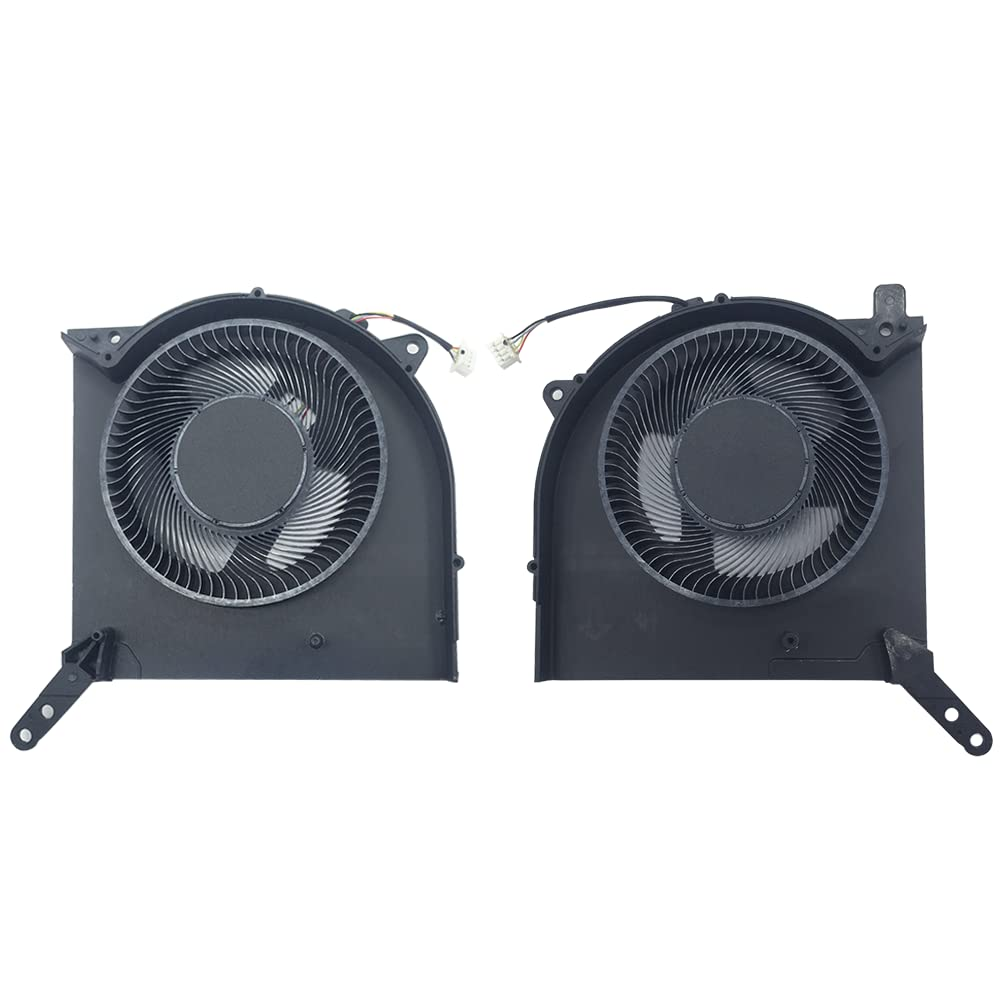
New Replacement Cooling Fans for Lenovo Legion 5 Pro 16ACH6H R9000P 2021H RTX3060 RTX3070 Model Gaming Laptop Series CPU GPU Fan (4-Pin 4-Wire) 10V 0.8A FNKF DFSAL12E164860 FNKD DFSAL12E064860

Item model number R9000P2021H, Y9000P2021H, FNKD,FNKF
Power Connector Type 4-Pin
Number of Items 2
Wattage 8 watts
Compatible Devices Laptop
Package Dimensions 6.02 x 5.98 x 2.05 inches; 0.71 ounces
Voltage 10 Volts (DC)
Cooling Method Fan

  • Compatible models: for Lenovo Legion 5 Pro 16ACH6H (type: 82JQ),for Lenovo LegionR9000P2021H RTX3060 RTX3070 model Gaming laptop Series CPU GPU Fan (4-Pin 4-Wire) 10V 0.8A FNKF DFSAL12E164860 FNKD DFSAL12E064860.
  • Fan description: brand new, 10V,0.8A ,(4-Pin 4-Wire).
  • Applicable scenarios:Solve the error, abnormal noise, and high temperature of your laptop fan, so that your laptop fan can operate normally again!
  • Worry-free service: Brand new, every fan has been tested before shipment and packed in a shockproof box. Ensure safety during transportation! In addition, we also provide a 90-day warranty for the product.
  • Note: Please check the compatible models before purchasing and compare the sample fan Pictures , If you have any questions about what kind of fan you need, please contact us.

Product description

How to find a laptop model ?

  • How to determine a compatible cooling fan for your laptop ?
  1. Flip your laptop 360 degrees, and on the back of the bottom of the laptop,you can see the detailed model number, as shown in the picture,Find the words ' model: Legion 5 Pro 16ACH6H , Type: (82JQ ) ' which is the detailed model number of your laptop.
  2. Part number of cooling fan: CPU Fan:FNKD DFSAL12E064860 ; GPU Fan:FNKF DFSAL12E164860 ;
  3. Compatible laptop models:for Lenovo Legion 5 Pro 16ACH6H (Type:82JQ ) RTX3060 RTX3070 graphics card laptop ,for Lenovo Legion R9000P 2021h RTX3060 RTX3070 graphics card laptop.
  4. fter disassembling the machine, remove your own cooling fan and compare whether the part number of your cooling fan matches the part number description of our cooling fan product.
  • The same model of laptop has fans with different part numbers. If your laptop model is consistent with our product description, it can also be compatible for use.
  • Advantages of Metal Copper Core Shaft:
  1. Metal copper core shaft More stable heat dissipation and lower noise.
  2. The axis of the cooling fan is made of metal, which has low operating sound, high air volume, and is durable and long-lasting .
  3. Using a computer is quiet, comfortable, and no longer troubled by noise.
  4. Solve the error, abnormal noise, and high temperature of your laptop fan, so that your laptop fan can operate normally again!
  • Replacing the cooling fan with a new one can solve the problem:
  1. Using a computer is quiet, comfortable, and no longer troubled by noise.
  2. The temperature of the laptop is no longer too high, and it runs faster and more comfortably at low temperatures.
  3. When the computer is turned on, it no longer prompts "fan error", making office use smoother.
  • Reminder : When the cooling fan is dissipating heat at full speed, there will be a certain amount of airflow sound, which is a normal phenomenon. When the temperature of the laptop drops, the airflow sound will disappear.
  • Some laptops prompt 'Fan error', which may not necessarily be a problem with the cooling fan. If a new cooling fan still prompts' Fan error ', it means it is not a problem with the cooling fan, but rather the motherboard or other issues.
  • Location diagram of laptop cooling fan:
  1. As shown in the above figure, When using a laptop normally, the one on the left is the CPU cooling fan, and the one on the right is the GPU cooling fan.

This is the front of the CPU fan. The voltage of the cooling fan is DC10V. When using a computer normally, the cooling fan is installed on the left side of the keyboard, which is the cooling fan below the F1 button.

This is the front of the GPU fan, and the voltage of the cooling fan is DC10V. When using a computer normally, the cooling fan is installed on the right-hand side of the keyboard, which is the cooling fan below the F12 button.

We accept all of the standard payment options offered at eBay checkout.

To provide a safe experience, eBay only allow payment methods that offer strong protection for buyers and sellers.

We are always working hard to ensure your package arrives as soon as possible. Please understand that some factors like weather, high postal traffic, and the performance of shipping companies are outside of our control.

We offer free shipping to the lower 48 states and ship within 3 business days of payment. We do not accept P.O. Boxes. Please provide a physical address.

We offer a 30-Day Return Policy on items which you are not completely satisfied with. You have the option for a full-refund or an exchange of the item. No returns are available on items shipped outside of the USA..

Feedback
As a seller Positive Feedback is very important to us, as well as our customers. Your satisfaction is our primary concern, and we will try to resolve every problem. We kindly request you to contact us FIRST before leaving any neutral or negative feedback to resolve the issue. We will try to respond within 24 business hours.