Description
Features:
- Original OEM SmartTag2 Bluetooth tracker
- Attach it to your keys, luggage, bags or other items you want to keep track of
- Register your SmartTag2 and start using SmartThings Find immediately
- Activate the Search Nearby feature for step-by-step guidance to your item's precise location with Compass View
- You can also make your SmartTag2 ring so that you can find it easier
- When you lose your SmartTag2, activate the Lost Mode for NFC contact information sharing
Note: Using Compass View requires an ultra-wideband (UWB)-enabled G smartphone running Android 11 or later
Specifications:
- Bluetooth: BLE v5.3
- Range: 120 m (BLE) max
- Battery type: CR2032 replaceable
- Battery life: up to 500 days
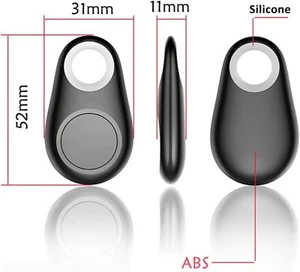
- Dimensions: 28,8 x 52,44 x 8 mm
- Weight: 13,75g
- System requirements: (smartphones, tablets) with Android 9 or later; UWB-enabled Galaxy devices for UWB functionality
Package includes:
- SmartTag2
- Battery
SmartTag2, Bluetooth Tracker, Smart Tag GPS Locator Tracking Device, Item Finder for Keys, Wallet, Luggage, Pets.


About this item;
- REDESIGNED TO DO MORE: The redesigned SmartTag2 is made so you can keep calm and keep track; Its design makes it easy for you to tag and carry your belongings.
- EASY TO USE: It's IP67-rated water- and dust-resistant, activates your compatible IoT devices
- RELAX, YOU'VE GOT IT TAGGED: Simply register a new GmartTag2 and get started right away with SmartThings Find; With its intuitive tracking experience, you now have a way to keep track of things you love right in the palm of your hand
- SEARCH NEAR WHEN IT'S NOT FAR: Lose something. Switch on Search Nearby and get guided instructions to your item's location via Compass View; If you still don't see it, just ring your Galaxy SmartTag2 to have it send out an audible signal
- Type of battery needed: replaceable CR2032 1 ea. Lithium battery (not included)
NEW smart Tag 2 GPS Tracker.
NEWSmart Tag 2 GPS Tracker + 2 FREE Extra Philips Batteries!
- Order Now For Immediate Dispatch
NEWSmart Tag 2 GPS Tracker + 2 FREE Extra Philips Batteries!
Method of use:
Step 1: Download the application "iSearching" on the mobile phone. Activate the app "iSearching" and Bluetooth.
-iOS system users can find and install iSearching in the APP Store.
- Android system users can search and install iSearching on Goggle Play Market (except for mainland China user);
-After installation, you need to open the "automatic operation" in the permissions management.
Step 2: Turn the tracker on/off.
- Turn on: Press and hold the button for 3 seconds until you hear two beeps.
- Power Off: Press and hold the button for 5 seconds until the beep sounds.
Step 3: In the application, within " device ", click " connect " in "device", link to the Bluetooth tracker.
If you want to add a new device, click the " + " button in the upper right corner.