⚡ Vitesse maximale : exploitez pleinement les débits du Minitel : typiquement 1200 bauds pour les premiers modèles, jusqu’à 9600 bauds sur les plus récents, pour des transferts plus fluides (images, Telnet, etc.).
Variantes disponibles (choisissez votre chipset) :
CH340G – Solution très répandue au rapport qualité/prix excellent.
- Compatible Windows 10/11, macOS, Linux
- Idéal pour une solution simple, fiable et abordable
- Pilotes : Télécharger
CP2102 – Excellent compromis performance/compatibilité.
- Pilotes certifiés, stables (Windows, macOS, Linux)
- Pratique pour usages réguliers ou avancés (jusqu’à ~1 Mbps)
- Pilotes : Télécharger
FT232RL (FTDI) – Choix premium avec pilotes reconnus dans l’industrie.
- Très large compatibilité (Windows, macOS, Linux, Android)
- Excellente stabilité à haut débit et en environnement multi-OS
- Pilotes : Télécharger
PL2303TA – Solution classique et simple pour les usages standard.
- Compatible Windows (via pilotes legacy), macOS jusqu’à certaines versions
- Parfait pour vitesses Minitel jusqu’à 9600 bauds
- Pilotes : Télécharger
Caractéristiques techniques
- Connecteur DIN 5 broches (standard Minitel) :
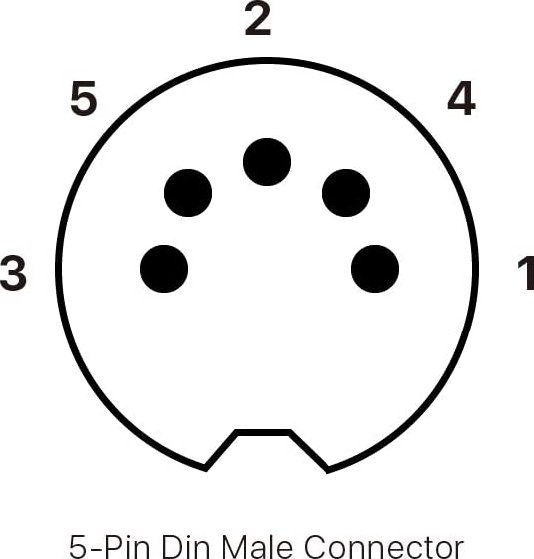 Pin 1 = TX • Pin 2 = Masse • Pin 3 = RX
 - Longueur : ~1 m
- Alimentation : 5 V (USB)
- Vitesse : 300 → 115200 bauds (selon Minitel : typiquement 1200, jusqu’à 9600 sur les modèles avancés)
Exemples d’utilisation
- Mode terminal : Télétel Videotex CEPT (40×25) et ASCII ISO 6429 (80×25)
- Connexion Telnet via Python : Minitel RS232/USB Telnet Interface
- Affichage d’images : Minitel-image-viewer (décor rétro, écran d’ambiance)
- Projets Raspberry Pi / Linux : serveurs rétro, bornes interactives, installations créatives
Démarrage rapide (Linux/Raspberry Pi)
ls /dev/ttyUSB* /dev/ttyACM*
# Ouvrir la session série (exemple à 9600 bauds)
screen /dev/ttyUSB0 9600
# ou : minicom -b 9600 -D /dev/ttyUSB0
Pilotes (liens officiels) : CH340/CH341 | CP2102 | FT232RL (FTDI) | PL2303 (legacy)
Avec ce câble, votre Minitel retrouve une seconde vie : terminal, afficheur d’images, projets créatifs — le pont idéal entre rétro-tech et informatique moderne.
⚡ Max speed unlocked: make the most of your Minitel’s capabilities — typically 1200 baud on early units, up to 9600 baud on the most advanced models for smoother transfers (images, Telnet, etc.).
Available variants (pick your chipset):
CH340G – Widely used, great value choice.
- Works with Windows 10/11, macOS, Linux
- Ideal for a simple, reliable, affordable setup
- Drivers: Download
CP2102 – Excellent performance/compatibility balance.
- Certified, stable drivers (Windows, macOS, Linux)
- Great for regular or advanced usage (up to ~1 Mbps)
- Drivers: Download
FT232RL (FTDI) – Premium option with industry-grade drivers.
- Very wide compatibility (Windows, macOS, Linux, Android)
- Outstanding high-speed stability in multi-OS environments
- Drivers: Download
PL2303TA – Classic and simple for standard use.
- Works on Windows (legacy drivers), macOS up to certain versions
- Perfect for Minitel speeds up to 9600 baud
- Drivers: Download
Technical specs
- 5-pin DIN connector (Minitel standard):Pin 1 = TX • Pin 2 = Ground • Pin 3 = RX
- Length: ~1 m
- Power: 5 V (USB)
- Baud rate: 300 → 115200 (depending on Minitel; typically 1200, up to 9600 on advanced models)
Use cases
- Terminal mode: Videotex CEPT (40×25) & ASCII ISO 6429 (80×25)
- Retro Telnet bridge (Python): Minitel RS232/USB Telnet Interface
- Image display: Minitel-image-viewer (retro décor, art screen)
- Raspberry Pi / Linux projects: retro servers, kiosks, creative installations
Quick start (Linux/Raspberry Pi)
ls /dev/ttyUSB* /dev/ttyACM*
# Open serial session (example at 9600 baud)
screen /dev/ttyUSB0 9600
# or: minicom -b 9600 -D /dev/ttyUSB0
Drivers (official links): CH340/CH341 | CP2102 | FT232RL (FTDI) | PL2303 (legacy)
This cable brings your Minitel back to life: terminal, image display, creative projects — the ideal bridge between vintage tech and modern computing.