Phonak Roger Clip-on Mic Docking Station
It is always a good idea to have a spare docking station. This can allow you have multiple charging stations around your home or in the office available. An empty battery will reach its maximum charge in approximately 2 hours. Charging is complete when the indicator light turns solid green.
The Roger docking stations all connect to each other with a magnetised feature to keep your Roger products together safe on your chosen surface.
Your docking station features include:
- Slot for Roger Clip-On Mic
- Charger input (micro-USB
- Audio input (3.5 mm / 1/8 inch jack)
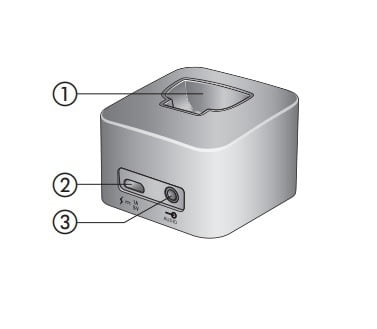
Setting up your docking station:
The Roger Roger Clip-On Mic docking station can be used to both recharge your microphone and transmit audio from a TV, or other audio device to your hearing aids. Simply ensure your Roger Clip-On is slotted into the docking station and follow the user guide instructions in your Clip-On mic user manual.
Connecting the docking station to a TV / audio device:
- Plug the audio cable into the audio input of the docking station.
- Connect the other end of the audio cable to the headphone output of your TV / audio device.
Alternatively, connect the other end of the audio cable to your TV's Cinch / RCA adapter. Connect the red and white plugs to the matching red and white output sockets on your TV.
You can also connect via a SCART adaptor, which can be bought from an electronics store or from us at Hearing Aid Accessories upon request. Connect the other end of the audio cable to the SCART adapter. Then plug the SCART adapter into a free SCART output socket on your TV. If your TV does not include an analogue audio output, you need a digital to analogue converter. Such converters can be found in electronics stores or may be purchased from us at Hearing Aid Accessories upon request.
Additional Features:
- When the docking station is plugged into the headset socket of your TV, you can adjust the volume via your TV's remote control.
- Some TVs will switch off their loudspeakers when you plug the jack into the headset socket - meaning the TV will not be audible for other people. In such a case use the Cinch / RCA or SCART output socket as described above.
- The Roger Clip-On Mic docking station can also be connected to any other audio device such as an MP3 player, PC or HiFi system using the audio cable.
*ROGER CLIP-ON-MIC SOLD SEPERATLEY*