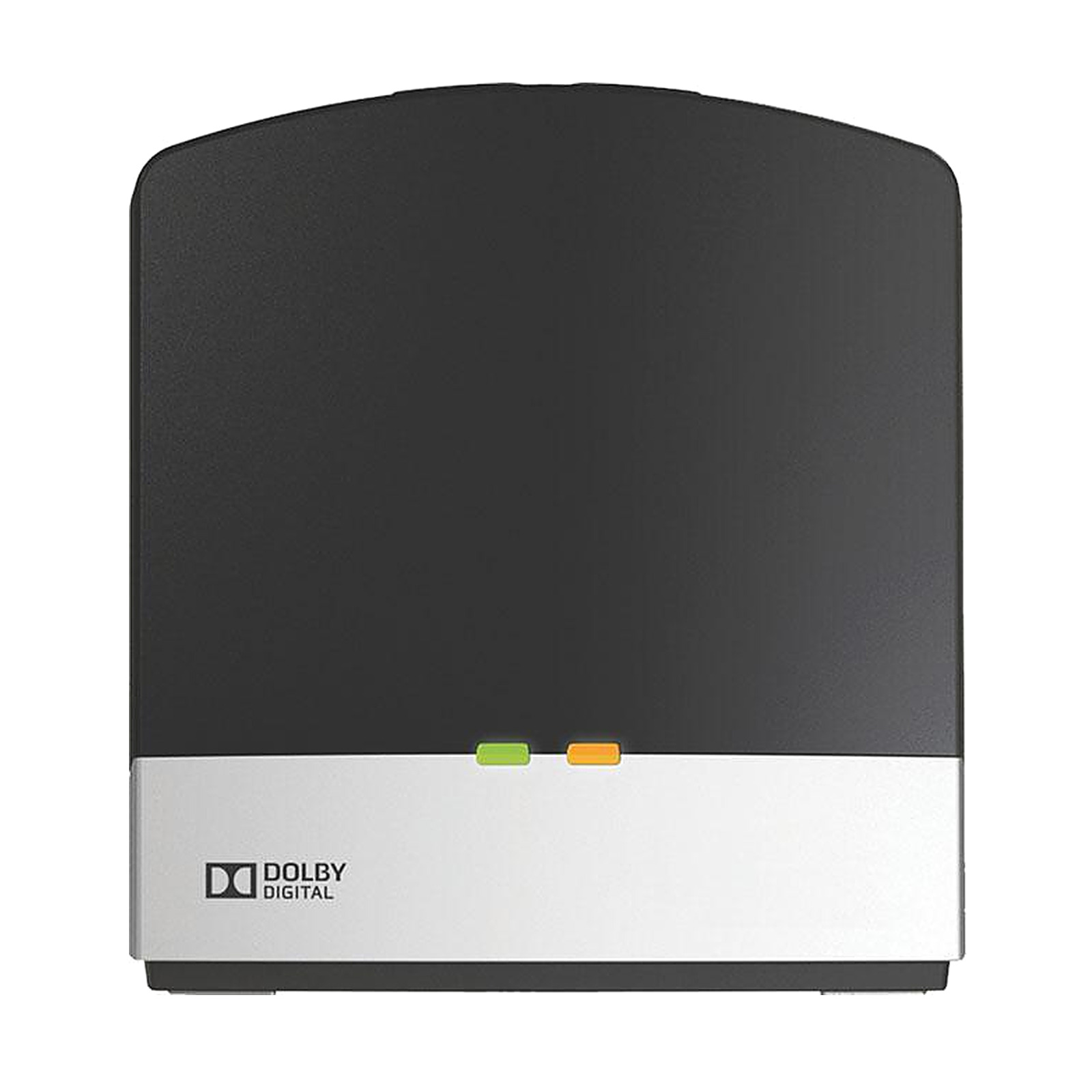
Danalogic TV Streamer 2 for NHS Hearing Aids
Run by qualified audiologists·30-day returns·Tracked delivery

Streams your television's sound directly into your Danalogic NHS hearing aids - your aids become wireless TV headphones with their own volume, while the room hears the TV normally. For Danalogic Ambio, Actio and Extend aids (see compatibility). The unit in the box is Danalogic's own TV Streamer 2, made by GN Hearing.
Setup is a one-time home job with no audiologist visit - pair once, then start the stream from your hearing aids' push button. It connects to the TV by optical or 3.5 mm cable - check your aids in the compatibility list, then see Initial pairing and setup below. Extend owners can also choose the newer Danalogic TV Streamer+, which adds Auracast.
Danalogic TV Streamer 2 - compatible hearing aids:
Danalogic Extend and Actio (both listed by Danalogic for this streamer)
Have an earlier Danalogic wireless aid, such as the CS-series (CS61W / CS71W / CS81W / CS91W)? Danalogic does not list this streamer for those ranges, so message us with your model before buying. Extend aids can also use the newer Danalogic TV Streamer+ and Danalogic Multi Mic+ (Extend only), which add Auracast.
Pairing is fully documented in Danalogic's user guide for the TV Streamer 2, so the steps below are the manufacturer's procedure, adapted into plain instructions. Start by plugging the streamer's power supply into a wall socket and checking that the green light indicator is on. Switch your hearing aids off by opening their battery doors.
Press the pairing button on the streamer once to pair on channel 1. The yellow light indicator blinks once every 2 seconds, and the unit stays in pairing mode for 20 seconds. While that window is open, close the battery doors on both hearing aids so they switch back on. A melody plays in both hearing aids to confirm a successful pairing. To use channel 2 or channel 3 instead, the procedure is identical except that you start with two or three presses of the pairing button.
Outside the GN family there is no cross-brand route. Phonak, Unitron, Oticon, Bernafon, Signia, Widex, and Rexton each run their own proprietary wireless-accessory systems, and no manufacturer has published pairing between any of those and this TV Streamer 2.
Pair once at home:
- Plug the streamer's power adaptor into a wall socket and check that the green light on its front is on. Then turn your hearing aids off by opening the battery doors.
- Press the pairing button on the streamer once. The yellow light on its front blinks once every two seconds, and the streamer stays in pairing mode for 20 seconds.
- Close the battery doors within those 20 seconds so both aids switch back on. A melody in both hearing aids confirms the pairing.
To listen, turn the TV on and press and hold the push button on each hearing aid for about three seconds (one is enough if your aids are set up to synchronise): a melody plays, then the TV sound.
Rechargeable aids have no battery doors: your hearing aid user guide shows how to turn your model off and on. If you hear no melody, message us with your model and we will talk you through it.
It stays wired to the TV, and your aids are the wireless part. Give it power, then connect the sound with one audio cable.
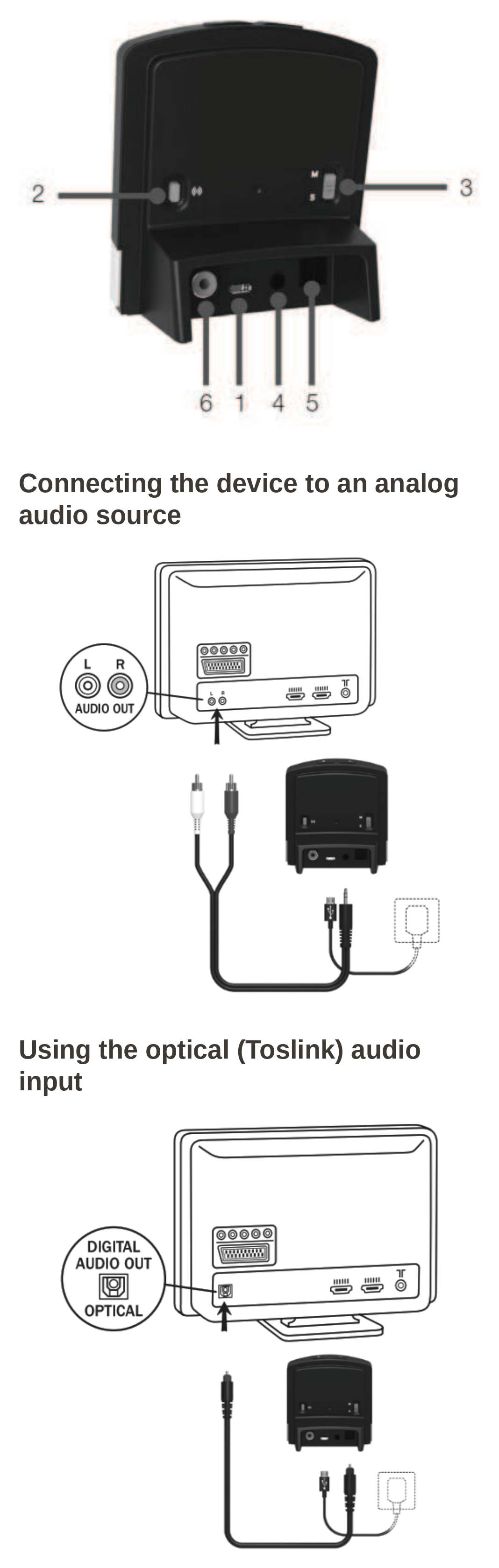
- The back. 1 micro-USB power socket, 2 pairing button, 3 mono/stereo switch (stereo for two aids, mono for one), 4 analogue mini-jack input, 5 optical input, 6 coaxial input.
- Give it power. Plug the power adaptor into a wall socket and its cable into the micro-USB socket (1). The green light on the front shows it is on.
- Connect the sound, with one cable. Analogue: the mini-jack goes into input 4, and the red and white plugs into the AUDIO OUT L and R sockets on the back of your TV. Optical: take the small protective cap off the cable's tips, then push one end into input 5 and the other into the TV's DIGITAL AUDIO OUT (OPTICAL) socket. If your TV has a coaxial digital output, the coaxial input (6) takes it the same way.
- No AUDIO OUT sockets? The guide also shows the analogue cable on a mini-jack adaptor into the TV's HEADPHONE socket, which usually mutes the TV's own speakers, or on a Scart adaptor.
Then pair it with your hearing aids, as set out under Initial pairing and setup above.
Drawings: GN Hearing, TV Streamer 2 User guide 402032000GB
- 1 × Danalogic TV Streamer 2
- Power adaptor (the user guide does not list the audio cables - message us before buying and we will confirm which are included)
- Sealed original packaging
Does the TV still play sound for everyone else?
Usually yes - with the streamer on the TV's audio output, most TVs send the sound to your aids and to their own speakers at the same time, and the volume keys on the streamer set the level of the streamed sound in your aids. Two exceptions in the user guide: on the TV's headphone socket the TV speakers are usually muted, and on some TVs turning the TV volume down lowers the streamed sound as well as the room's.
Is this an NHS part?
Danalogic is GN Hearing's NHS brand, and this is the genuine TV Streamer 2 for NHS-fitted Danalogic aids, made by GN Hearing. NHS audiology may also supply accessories; buying here is the fast self-serve route.
I have Danalogic Extend aids - which streamer do I need?
Either will work. Danalogic lists this TV Streamer 2 for Extend aids, and the newer Danalogic TV Streamer+ (Extend only) is also Auracast ready.
Do I need an audiologist to set it up?
No - pairing is a one-time, at-home step. Your audiology department does not need to reprogram anything.
How far can I sit from the streamer?
Normal living-room distances are its design range - the streamer stays wired to the TV and your aids are the wireless part, so an armchair or sofa across the room is exactly what it is built for. Thick walls and metal furniture can shorten the reach. If your room layout is unusual, message us and we will advise before you buy.
Will it also work with ReSound hearing aids?
This listing is set out for Danalogic aids. If yours are ReSound, message us with your model and we will confirm the right streamer before you buy.
What if the streamer stops connecting to my aids?
First check that the streamer's green light is on, its cable to the TV is plugged in properly, and the TV sound is not muted. If you go out of range (more than 7 metres) and come back within 5 minutes, your aids pick the stream up again by themselves; after longer, start it again by pressing and holding the push button on your aids for about three seconds. If the push button has no effect, pair again the same way as first setup (see Initial pairing and setup above). A nearly flat hearing aid battery can also stop the stream. If it still will not connect, message us with your aid model and we will talk you through it.
What warranty covers this accessory?
Whatever the manufacturer's position, you are covered twice with us: our 30-day returns policy, and your statutory consumer rights, which run against us as the retailer.
Danalogic and ReSound are trademarks of GN Hearing. Auracast is a trademark of the Bluetooth SIG.
EarX is an independent retailer. The products we supply are genuine manufacturer parts, sourced through authorised channels.