
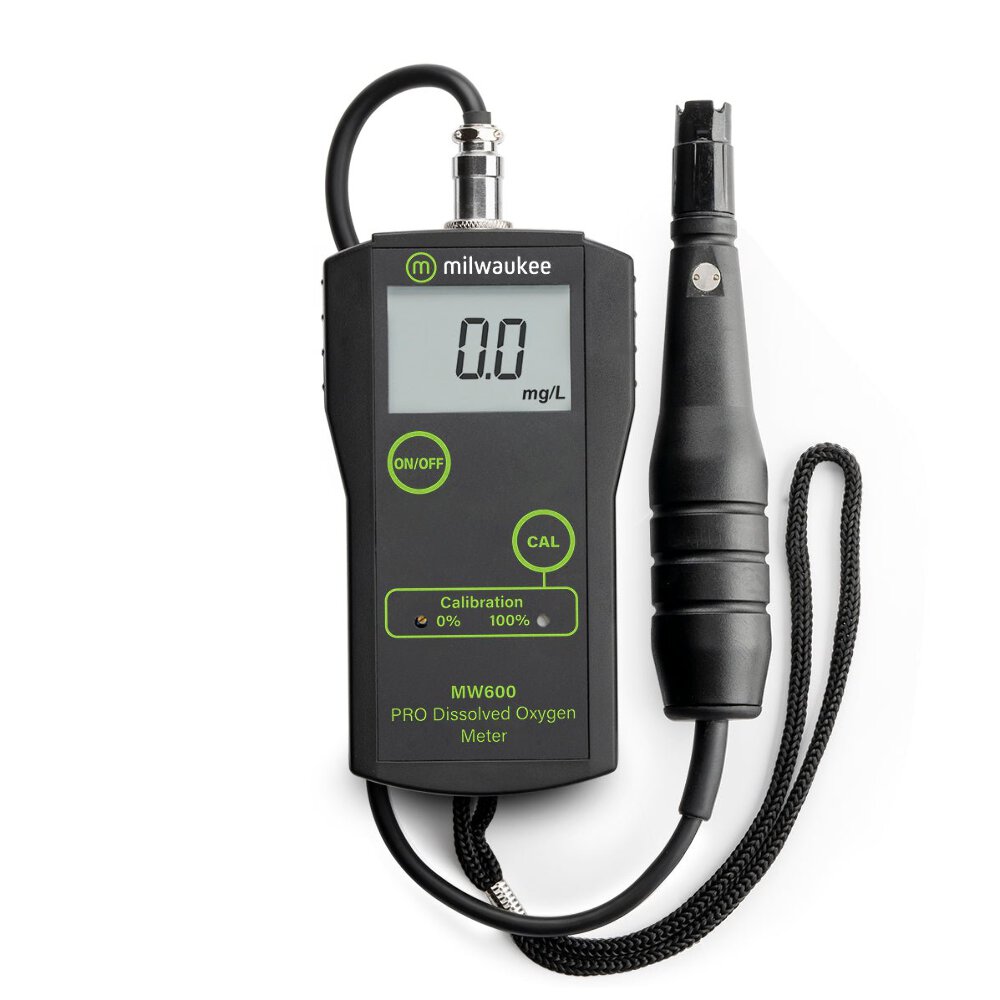
Milwaukee MW600 PRO Dissolved Oxygen Meter

The Milwaukee MW600 PRO Portable Dissolved Oxygen meter is one of Milwaukee's most popular meters with its reliable and fast operation as well as its accuracy. The Milwaukee PRO DO Meter is preferred by people looking for lab level accuracy without the cost. The Milwaukee DO Meter is popular with everyone from field biologists and educators to fish farmers and koi pond owners.Please note that this item does not include calibration solutions. DESIGN FEATURES Fast, easy-to-read results with large digital LCD readout Repeatable, accuracy to ±1.5% FS Lightweight and portable Simple 2 point open air calibration (see video below) Uses MA840 reinforced polarographic probe with an oxygen-permeable polytetrafluorethylene (PTFE) membrane sensor 5 O-rings, membranes and one protective cap included 10 feet probe cable for extra flexibility when testing 70 hours of battery life with continuous use (battery included) with low battery warning CARE AND USE “OPEN AIR” CALIBRATION PROCEDURE 1. Remove the membrane Take the membrane off the end of the probe and dry the diode off. 2. Zero out the display Connect the probe to the base unit and turn the unit on. Your display should read 0.0. If it does not, go to the position “0” screw on the front of the unit with the screw driver provided and through the access hole make the unit display read 0.0. 3. Fill the membrane Go to the membrane and put the “O” ring inside the membrane on the shoulder at the base of the threads. Fill the membrane to just short of the “O” ring with MA9071 electrolyte solution. Be sure that there are no bubbles inside the membrane. (Air bubbles are the main cause of calibration failure) 4. Attach the membrane Screw the membrane on to the probe. 5. Let stablize Turn the meter on and hang the probe off the end of a table pointing down and let the unit display stabilize (this may take 5 to 15 minutes) 6. Adjust Push down and hold the “Cal” button on the front face of the meter and with the screwdriver go to the front Cal position “100%” and make the display read 100. You are now calibrated. EXTRA TIPS Watch for the membrane having wrinkles or stretch marks. If you see wrinkles, replace with a new membrane. Always use fresh electrolyte solution (MA9071). DOWNLOAD EXCEL WORKSHEET FOR TEMPERATURE COMPENSATION ON MW600 DO METER (XLS) Determine water temperature, insert reading from meter display, and this worksheet will automatically calculate a temperature-compensated DO reading for you.
Milwaukee MW600 PRO Dissolved Oxygen Meter

Description

The Milwaukee MW600 PRO Portable Dissolved Oxygen meter is one of Milwaukee's most popular meters with its reliable and fast operation as well as its accuracy.
The Milwaukee PRO DO Meter is preferred by people looking for lab level accuracy without the cost. The Milwaukee DO Meter is popular with everyone from field biologists and educators to fish farmers and koi pond owners.

Please note that this item does not include calibration solutions.

DESIGN FEATURES

  • Fast, easy-to-read results with large digital LCD readout
  • Repeatable, accuracy to ±1.5% FS
  • Lightweight and portable
  • Simple 2 point open air calibration (see video below)
  • Uses MA840 reinforced polarographic probe with an oxygen-permeable polytetrafluorethylene (PTFE) membrane sensor
  • 5 O-rings, membranes and one protective cap included
  • 10 feet probe cable for extra flexibility when testing
  • 70 hours of battery life with continuous use (battery included) with low battery warning

CARE AND USE

“OPEN AIR” CALIBRATION PROCEDURE
1. Remove the membrane
Take the membrane off the end of the probe and dry the diode off.
2. Zero out the display
Connect the probe to the base unit and turn the unit on. Your display should read 0.0. If it does not, go to the position “0” screw on the front of the unit with the screw driver provided and through the access hole make the unit display read 0.0.
3. Fill the membrane
Go to the membrane and put the “O” ring inside the membrane on the shoulder at the base of the threads. Fill the membrane to just short of the “O” ring with MA9071 electrolyte solution. Be sure that there are no bubbles inside the membrane. (Air bubbles are the main cause of calibration failure)
4. Attach the membrane
Screw the membrane on to the probe.
5. Let stablize
Turn the meter on and hang the probe off the end of a table pointing down and let the unit display stabilize (this may take 5 to 15 minutes)
6. Adjust
Push down and hold the “Cal” button on the front face of the meter and with the screwdriver go to the front Cal position “100%” and make the display read 100.
You are now calibrated.

EXTRA TIPS

  • Watch for the membrane having wrinkles or stretch marks. If you see wrinkles, replace with a new membrane.
  • Always use fresh electrolyte solution (MA9071).
DOWNLOAD EXCEL WORKSHEET FOR TEMPERATURE COMPENSATION ON MW600 DO METER (XLS)
Determine water temperature, insert reading from meter display, and this worksheet will automatically calculate a temperature-compensated DO reading for you.

1. We strive for our customer satisfaction as best as possible. If you have any questions, please feel free to send a message to us via eBay messaging platform. Our service specialists will respond in a few hours


2. We greatly appreciate your POSITIVE feedback. Please Do not leave negative neutral feedback without asking for help. Our aim is to provide Top Level Customer Service normally so we will try our best to solve any problem you have.

We accept via PayPal and eBay wire management. Please make sure your PayPal and eBay shipping addresses match. We will send your order immediately after receipt of the order, even if you have not yet paid. We would like to offer you, the customer, the best possible service and are ready to take on the seller's payment default risk.

We only ship using tracked services to the UK an overseas with our partners DHL, Parcelforce & Deutsche Poste.

Your complete satisfaction is our ultimate goal. You may return any unopened, unused item shipped by us for a refund within 30 days of receipt. Please contact us if you would like us to provide a return shipping label. You may choose your own shipping method, but be sure to select a method that includes tracking information. All costs associated with shipping product returns are at the expense of the customer and are non-refundable. Once your package has been received and inspected, a credit will be issued for the the full price of the item.

Our priority is to make sure our customers receive the best possible service at all times. Therefore we make ourselves available 24/7 via email. Or To contact our customer service team, just click Send Message and our customer service team will be happy to assist you.
30 DAYS RETURN POLICY
FAST DELIVERY
FREE SHIPPING
MANUFACTURER WARRANTY
eBay integration by