
for 2015/2016 Vehicles,
Same day Very Fast Activation
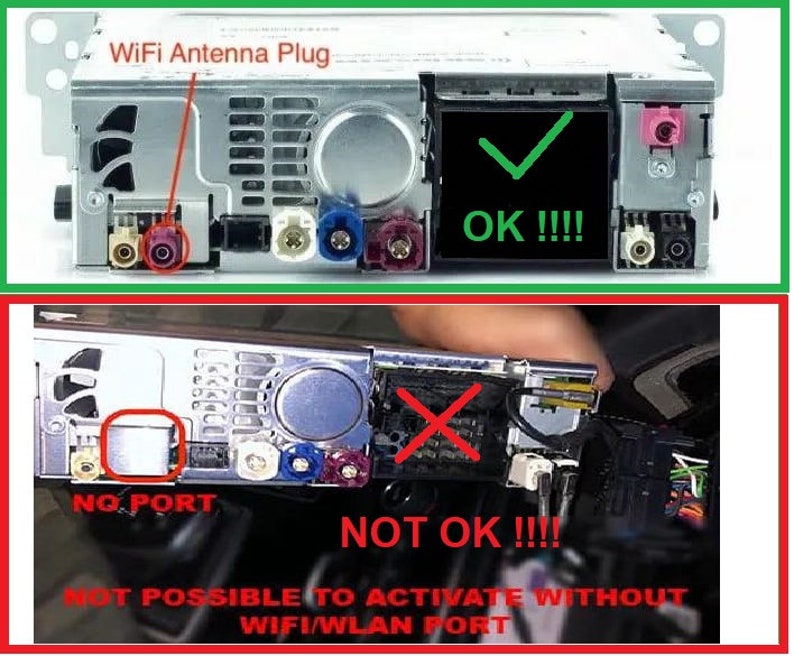


Description
!Please contact me BEFORE BUYING! Send us the VIN number of the car and a photo version of your EntryNav2!
!Your car must have a WI-FI antenna output!
! According to the VIN number, we will check whether your car has a WI-FI antenna output !
!Please ensure your multimedia system is compatible with CarPlay by checking the table below!
COMPABILITY
Check the EntryNav2 version: go to "Navigation" > "Map" > "Options" Button > Navigation Settings > From below will be "Position and Version" > Select "Version information"
The following versions support only ENET activation:
Only Split Screen CarPlay
Version_F — ✔Only Split Screen CarPlay
Version_G — ✔Only Split Screen CarPlay
Version_H — ✔Only Split Screen CarPlay
Version_I — ✔Only Split Screen CarPlay
Version_J — ✔Only Split Screen CarPlay
Version_K — ✔Only Split Screen CarPlay
Version_L — ✔Only Split Screen CarPlay
Version_M — ✔Only Split Screen CarPlay
Version_N — ✔Only Split Screen CarPlay
Only Full Screen CarPlay
Version_O — ✔ Only Full Screen CarPlay
Version_P — ✔Only Full Screen CarPlay
Version_Q — ✔Only Full Screen CarPlay
Version_R — ✔Only Full Screen CarPlay
Version_S — ✔Only Full Screen CarPlay
Version_T — ✔Only Full Screen CarPlay
Version_U — ✔Only Full Screen CarPlay
How to Activate CarPlay Using a USB Stick?
this version of EntryNav2 does not support USB activation
How to Activate CarPlay Using an ENET Cable?
If your vehicle is compatible with activation through an ENET cable, I will provide you with detailed instructions following your payment.