Original Samsung Galaxy Z Flip8 Flipsuit Case w Eye-catching LED Card EF-FF776
Features
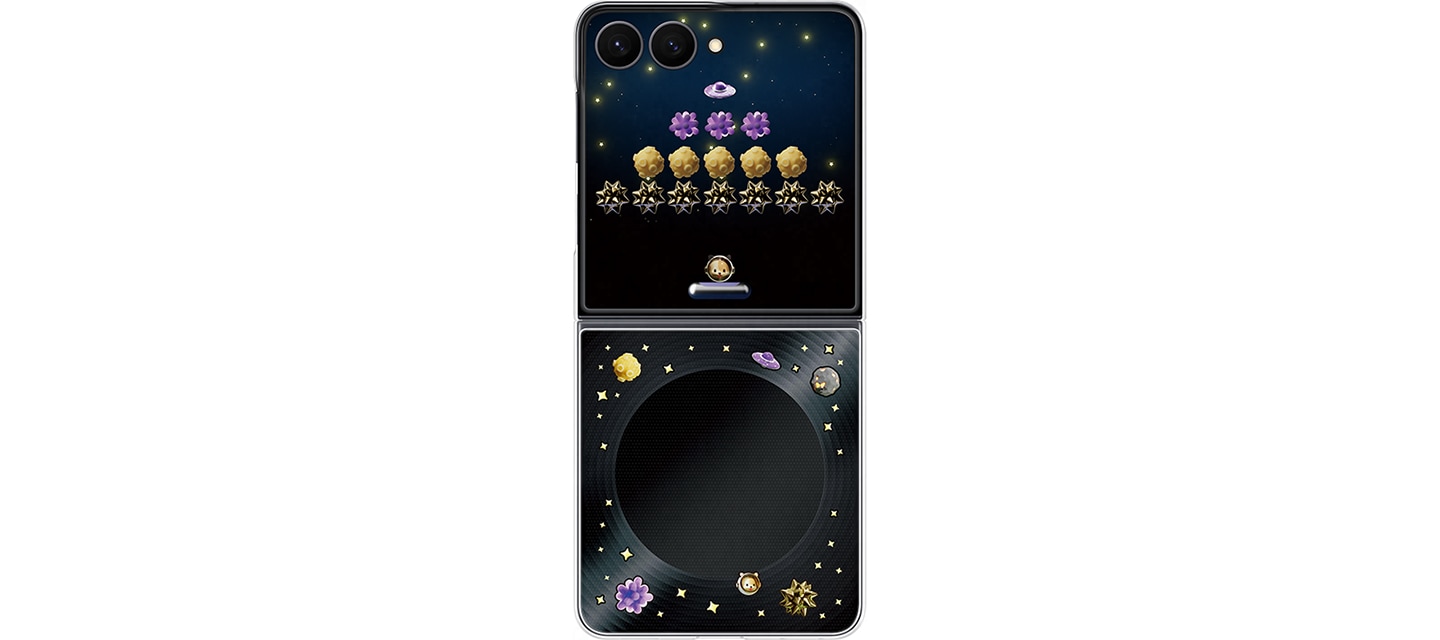
* Enjoy quick gaming moments and eye-catching LED effects
Double tap your cover screen to activate the FlexWindow and tap anywhere to play Brick Breaker game—no need to open your phone.
Tilt your phone side to side to move the paddle and bounce it back, right on your FlexWindow.
Plop the interactive LED Flipsuit Card into the case, then snap it onto your phone and enjoy LED lighting effects with matching visuals.
You can also display your favorite gallery photo on your FlexWindow using a Flipsuit photo frame.
(All accessories are sold separately.
In-box items include one Flipsuit Case and one LED Card. LED function activates when the device is unfolded. It also activates when the FlexWindow is double-tapped or when the power key is pressed while the device is folded. It's activated in call or when the alarm goes off.
LED effect uses your phone's battery. It may not work in Power Saving mode, No Distractions mode, or on certain brand collaboration products.
The Flipsuit Case and Flipsuit Card shown are only compatible with the Galaxy Z Flip8.
Each Flipsuit Card includes one basic content and one photo frame.
A photo frame can be applied on Settings.
A network connection is required to download content before using.
To activate Galaxy Z Flip8 Flipsuit content, please set up a lock screen on your Galaxy Z Flip8.
The time displayed on the FlexWindow in the video reflects the user's time settings.
The screen will return to basic settings once the Flipsuit Card is removed, or when the user changes the settings.
Game will reset if you change the cover screen wallpaper, clock settings, or if the Galaxy Z Flip8 Flipsuit case is detached and reattached.
Actual color, design options, and content displayed for the brand collaboration Flipsuit Case may differ.)
Specifications
* Compatibility: Galaxy Z Flip8
* Package Contents: Flipsuit Case, 1 Flipsuit Card
* Dimension: 77.1 x 168.5 x 9.1 mm
* Weight: 21 g
** Depending on your monitor, the colors may appear different from actual colors.
** Please note that we cannot exchange or refund in case of the color dissatisfaction.
* We ship your order within 1~2 business days via KOREA POST & eGS airmail.
* Weekend and holiday orders will be processed on the next business day.
* We ship the item to your eBay-registered address. Please check your address before placing an order.
* All of our parcels are shipped with tracking number.
* It usually takes about 3~4 weeks after shipment. During the peak season, delivery can take more up to 5~6 weeks.
It can take more time in some regions. (7~8 weeks, Africa, South America, Russia, Ukraine, Moldova, etc.)
* Shipping delays may occur due to Post Office or Customs problems.
* We can send the item by express mail by Korea Post EMS service) if you want. Please contact us first.
But in some countries, it can not be sent by Korea Post EMS service, so the additional cost can be charged.
* Customs duties, and any other charges are not included in the item price or shipping cost. (Excluding the United States)
* These charges are the buyer's responsibility.
* Please check if there will be additional costs with your country's customs office before bidding or buying.
If you have any question, feel free to let us know. We respond within 24 hours.