Product Features:
Support System:
Compatible with gamecube System,Wii Console
Compatible with Nintendo Switch ,Switch 2,Steam deck (spurrt 1 Player)
Compatible with PC Mac , RetroPie, Raspberry Pi -Emulation: Dolphin emulator
Compatible with Nintendo Switch ,Switch 2,Steam deck (spurrt 1 Player)
Compatible with PC Mac , RetroPie, Raspberry Pi -Emulation: Dolphin emulator
2.4G wireless Gamecube controller is compatible with Switch, Gamecube, Wii, and PC. With its classic GameCube-style design, it offers the perfect fusion of retro charm and modern functionality, delivering the ultimate gaming experience for gamers.
Ley players have fun with Super Smash Bros and other switch games (Mario Kart 8 Deluxe, Splatoon, Super Mario Odyssey, The Legend of Zelda,Breath of the Wild...etc). It features full button layout with any modern Switch Pro controller and support to play on Switch, Lite, PC, Steam.
Anti-snapback analog sticks and fast-action L/R & ZL/ZR Buttons
Using 2.4G wireless connection, Play from up to 33 feet (10M)away without lag or disconnection.
Dual Vibration: built-in independent dual vibration motor, providing a clearer impact feedback experience.bring every in-game action to life, enhancing your connection to beloved characters and stories
Long battery experience: wireless switch controller built-in 500mAh rechargeable battery can last for 10 hours when fully charged, make sure you have enough time to immerse yourself in the joy of the game
【 Christmas Gift For Kids and Holiday Accompany 】Helps to establish a more intimate parent-child relationships.Take it to play with the children and enjoy relaxing and happy family time. Accessible to people of all ages and all abilities. Your family, your friends, let them enjoy totally relax at your free time to get rid of working fatigue, school unhappiness, daily trivia
【 Durability Support 】We've worked hard to improve product quality and customer service, so if you have any questions about our Fiotok Brand Related Product, please let us know, we will reply to you within 24 hours and provide support for you
Package Includes(Yellow/Red/Black/purple)
1 x 2.4G Wireless Game Controller
1 x NGC adapter.
1 x usb receiver
1 x charging cable
1 x manual
Notice: switch button must be on when in charged
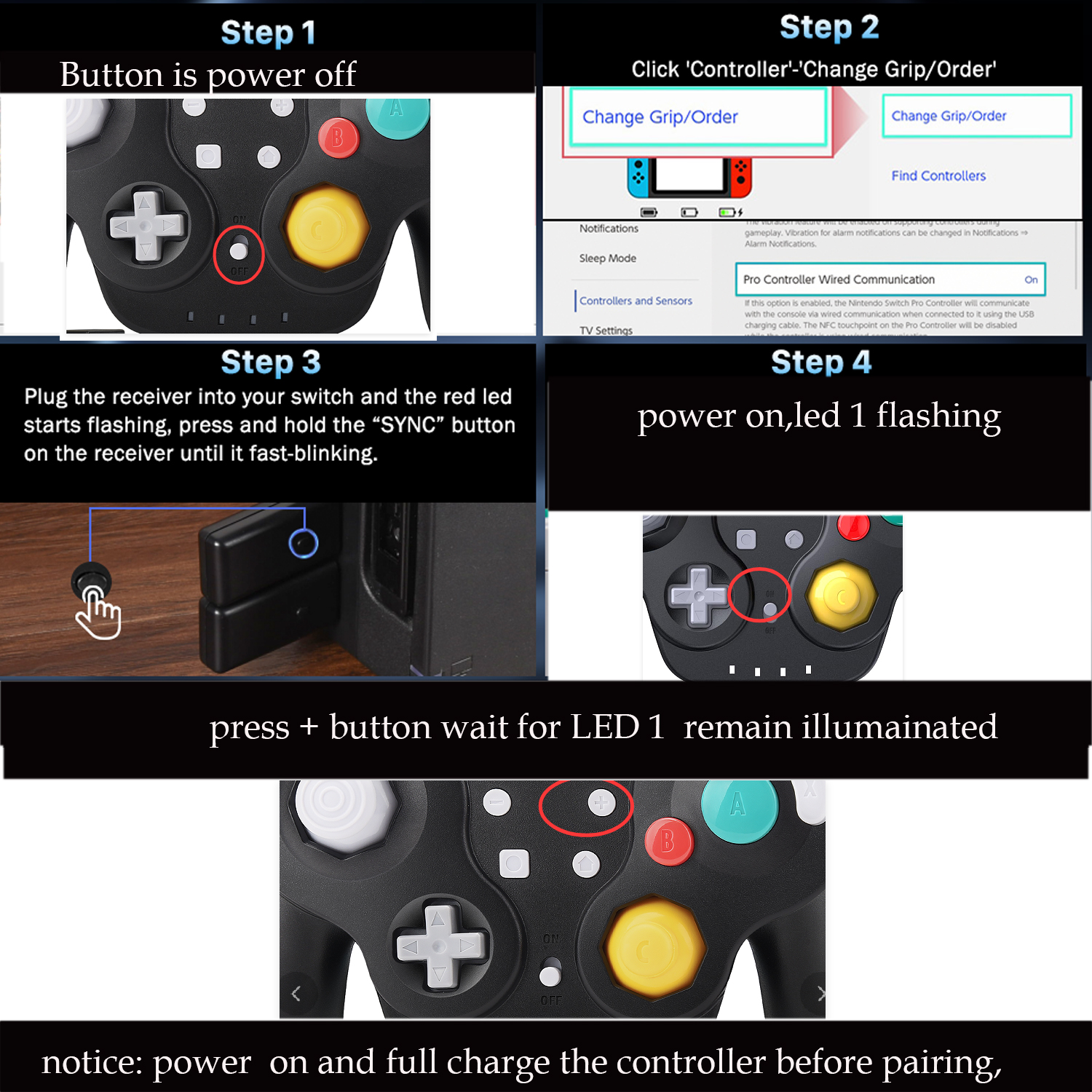
HOW TO CONNECT to Switch:
First Connection:
1.Click the menu “System settings “by Switch Joypad , find the icon”Controllers and Sensors” and click the button“ Pro Controller Wired Communication" must be ON status.
2.power off controller
3.Press and Hold the [ sync ] key 4 seconds on the [ receiver ] and led indicators blinks fast.
4.power on controller,LED 1 on controller begain flashing
5,Press [ + ] button After the connection is successful,the LED lights indicate the corresponding game player.


On Dec 26, 2024 at 05:12:52 PST, seller added the following information:
On Jun 14, 2025 at 21:25:18 PDT, seller added the following information:
On Aug 6, 2025 at 21:19:06 PDT, seller added the following information:
On Oct 29, 2025 at 22:59:38 PDT, seller added the following information:
On Apr 16, 2026 at 00:04:08 PDT, seller added the following information:
On Apr 16, 2026 at 02:08:47 PDT, seller added the following information:
On Jun 5, 2026 at 18:26:56 PDT, seller added the following information:
On Jun 5, 2026 at 19:08:54 PDT, seller added the following information:
On Aug 22, 2026 at 00:27:24 PDT, seller added the following information:
On Sep 3, 2026 at 01:25:29 PDT, seller added the following information:
On Oct 2, 2026 at 06:35:22 PDT, seller added the following information:
On Oct 13, 2026 at 20:04:11 PDT, seller added the following information:
On Oct 18, 2026 at 01:01:16 PDT, seller added the following information: