VPFET KVM Switch DisplayPort Dual Monitor 2 Port Displayport 1.4 Switch for 2 Computers 2 Monitors Share Keyboard Mouse Printer Support 4K120HZ 8K60HZ with 4 Port USB 3.0 Support Desktop Control
*BRAND NEW BOXED*
| Operation mode | ON-OFF |
| Current rating | 1 Amps |
| Operating voltage | 5 Volts |
| Connector type | Plug In |
| Brand | VPFET |
| Switch type | KVM Switch, Push Button Switch |
| Material | Metal |
| Item dimensions L x W x H | 20.2 x 14.5 x 5.4 centimetres |
| Mounting type | Tabletop |
| Actuator type | Push Button |
About this item
- 【KVM Switch 2 monitors 2 computers】 The 2 port dual channel DP KVM switch can be connected to 2 computer hosts, sharing 1 set of keyboard, mouse and 2 monitors. Supports copy and expansion modes for computer hosts (computer host graphics card needs to have 2 DP outputs), Mode 1: Copy mode (computer host outputs 2 identical screens on 2 displays). Mode 2: Extended mode (PC host outputs 2 different screens on 2 displays)
- 【Push-button switching and external cable control】 The KVM Switch displayport dual monitor supports front panel push-button and external cable control switching, allowing you to switch between two sources at the touch of a button. The cable control can also be hidden to make the desk surface neater and faster.
- 【Dual monitor KVM Switch displayport Support up to 4K120Hz】 The KVM Switch 2 computers 2 monitors supports resolutions up to 7680*4320@60Hz, backwards compatible with lower resolutions (e.g. 4K@60Hz, 1080p, etc.) Compliant with DP 1.4 standard. Giving you clearer text and more detailed images.
- 【4-port USB 3.0 and wide compatibility】This KVM displayport 1.4 Switch has has four USB 3.0 ports and supports video bandwidth up to 48Gbps, data transfer rates up to 5Gbps and is backwards compatible with USB 2.0 and USB 1.1 devices. It supports various operating systems such as Windows/Vista/XP and Mac OS, Linux and Unix, and is plug and play.
- 【Displayport Switch 2 in 2 out Note】 You can use this KVM to enable two computers to share two monitors, extended mode or duplicate mode (depending on your computer's graphics card) only if your computer supports dual or multiple monitors. If your computer only supports a single monitor, then this dual monitor KVM switch will not help you get dual monitor functionality.
Product Description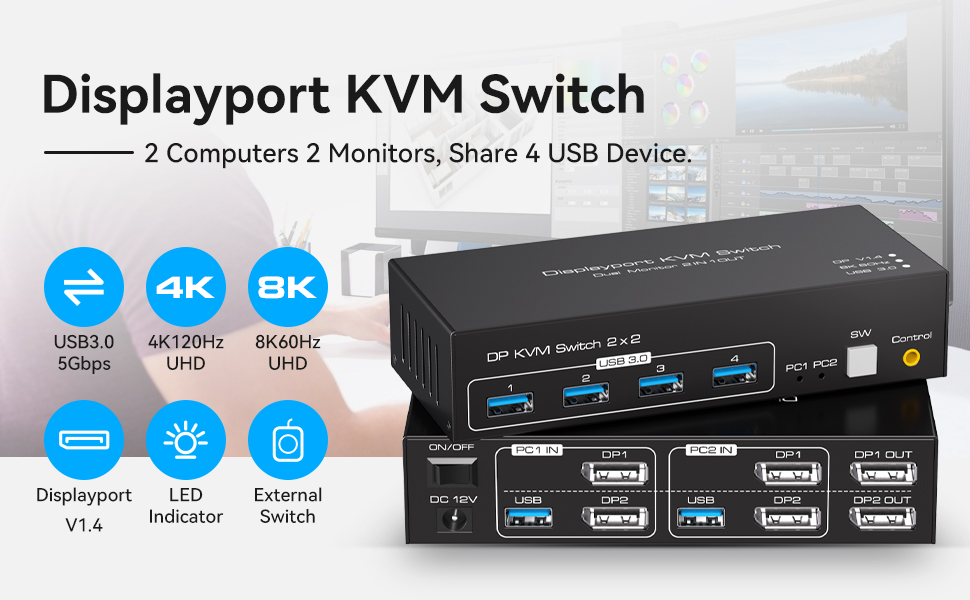 VPFET Dual Monitor Displayport KVM Switch 2 computers share 2 monitor and 4 USB 3.0 device
 Supports resolutions up to 7680*4320@60Hz, backwards compatible with lower resolutions (e.g. 4K@60Hz, 1080p, etc.) KVM Switch Displayport 2 monitors 2 computers supports 2 modes
 Data transfer rates up to 5Gbps and backward compatibility with USB 2.0 and USB 1.1 devices
 |


