|
Brand New ! Wifi Car Backup Camera Realtime Video Transmitter for iPhone iPad SAMSUNG Android 903S |
|
Item's Detail: Support Android 4.3 or higher system version, Apple iOS supports 10.3 or higher system version Wifi wireless video signal transimiter ransmitting frequency:2400MHz-2483.5MH Modem mode:802.11b: DSSS(CCK,DQPSK,DBPSK) 802.11g/n: OFDM(BPSK,QPSK,16QAM,64QAM) Transmission distance with no obstacle:>150m Frame rate:30fps Video resulutions:VGA Video compression:H.264 Wireless protocols:IEEE 802.11b, IEEE 802.11g IEEE 802.n(1T1RModes) Power supply:DC 12V Consumption current:150mA (Max) Encryption mode:WPA2 Rainproof:Yes Weight:80+-5g Dimensions:78*43*18mm Operation tempreature:-10℃~+50℃ Operation humidity:15%~85% RH Android Install APP software 1. GOOGLE PLAY store can be downloaded 2. Search "WIFIAV-HD" and download and install it, or scan the QR code on manual to download and install. 3. Using the APP software, follow the steps below  Connect to WIFI: 1. Open the WIFI of the smart terminal and search for the AP hotspot. The SSID of the device is “WIFIAV-HD” and enter the password (default password: 12345678) 2. Click the smart terminal icon to run the app. Open the APP, if the WIFI connection is normal, the undefined icon will be brighter and the APP can see the picture. 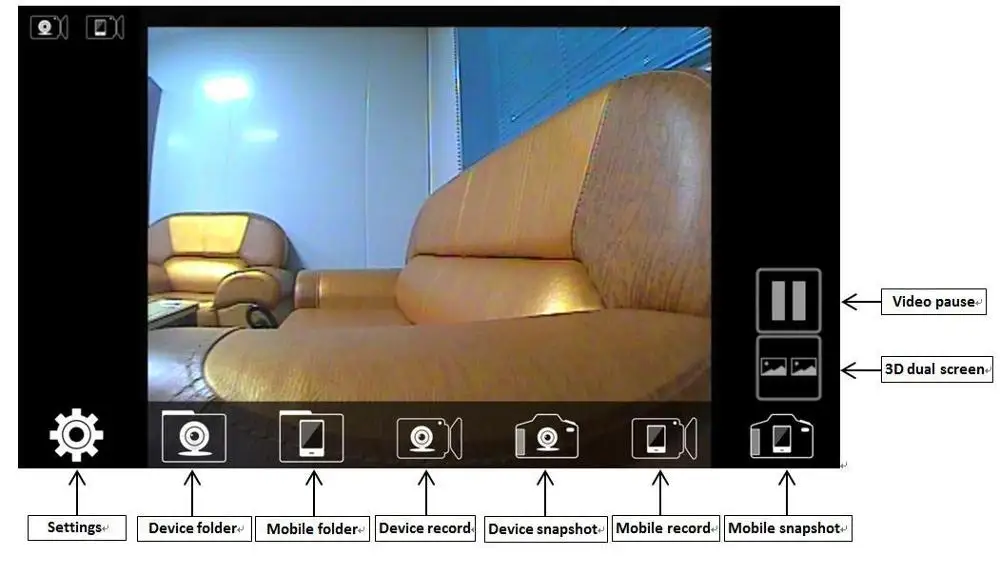 Note: 1. If the background is black or the screen is paused, please exit the APP and check if the WIFI connection is normal. If the connection is normal, please re-enter. 2. If the image is delay , please clean up the memory of mobile phone Settings: Go to the settings menu. You can set the SSID and password (The user can press the RESET button to restore the default settings.) IOS Install APP software 1. Open the smart terminal and enter APP store 2. Search for “WIFIAV-HD” and download and install it, or scan the QR code on the manual to download and install. 3. Using the APP software, follow these steps: Connect to WIFI: 1. Open the WIFI of the smart terminal and search for the AP hotspot. The SSID of the device is “WIFIAV-HD” and enter the password (default password: 12345678). 2. Open the "WIFIAV-HD" APP Open the APP, if the WIFI connection is normal, the undefined icon will be brighter and the APP can see the picture. Note: If the background is black or the screen is paused, please exit the APP and check if the WIFI connection is normal. If the connection is normal, please re-enter. Settings: Go to the settings menu. You can set the SSID and password (The user can press the RESET button to restore the default settings.) Special Note: If the Samsung mobile phone (including S7, S8, etc.), please follow the following steps, press the "RESET" button 4 times, wait for the restart, switch to the Samsung mode (SSID: WIFIAV-SAMSUNG), then please refer to the previous Android system for all operations, long Press the “RESET” button for 10 seconds to reset to the default mode (SSID: WIFIAV) for all non-Samsung phones. Package includes: |