| Product Description: Listing Update #1...This is not so much an update as it is a brief comment about the computers and related parts I have available for sale. Personal computers (and in particular desktop computers) have always been a hobby of mine. I've enjoyed tinkering with this stuff over the years and have accumulated a number of items during this time...some new and some used. I am not an expert on the subject...more of an enthusiast...but I will still do my best to answer any questions as it relates to my computer related listings. Thank you. Listing Update #2...I want to draw your attention to the last two pictures included above. You will see that I have pulled the motherboard out of the retail packaging and taken two (2) close-up pictures of the LGA 1200 socket (one with the factory cover secured over the pins and another with the factory cover flipped up to show the pins). I will now do this for every factory new Intel motherboard I sell on eBay. I understand the last picture that shows all the socket pins is somewhat distorted from the camera lens, but you can still see there are no "squashed" or "rogue" pins that stand out from the others. In other words, I can confirm there are no bent pins in the socket on this factory new motherboard. I've been fortunate in that I've built many Intel computers over the years and never had a new motherboard come to me with bent socket pins. Unfortunately, since I've started selling factory new Intel motherboards on eBay, I've had some customers return them with bent pins. I've trusted the customers and accepted the returns for a full refund (or exchange), because that is the right thing to do. Although, since my eBay customer experience has been worse than mine when it comes defective sockets from bent processor pins, I'm taking the extra step to inspect each LGA 1200 socket on my factory new motherboards. So please understand, I've confirmed this next motherboard for sale has no bent socket pins and I cannot take it back on a return if you accidentally bend some pins. I guess what I am trying to say is please be careful, as I am not skilled enough to straighten pins and the motherboard manufacturers charge too much to repair a motherboard with bent pins.
Original Listing...
This offering is for a new GIGABYTE Z490 AORUS MASTER motherboard with a LGA 1200 socket for 10th/11th generation Intel processors. It's spec'd to the ATX form factor, includes an excellent feature set and the power delivery capabilities are beyond impressive (as would be expected on a top-end model). My research indicates this motherboard has a massive 14 (Vcore) + 1 (Vsoc) phase VRM (Voltage Regulator Module) with a single power stage per phase that include excellent quality MOSFETs, inductors and capacitors. Then there are the large heatsinks seated over both VRMs, and it is important to note that these heatsinks are not simply chunks of metal with some fins cut into them. To the contrary, these are true heatsinks with numerous vertical fins connected by a copper heat pipe. Additionally, the VRM heatsinks are also anchored with screws and not push-pins. This is important because it allows for better contact between the heatsinks, thermal pads and the VRM components they are cooling. In summary, the VRM is truly overkill, as are the heatsinks. Not to be outdone, there are also oversized heat shields that cover all three M.2 slots and the chipset. Finally, if you flip the motherboard over, you will see another large metal plate that further aids in the dissipation of heat. I know I am going a little overboard with my comments, but its just remarkable how much GIGABYTE has put into the power delivery and cooling of this motherboard. As a result (and not surprisingly), this motherboard can handle any of the Intel 10th/11th generation processors, even the top-end Intel Core i9-10900K or i9-11900K. The VRM should also be capable of handling very competitive overclocking scenarios.
From a marketing standpoint, the AORUS name is GIGABYTE's premium brand. So the AORUS MASTER model represents a top-end offering from their high-end Z490 motherboard line-up. Aesthetically, this branding is on full display with a profile view of the "Bird of Prey" on the chipset shield and AORUS labeling on the Vcore VRM. This is complimented by some built-in addressable LEDs around the same chipset shield and Vcore VRM. As alluded to above, the three M.2 slots are also dressed up with massive black/gray heat shields that match the overall theme of the motherboard. Finally, there is the built-in i/o shield with its similar aesthetics that completes the branding and compliments the premium build quality.
Functionally, I am a huge fan of the "Q-Flash" feature located on the rear i/o shield. In short, this feature allows for a BIOS update to the motherboard with just a 24-pin and 8-pin power supply connection and a USB drive with the desired BIOS version to be installed. That's it, no other components are needed to update the BIOS on this motherboard. Then there is the enhanced Debug Port that offers so much more troubleshooting detail (with numerous alpha/numeric codes) relative to the traditional four (4) LEDs that only offer basic debugging information. I should also mention the advanced network connectivity (2.5 GB LAN, WiFi 6 and Bluetooth 5.0) and the four fast USB Type-A port (3.2 Gen 2 running at 10 Gb/s), as well as the convenience of a clear CMOS button on the rear i/o shield. Finally, there is the upgrade to PCIe 4.0 as it relates to the first/top expansion slot running at x16 lanes and the first/top M.2 socket running at x4 lanes (assuming an Intel 11th generation processor...10th generation processors only support PCIe 3.0). Please refer to the discussion that follows related to the PCIe 4.0 upgrade. PCIe 4.0 Upgrade Discussion
On December 31, 2020, GIGABYTE issued a press release titled "Premium PCIe 4.0 Design! GIGABYTE Z490 Motherboards will Perfectly Support 11th Generation Intel Core Processors". In this release, there is further clarification as to what this means, "...all Z490 motherboards featuring PCIe 4.0 hardware design can support the 11th Generation Intel Core processors perfectly by update to the latest F20 BIOS, and provide the extreme bandwidth and performance for PCIe 4.0 graphics cards and SSDs." So this information from GIGABYTE indicates PCIe 4.0 support, but let me share some additional thoughts as it relates to this particular motherboard. Let's first consider the M.2 slots. There are three of them and the top one will run at either PCIe 4.0 (with an 11th generation processor) or PCIe 3.0 (with a 10th generation processor). The bottom two M.2 slots will run at either PCIe 3.0 or SATA 3.0, regardless of the processor because they are connected to the chipset. The second consideration is the top PCIe expansion slot running at x16 lanes. This slot will run at the PCIe 3.0 with a 10th generation processor and upgrade to PCIe 4.0 (while still retaining backwards compatibility to PCIe 3.0) with an 11th generation processor. Having said the above, I thought it might also be helpful if I shared a specifications sheet of sorts that provides more details.... Chipset / Socket Type: Z490 chipset that supports the LGA 1200 socket for 10th/11th generation Intel processors. Size: ATX form factor that measures 12" x 9.6" Memory: 128 GB (max) of DDR4 memory (4 x 288 pin slots)...dual channel supported and max clock speed of 5000 MHz. Note: the max clock speed is coming from the GIGABYTE website and seems a bit optimistic to me). Audio: Integrated Realtek ALC1220-VB Codec that supports up to 7.1 (8 channel) surround sound w/8 speakers (integrated means the sound card is built onto the motherboard) LAN: Integrated Intel 2.5GbE controller (chipset) w/transfer rate up to 2500 Mbps or 2.5 Gbps Wireless LAN (aka WiFi) and Bluetooth: Intel dual band wireless 6th generation chipset that is compatible with IEEE 802.11 a/b/g/n/ac/ax wireless standards running at either 2.4 GHz or 5.0 GHz. The chipset also includes built-in Bluetooth wireless technologies (version 5.0). Input/Output ports (rear shield): one video (HDMI), four black USB Type-A (2.0 running at 480 Mb/s), two blue USB Type-A (3.2 Gen 1 running at 5 Gb/s), three red USB Type-A (3.2 Gen 2 running at 10 Gb/s), one USB Type-C (3.2 Gen 2 running at 10 Gb/s), a RJ-45 Network (LAN) with LED indicator, first gold audio output (center/sub woofer speaker), second gold audio output (rear speakers), S/PDIF (Sony/Philips Digital Interface Format) audio output, third gold audio input (various devices), fourth gold audio output (headphone, two-channel speakers or front speakers), fifth gold audio input (microphone) Storage ports/sockets: six SATA 3.0 ports, one M.2 socket that will accommodate sizes 2242/2260/2280/22110 (PCIe 4.0/3.0 support up to x4 lanes for SSD...see PCIe 4.0 Upgrade Discussion above) and two M.2 sockets that will accommodate sizes 2242/2260/2280/22110 (SATA 3.0 or PCIe 3.0 support up to x4 lanes for SSD). Note1: PCIe 4.0 requires an 11th generation processor. Note2: data transfer rates are as follows...SATA 3.0 is stated at 6 Gb/s (750 MB/s, but it's actually less due to the overhead caused by the 8b/10b SATA encoding scheme. This lowers the actual transfer rate to about 80%, or 4.8 Gb/s, which when divided by 8 bits gives us 600 MB/s.), PCIe 3.0 is 8 Gb/s (1 GB/s) per lane and PCIe 4.0 is 16 Gb/s (2 GB/s) per lane. So as it relates to PCIe supported sockets, just multiply the number of lanes available by the applicable PCIe transfer rate and this will give you the theoretical maximum bandwidth for that socket (FYI: PCIe overhead is about 3%, due to a more efficient encoding scheme. So PCIe transfer rates are closer to their theoretical maximums relative to SATA transfer rates.). Note3: We generally use bits-per-second to measure transfer speeds, but bytes-per-second to measure data, because it takes 8 bits (or 1 byte) to encode a single character of text. Expansion slots: one PCIe 4.0/3.0 x16 slot running at x16 lanes, one PCIe 3.0 x16 slot running at x8 lanes and one PCIe 3.0 x16 slot running at x4 lanes. Note1: PCIe 4.0 requires an 11th generation processor. Note2: data transfer rates are as follows...PCIe 3.0 is 8 Gb/s (1 GB/s) per lane and PCIe 4.0 is 16 Gb/s (2 GB/s) per lane. So just multiply the number of lanes available in a particular slot by the applicable PCIe transfer rate and this will give you the theoretical maximum bandwidth for that slot. Other: There are other available headers/connectors on the motherboard and I can try to answer related questions or refer you to the manufacturer's website for a full motherboard description. As I mentioned above, this is a factory new motherboard and it will come to you in it's original retail box/packaging. I opened the box to confirm all the accessories and literature/manuals were present (and they are). I also pulled the motherboard out of its anti-static packaging to further inspect the LGA 1200 socket, as discussed in Listing Update #2 above. So this is truly a factory new motherboard that has been removed from it's anti-static packaging on just the one occasion (for the aforementioned inspection purposes). Finally, I want to emphasize the importance of the discussion in Listing Update #2. Please be so very careful when handling one of these factory new Intel motherboards. I've taken the time to inspect the LGA 1200 socket on this motherboard and can confirm there are no bent socket pins. So I won't be able to take it back on a return if a customer accidentally bends some of the socket pins.
Supplemental Discussion Regarding Intel 10th Generation Improvements...
Intel has been designing processors with 14nm micro-architecture since their 6th generation Skylake release in 2015. At that time, the top of the Intel Core product stack was an i7-6700K, with 4 cores / 8 threads and a "boost" clock of 4.2 GHz. Fast forward to the end of 2018 and Intel released their first 9th generation Coffee Lake processors on a similar 14nm node. This was significant and slightly concerning because the top of the Intel Core product stack had changed dramatically, even if the manufacturing process had not. Of course, I am referring to Intel's first Core i9 processor. At the end of 2018, Intel shipped their first of many i9-9900K processors with 8 cores / 16 threads and a "boost" clock of 5.0 GHz. So the question became, how could Intel double the size of the processor and increase the clocks speed, while still effectively using the same die size and manufacturing process. Even though there were design and manufacturing improvements on the margins, the truth was the processors just ran hotter (and especially the i9-9900K). This brings us to the 10th and 11th generation Intel processors (code named Ice Lake and Tiger Lake, respectively) that are compatible with this motherboard. When I learned that Intel was going to remain on the 14nm die size, while expanding the core/thread count on their top end 10th generation processor, I immediately thought there was "no way to effectively cool that beast". I was wrong, as the top-of-the-product-stack Core i9-10900K, with its 10 cores / 20 threads and a "boost" clock of 5.3 GHz, actually runs cooler than the venerable Core i9-9900K. I don't pretend to understand all the technological advancements, but I was interested enough to provide an image (below) that highlights the design and manufacturing improvements. Note: The image highlights Intel 9th generation technology on the left and 10th generation improvements on the right.
According to Intel, their 10th generation processors incorporate a redesigned substrate with better supporting materials that allow for a thinner die (i.e., the small piece of a silicon wafer on which a microprocessor is fabricated). Then there is the more advanced and thinner STIM (solder thermal interface material) that improves thermal dissipation. Intel also made a thicker IHS (integrated heat spreader), which is the metal "lid" that seats over and protects the delicate processor. The IHS was also made with better heat dissipating materials to compensate for its added thickness. The critical technological improvements were Intel's ability to design and make certain components thinner (i.e., the die and STIM). These advancements improved heat dissipation to the heat spreader, which was then able to more effectively transfer the heat to the external cooler seated over it. The thicker heat spreader was a necessary compromise, because Intel wanted to maintain the same overall processor height (to allow for better compatibility with existing coolers). 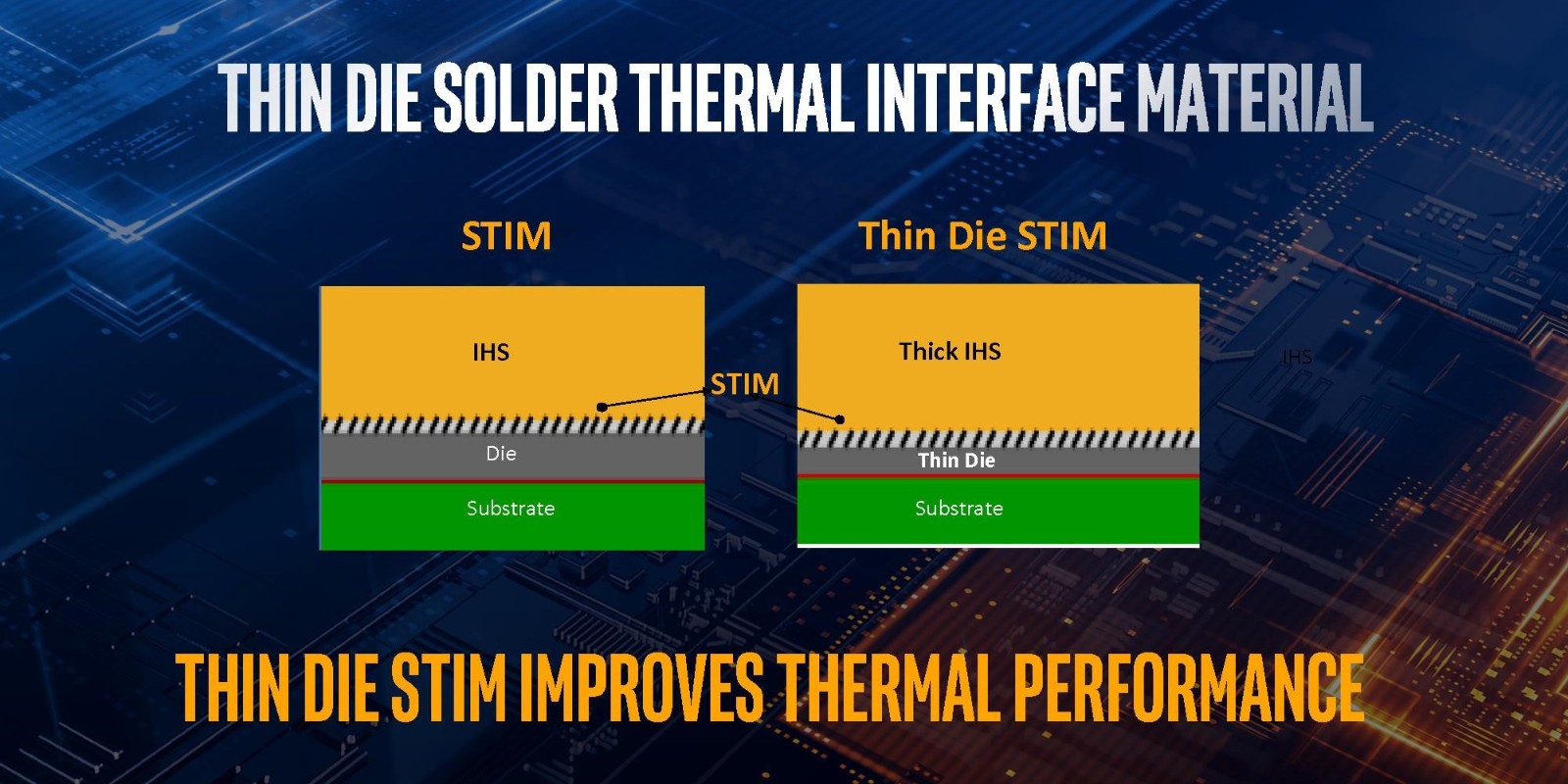
You may visit our store by clicking on this "Store Home Page" link. Note to international customers regarding shipping...
We apologize to those that feel some of our international shipping charges are too high. We only charge actual shipping rates, but once an order exceeds a certain amount, we hesitate to use the least expensive US Postal Services First Class International service. We feel this way, because this service is not trackable or insurable...so more risk of loss. We prefer the US Postal Services Priority Mail International service for more expensive orders, because this service is trackable at USPS.com and insurable...so less risk of loss. Unfortunately, this service is more expensive, especially for smaller/lighter packages, relative to the First Class International service. We are sorry about these higher shipping costs, but hopefully our notes help to explain why this is the case. Note to international customers regarding customs...
We also apologize to those that feel their country import taxes, duties and brokerage fees are excessive. As a small US business, we are required by customs' laws to declare each order as a retail sale. Additionally, the declared order value must be equal to total store purchases and/or winning auction bids (less any shipping costs, as these are not considered in the declared value). As a result, each customer will be responsible for paying his/her own country taxes, duties and brokerage fees, which will be collected upon delivery. Again, we apologize for these additional costs, but we cannot afford the penalties and fines that come with breaking customs' laws...so we have to strictly abide by them. |