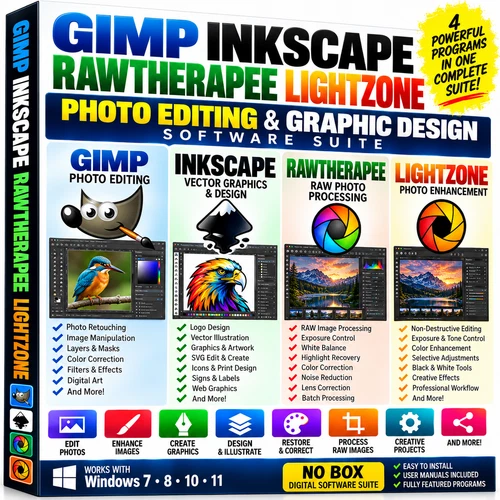
GIMP Inkscape RawTherapee LightZone
Photo Editing
Graphic Design
Software Suite
Photo Retouching • RAW Processing • Vector Graphics • Creative Design
Four complementary programs in one collection
Build a flexible photography and graphics workflow with GIMP, Inkscape, LightZone, and RawTherapee. Choose the application that suits each task: detailed photo retouching, scalable vector artwork, tonal enhancement, or RAW image development. These are four independent applications, giving you different tools for different creative projects.
GIMP — photo editing, retouching, and compositions
Edit photographs and create layered image compositions. Work with selections, layers, masks, text, color adjustments, and creative effects. Crop, rotate, and resize images; retouch portraits; restore scanned photographs; and remove or replace backgrounds. A useful choice for product photos, social-media images, digital artwork, and preparation for print or online use.
Inkscape — scalable vector graphics and design
Create logos, illustrations, signs, labels, diagrams, and text-based designs using vector artwork. SVG graphics can be scaled for different output sizes while retaining the sharpness of vector shapes and paths. Use Inkscape when your project calls for clean outlines, editable shapes, and artwork that needs to work at more than one size.
LightZone — photographic tone and color enhancement
Explore a photography-focused approach to exposure, contrast, color, and selective adjustments. Its non-destructive tools let you revisit editing decisions while developing the look of a photograph. Use it for everyday enhancement, black-and-white treatments, sharpening, and creative photographic effects.
RawTherapee — RAW development and batch processing
Develop supported RAW camera files with controls for exposure, white balance, color, highlights, shadows, sharpening, noise reduction, and lens correction. Batch processing can help apply a consistent approach to groups of photographs. Export a processed image for sharing, printing, or further editing in another application. Camera and lens support depend on the supplied software version.
A practical creative workflow
Develop: Start with a supported RAW photo in RawTherapee, or explore tonal enhancement in LightZone.
Retouch: Continue detailed pixel editing, layers, text, or compositing in GIMP.
Design: Create accompanying logos, SVG artwork, labels, or illustrations in Inkscape.
Finish: Export in a format supported by your chosen program and suitable for your project. File transfer between programs depends on their supported import and export formats; this is a collection of separate applications rather than one shared interface.
Projects you can create
Enhance family and travel photographs • Restore old pictures • Retouch portraits • Process RAW images • Prepare online listing photos • Create social-media artwork • Design logos and illustrations • Make signs and labels • Add text and effects • Resize and prepare images for print or online use.
Guides and installation materials included
The collection includes user manuals or guides, installation instructions, getting-started information, and organized software files for convenient access. Use these materials to choose the right program, install the supplied applications, and begin exploring their tools. Some techniques require practice; the collection offers a range of capabilities for learners and experienced users.
Windows compatibility — check the supplied versions
Prepared for compatible Windows PCs. The existing package description lists Windows 7, 8, 10, and 11; each application has its own requirements, and support depends on the particular version supplied. Check your Windows version, system architecture, available storage, and program requirements before installing.
Software version numbers and exact processor or RAM requirements are not specified here. Do not assume the newest release is included or that every version supports every Windows edition. RAW camera support and individual features also vary by application and release.
What is included
GIMP photo and image editor
Inkscape vector graphics editor
LightZone photo enhancement software
RawTherapee RAW image processor
User manuals / guides
Installation instructions and getting-started information
Physical software media only — no retail box.
SOFTWARE & LICENSING INFORMATION
Graceful Life is the creator of this software package and its UPC/MPN Code. The individual software applications remain subject to their respective licenses and terms.
The software included in this collection is obtained from publicly available, open-source, freeware, or otherwise authorized distribution sources as applicable.
The purchase price covers the service of locating, organizing, and preparing the software collection, testing and preparation, installation instructions, user manuals and supporting materials, physical media, packaging, handling, listing, and shipping.