This listing is for a pair of Truss Clamps only
No TV bracket included
Truss is the default choice to built large exhibition stands and performance stages. The Allcam TA4851-series LCD screen truss clamp mount adapters offer you a quick way to mount LCD TVs/ and commercial digital signage to the truss system, quick, easy and secure.

Truss mount lcd tv bracket
- Clamp mount large screen TVs/digital signage to truss-based exhibition stands and performance stages.
- Heavy duty alu-aloy truss clamps, supports up to 100 kg, tested and certified by TÜV
- Compatible with truss system with pole diameter 48 to 51 mm, also scaffold with the same pole diameters.
- Quick and easy to install and dismantle.
LCD TV display truss mount adapter bracket stage stand
How does the Allcam Truss Clamp Mount Work?
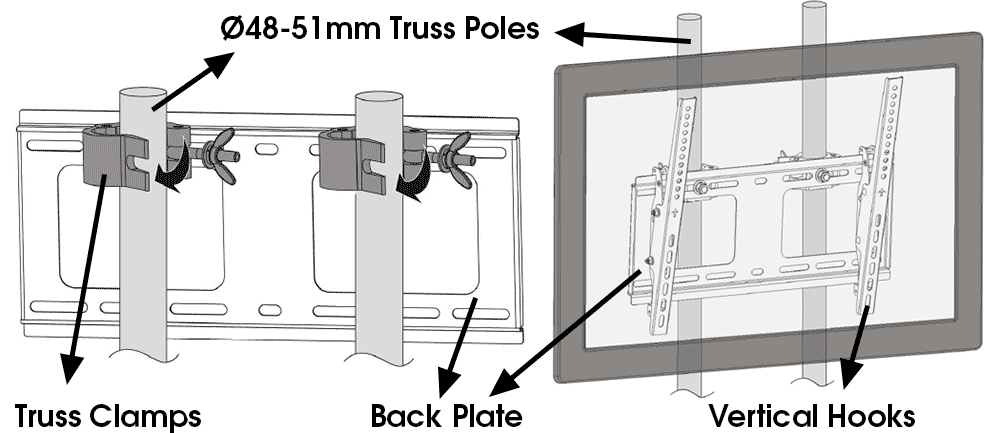
These can be used with a TV bracket (not included). To mount your TV/commercial display to a truss stage/stand is fairly straight forward:
- Attach the two truss clamps to the back plate (of the TV bracket);
- Clamp the combination to two adjacent vertical poles or one horizontal beam (of the truss system), and tighten the 2 clamps with bare hand;
- Attach the two vertical hooks to the TV/digital signage (so the TV can be hooked onto the back plate);
- Hook the LCD TV/commercial display to the back plate.
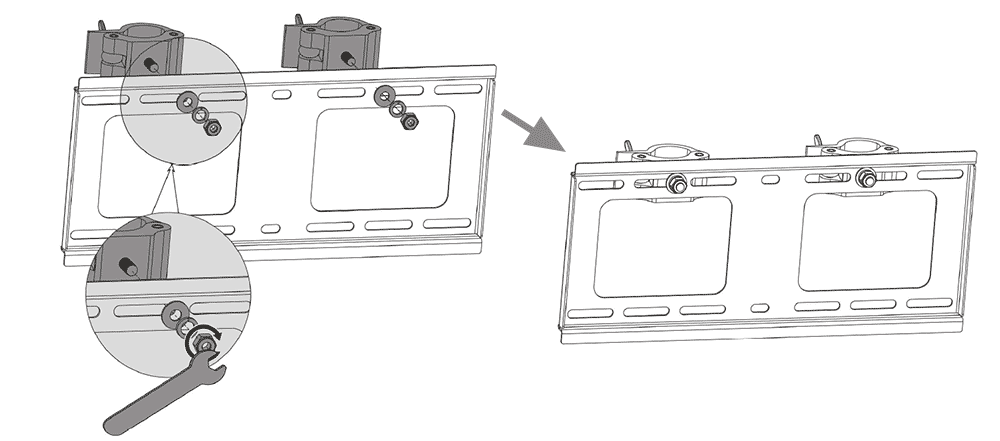
LCD TV display truss clamp mount installation 1