Product features:
1, mature and stable on-board ESP-12F WIFI module, large capacity 4M BYTE FLASH;
2, WIFI module I/O port and UART program download port are all drawn out, convenient for secondary development;
3, onboard AC-DC switching power module, power supply mode supports AC90-250V/DC7-30V/5v;
4, onboard WIFI module RST reset button
5. ESP-12F supports development tools such as ECLIPSE/ARDUINO IDE and provides reference programs under ARDUINO development environment;
6, 4 on-board 5V relay, output switching signal, suitable for control control voltage AC250V/Dc30V within the load;
7, onboard power indicator, 1 programmable LED and relay indicator.
Flashing
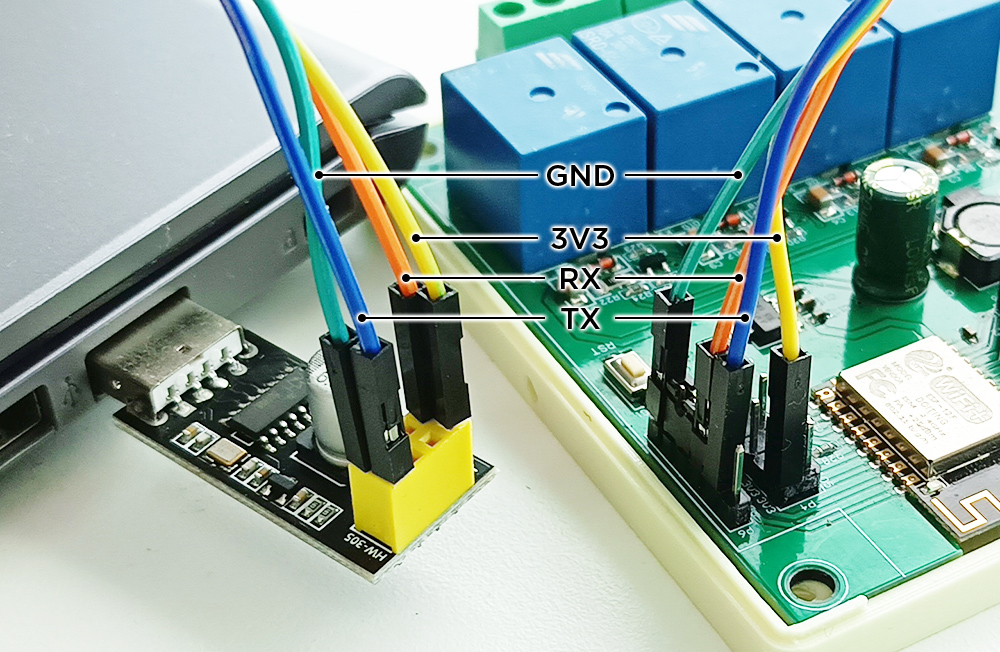
Similar to other comparable modules, the X4 does not include an on-board UART-USB converter. To flash this board, follow these steps:
- Connect the UART-USB converter to the module by connecting the following pins:
TX -> TX,RX -> RX,GND -> GND, and3V3 -> 3V3(or5V -> 5V). (Please note that each UART-USB converter may have a different pin layout, so please refer to your own converter’s specifications. For more details on connecting the UART-USB converter to the ESP8266, refer to our Serial line tutorial.) - Use the included jumper or any cable to connect the module’s
IO0(D3) andGNDpins. This will initiate the Flashing mode upon the next reset. - Connect the power supply to the module (or press the RST button).
- Insert the UART-USB converter into your computer.
- Proceed to flash the device following the standard procedure outlined in our Flasher turorial.
- Disconnect the UART-USB converter from the module.
- Disconnect the module’s
IO0D3GNDpins to ensure a standard boot. - Reboot the module by pressing the RST button.
- Now you can proceed with the First boot tutorial.