You may also like

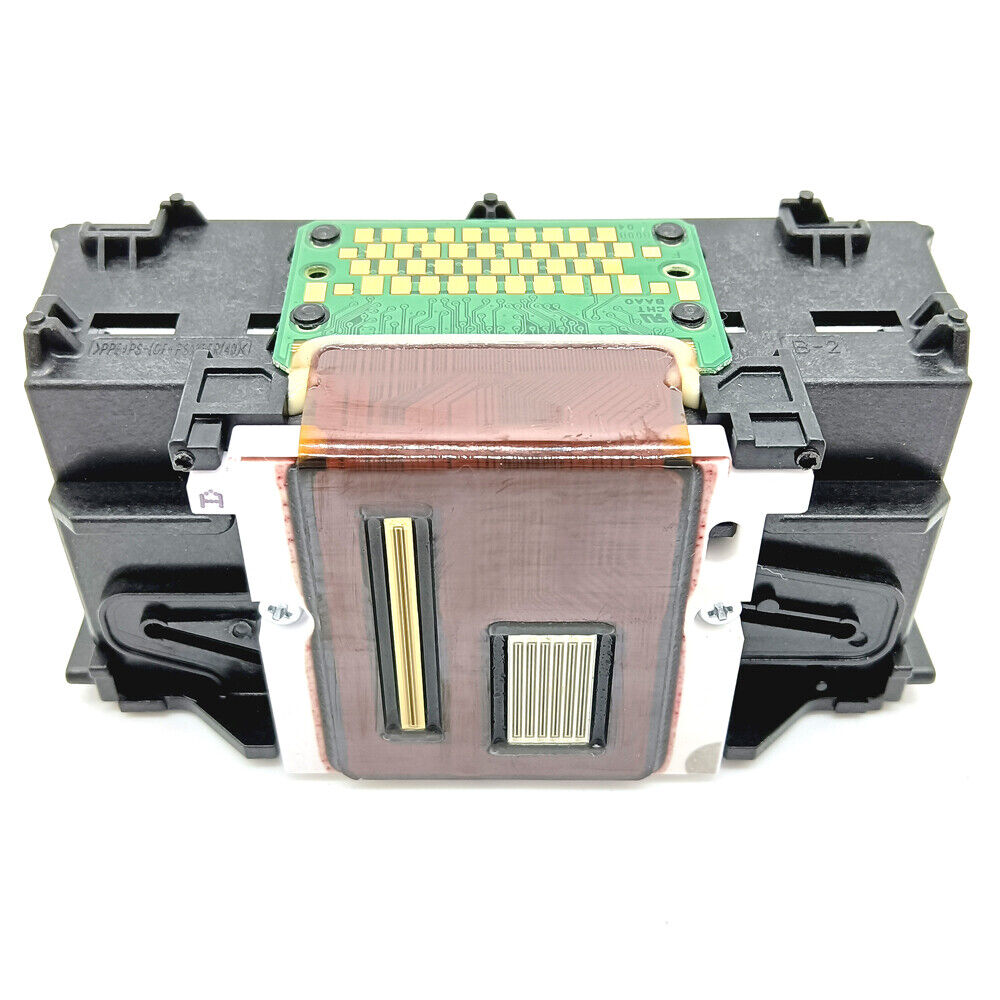
Printhead Printer Nozzle QY6-0089 Fits For Canon TS6350TS6170 TS6150 TS6140 TS6280
Printhead Printer Nozzle QY6-0089 Fits For Canon TS6350TS6100,TS6110,TS6120,TS6130,TS6140,TS6150,TS6151,TS6152,TS6160,TS6170,TS6180,TS6200,TS6210,TS6220,TS6230,TS6240,TS6250,TS6251,TS6260,TS6280,TS6290,
| SOLUTION FOR CANON ERROR | |||
| Error condition | Error code | Power light | Solution or Where the fault is |
| Automatic duplex printing cannot be performed | 1301 | Orange light flashes 10 times | Press the RFSUME button to cancel and exit this error, then Replace the ink-absorbing sponge |
| The ink cartridge hardware is malfunctioning. The ink cartridge cannot be recognized. | 1682 | Reinstall the ink cartridge. If the error is not cleared, the ink cartridge may be malfunctioning, so replace it. | |
| Unrecognized ink remaining | 1683 | Orange light flashes 13 times | Replace with new ink cartridges |
| Ink cartridges cannot be recognized | 1684 | Orange light flashes 14 times | Install a suitable ink cartridges |
| The remaining ink level cannot be determined. | 1686 | replace the ink cartridge | |
| The ink cartridge is not installed properly/The ink cartridge cannot be recognized. | 1687 | Reinstall the ink cartridge. | |
| Automatic print head calibration failed | 2500 | The orange light flashes 11 times | Press the FESUME button |
| No Paper (ASF) / No DVD / No Paper in Tray | 1000/1001/1002/1003 | Orange light flashes 2 times | After putting paper in ASF, then press the Resume button |
| Paper jam: the paper is jammed on the tray/ the paper is jammed at the bottom/ Error closing the front door | 1300/1303/1304/1250 | Orange light flashes 3 times | Remove the paper and press the Resume button |
| The print head is not installed / the print head is installed improperly / printing Head EEPROM data error | 1401/1403/1405 | Orange light flashes 5 times | After installing the print head correctly or reinstalling the head, then shut down, then open the printer .A 1403 code appears: Please do not install the printhead and check whether this error message still appears after powering on.". Please wipe the print head contacts with a cotton swab dipped in alcohol, and then install the print head to see if there are any improvements. |
| Ink cartridge chip error | 1410-1419 | Orange light flashes 15 times | Replace the good ink cartridges |
| The ink cartridge is not installed properly. The ink cartridge cannot be recognized. | 1485/1486/1487 | Reinstall the ink cartridge. If the error is not cleared, the ink cartridge may be malfunctioning, so replace it. | |
| No ink or no ink cartridges installed | 1600/1660 | Orange light flashes 4 times | Replace the ink cartridges or press the RESUME button |
| Ink cartridges is incorrectly placed | 1681/1680 | Orange light flashes 7 times | Replace the correct ink cartridges |
| No ink | 1688 | Orange light flashes 16 times | Replace the ink cartridges with ink |
| Waste ink is nearly full | 1700/1701 | Orange light flashes 8 times | Press the RESUME button to cancel and exit this error, then replace the ink-absorbing sponge |
| Front door error/CD/DVD printing timeout | 1841/1846/1856/1850/1851/1855/1830 | Orange light flashes 6 times | Close the front door |
| Digital camera or camcorder does not support direct printing | 20C1 | Orange light flashes 9 times | Unplug the connection cable, press the RESUML button, and then reconnect |
| Carriage Unit wrong | 5100 | Orange light/green light flashes 2 times alternately | replace Carriage Unit or the encoder or Carriage Unit motor or main board |
| The carriage unit raises the mechanical error | 5110 | Orange light/green light flashes 11 times alternately | Adjust the Carriage Unit guide rails, frame and paper feeding components, etc. |
| The print head temperature is too high error | 5200 | Orange/green light flashes 8 times alternately | Replace the print head or motherboard |
| High temperature inside the printer | 5400 | Orange light/green light flashes 6 times alternately | Replace the paper feeder or main board |
| ASF (cam) sensor error | 5700 | Orange light/green light flashes 5 times alternately | Check the Paper feeder assembly |
| Waste ink full errors | 5B00/5B10 | The orange light/green light flashes 7 times alternately | Replace the ink-absorbing sponge or motherboard |
| Cleaning unit (cam) sensor error | 5C00 | Orange/green light flashes 4 times alternately | Replace the cleaning unit or main board |
| Cleaning unit (cam) sensor error | 5C20 | Orange light/green light alternately 16 times flashing | check Cleaning unit drive system |
| the paper paper incorrectly | 6000 | Orange light/green light flashes 3 times alternately | Replace the encoder or pickup roller or main board or paper feed motor |
| Paper feed encoder error | 6010 | Orange light/green light flashes 17 times alternately | check Paper feed encoder or main board or paper feed motor |
| Other errors | 6500 | Orange light/green light flashes alternately 20 times alternately | Replace the motherboard |
| Ink cartridges home position detection error | 6502 | Orange light/green light flashes alternately 19 times alternately | Reinstall the ink cartridges or replace the motherboard |
| EEPROM error | 6800/6801 | The orange light/green light flashes 9 times alternately | Replace the motherboard |
| APP misalignment | 6A80 | Orange/green light flashes 12 times alternately | Replace the cleaning unit or the main board or paper feed assembly |
| APP sensor/feed cam sensor error | 6A90/6B10 | Orange light/green light flashes 14 times alternately | Replace the cleaning unit or the main board or paper feed assembly |
| Cleaning unit valve sensor error | 6C10 | Orange light/green light flashes alternately 23 times alternately | Replace the cleaning unit or main board |
| USB port error | 9000 | Orange light/green light flashes 15 times alternately | Replace the motherboard |
| VH monitoring error (print head voltage is abnormal) | B200 | Orange light/green light flashes 10 times alternately | Canon printers indicate "B200 error" indicating that there may be a problem with the print head or the motherboard. The way to determine the problem is: 1. Remove the printhead. 2. Start up and observe the error. 3. If the error B200 is still reported, it is the problem of the print head, if not, it is the problem of the motherboard. Remove the printhead. Startup and observe the error. If you look at it or report B200, it is a motherboard problem. If not reported, print head |
| Drive switch error | C000 | Orange light/green light flashes alternately 21 times alternately | Replace the cleaning unit or paper feeder |
| No interface support | Orange light flashes 19 times | ||
| Maintenance mode: First enter the maintenance mode: A. Press the RESUME button firstly, then press the POWER button to turn on the printer. B. Pressing the POWER button, and release the RESUME button at the same time. Then double-click the RESUME button. C. Release the POWER key and RESUME key at the same time, and when the power light turns green, it will enter the maintenance state. | |||
note!Used Part, not new, removed from used and working printer
Special statement
We have an ample supply of all items in our store. If you require additional quantities, please do not hesitate to contact us. Furthermore, if you need any other parts that are not listed in our inventory, please feel free to reach out to us. We offer a wide range of printer accessories, some of which may not be currently listed. Simply send us a message, and we will assist you in finding the specific item you need.
SHIPPING & HANDLING
International Post Airmail:
We charge a fixed fee for Shipping & Handling, which covers packing, warehousing, distribution, order handling, and processing expenses. Upon receiving payment, we will ship the item to you within 24 hours. The parcel containing the item will be sent from either Hong Kong or China via Flat Air Mail or Registered Air Mail.
Typically, delivery takes 1-2 weeks (maximum 3 weeks). Please note that buyers are responsible for any additional COD charges, VAT, customs fees, or import duties, if applicable.
We kindly request your understanding that the shipping charge encompasses various costs beyond the actual shipping expenses, such as stock fees, human resources, PayPal fees, eBay final value fees, listing fees, insurance fees, packaging material fees, handling fees, and more. Your support in accepting the shipping charge is greatly appreciated as it enables us to continue providing quality service.
PAYMENT METHODS
We accept most payment method. If you have payment problem, please send a message to contact us. In normally, we will reply you in 24 hours in working days. Payment should be made within 14 days since the winning of the first item.
Non-paying winners will be reported to eBay. Serious bidders only please. Please email us with any questions you may have during the transaction.
TERMS OF SALES
Our top priority is customer satisfaction. All products undergo quality checks and are in good condition when shipped to our customers. In the event of a defective or damaged product upon arrival, or if the wrong product was shipped, please contact us immediately. Returns are accepted within 30 days of the delivery date, provided the item is in its original new condition with attached tags and packaging intact. Please note that altered or worn items cannot be returned. Return shipping costs are the responsibility of the buyer.
Please contact us first if you have any problems/questions/concerns. We will be happy to resolve any issues you may have in a cordial and friendly manner.
Your positive feedback is highly appreciated, and we will reciprocate the same. We kindly request that you refrain from leaving negative feedback without communicating with us first. Please allow up to 1 business days for us to respond.
CONTACT US
Please use "Ask Seller a Question" link to contact us for any queries. We normally reply to every message within 24 hours.