

WARRANTY

FREE SHIPPING

FAST DISPATCH

AUSTRALIAN SUPPORT

Product Comes with applicable Dell Power Supply, 180W or above.
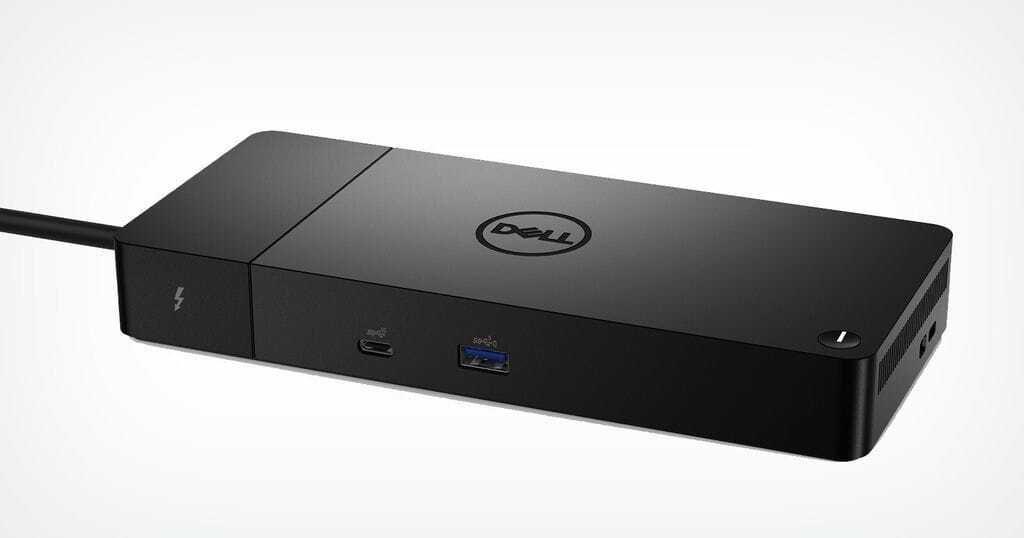
Modular thunderbolt dock with swappable modules for easy upgrades and SuperBoost technologies for fast charging.
You'll experience power delivery of up to 130W on Dell devices with ExpressCharge technology that enables:
Connect displays and peripherals to your system with a single cable for ultimate productivity.
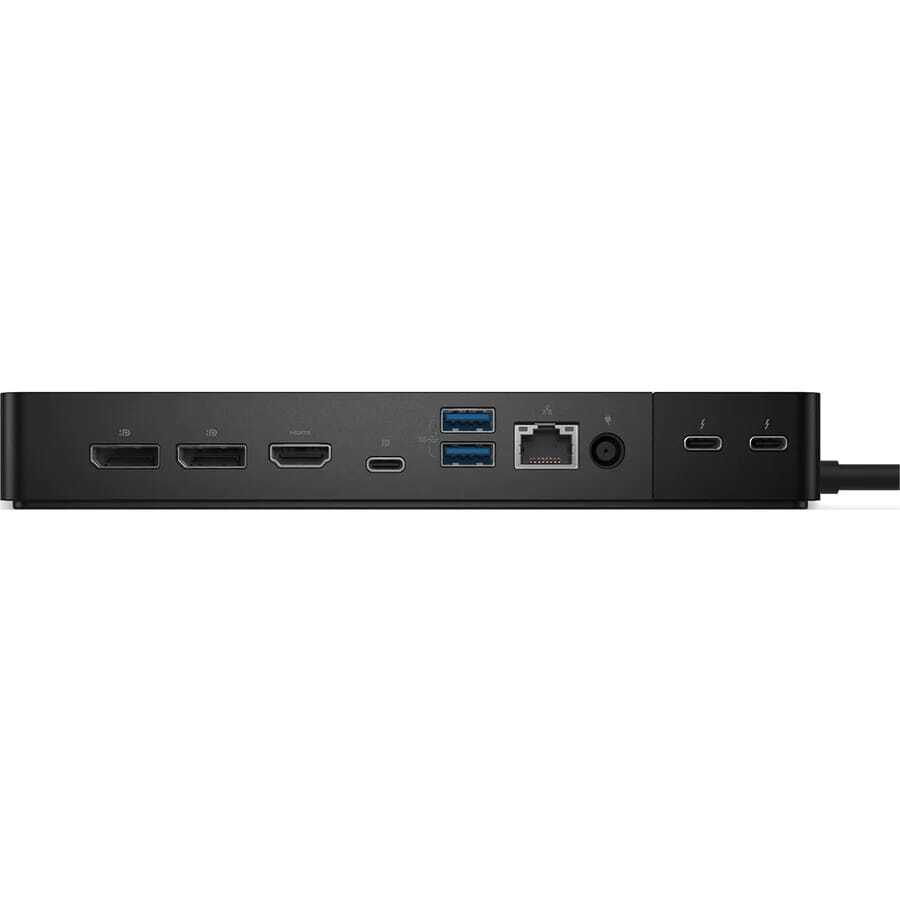
Thunderbolt™ 4 dock with the highest number of ports* connects multiple 4K displays and Thunderbolt peripherals allowing you to not compromise with your work setup. Get the maximum from your peripherals with data transfer of 40 GB/s.
Work without disruption: Firmware updates can be completed in five to seven minutes without needing to reboot the system.
Easier for IT: Dell Client Command Suite and Microsoft System Center Configuration Manager offers a smoother firmware update experience. You can also streamline deployment and management with a single firmware.
Easier upgrades: Modularity allows for simple field replacement of the power cable or connectivity module.
Better support: Inventory management got easier since each has its own service tag, allowing IT to push firmware updates only to certain dock.
Secure manageability: Keep your information safe with MAC Address pass-thru and remote port-disablement. Plus, with features like PXE Boot, Wake-on-LAN, and more, it’s easier than ever to stay productive while managing your dock.
Dell Thunderbolt™ Dock – WD22TB4 offers wide compatibility across Dell Commercial laptops. It is is also compatible with notebooks from other manufacturers which support industry standards for Thunderbolt™ docking.
Product Comes with applicable Dell Power Supply, 180W or above.
Modular thunderbolt dock with swappable modules for easy upgrades and SuperBoost technologies for fast charging.
You'll experience power delivery of up to 130W on Dell devices with ExpressCharge technology that enables:
Connect displays and peripherals to your system with a single cable for ultimate productivity.
Thunderbolt™ 4 dock with the highest number of ports* connects multiple 4K displays and Thunderbolt peripherals allowing you to not compromise with your work setup. Get the maximum from your peripherals with data transfer of 40 GB/s.
Work without disruption: Firmware updates can be completed in five to seven minutes without needing to reboot the system.
Easier for IT: Dell Client Command Suite and Microsoft System Center Configuration Manager offers a smoother firmware update experience. You can also streamline deployment and management with a single firmware.
Easier upgrades: Modularity allows for simple field replacement of the power cable or connectivity module.
Better support: Inventory management got easier since each has its own service tag, allowing IT to push firmware updates only to certain dock.
Secure manageability: Keep your information safe with MAC Address pass-thru and remote port-disablement. Plus, with features like PXE Boot, Wake-on-LAN, and more, it’s easier than ever to stay productive while managing your dock.
Dell Thunderbolt™ Dock – WD22TB4 offers wide compatibility across Dell Commercial laptops. It is is also compatible with notebooks from other manufacturers which support industry standards for Thunderbolt™ docking.
| FEATURE | SPECIFICATIONS |
|---|---|
| Model |
WD22TB4 |
| Video ports |
|
| External displays supported |
Up to 4 |
| USB Type-A ports |
|
| USB Type-C ports |
|
| Network | Gigabit Ethernet (RJ-45)
Support Wake On LAN from S0, S3, S4, or S5 sleep state with select Dell systems. See platform setup guide for more details. Support MAC Address Pass-Through with select Dell systems. See platform setup guide for more details. |
| LED indicators |
|
| AC adapter options |
180 W |
| Dimensions |
205 mm x 90 mm x 29 mm 8.07 in. x 3.54 in. x 1.14 in. |
| Weight | 650 g (1.43 lb) |
| DC-in Port | 7.4 mm |
| Cable |
0.8 m for WD22TB4 |
| Power delivery |
|
| System requirements | Compatible with USB Type-C Thunderbolt systems and USB Type-C systems with DisplayPort Alt Mode |
| Power button function |
Sleep/Wakeup/Power button NOTE On compatible Dell systems, the power button mimics the host power button behavior. |
| Operating systems |
|
| Systems management |
|
| MAC address | Pass-through MAC address
NOTE On Dell systems, check the BIOS to confirm MAC address pass-through support. |

Buying refurbished isn’t just a great way to save money but a great way to do your bit for the environment. Optimising the life of electronics provides greater environmental gains to the environment including minimising the impact of eWaste on our planet. Buying refurbished equipment is a sustainable form of recycling. Your purchase has contributed minimising pollutions, limiting the use of raw materials in the manufacturing process and a significant cost saving to you.

With over 20 years experience and over 2 million (and counting) products processed. We have developed an enviable reputation for quality products, first class service and a 'no fuss' approach to assisting customers. We continually strive to improve and grow our range of products and services for our customers. As a result we have evolved over the years to have specialised divisions within the ACT Group of companies

We're not just about computers, from humble beginnings we've grown to include all sorts of IT and commercial equipment. We offer a range of products and services including everything from Desktop Computers, LCD's, Laptops, Tough-books, Laser Printers, Office Multi-function Printers, Commercial Paper Shredders, Printer Plotters, Projectors, Servers, Other Network Equipment, IT Accessories, Toners and much much more.

We are famous for our service and recognised nationally as one of Australia's largest and most respected suppliers of Ex-Government IT equipment and excess or surplus manufacturers stock. We put you, the customer first. with dedicated customer support agents, you can rest assure that if there is anything you need pre or post sale we are only a message away.
We're not just about computers, from humble beginnings we've grown to include all sorts of IT and commercial equipment! We offer a range of products and services including everything from Desktop Computers, LCD's, Laptops, Tough-books, Laser Printers, Office Multi-function Printers, Commercial Paper Shredders, Printer Plotters, Projectors, Servers, Other Network Equipment, IT Accessories, Toners and much more.
We are famous for our service and recognised nationally as one of Australia's largest and most respected suppliers of Ex-Government IT equipment and excess or surplus manufacturers stock. We stock the world's leading brands which include DELL, IBM, TOSHIBA, ACER, HP and APPLE.
With over 20 years' experience, we are an authorised dealer (License #11912) within the second-hand market. We have developed an enviable reputation for quality products, first class service and a 'no fuss' approach to assisting customers. We continually strive to improve and grow our range of products and services for our customers. As a result we have evolved over the years to have specialised divisions within the ACT Group of companies:
Australian Computer Traders - specialising in retail, business-to-business and export of refurbished IT Equipment. From this location we service customers from all over the world including, Australia, NZ, PNG, Asia and the Middle East with capability to distribute product anywhere in the world. We can supply one item or 40 foot containers...."you choose".
We accept PayPal Only
All of our Items are sent out of our East Brisbane Office or Our Warehouse.
Items Bought and Paid for by 11am and generally sent same day.
Returns & Warranty
All Products are covered with a 6 Month RTB Standard warranty unless otherwise stated.
Printer warranty does not cover consumables or mechanical ware and tear.
All products are covered with a 180 days RTB warranty unless specified different
Printer Warranty does not cover consumables or Mechanical Ware & Tear.
Your customer satisfaction is important to us, if you have any issues please Contact us immediately
