Processor |
|
Memory |
|
Storage |
|
Platform |
|
Display |
|
Graphics |
|
Input |
|
Audio |
|
Ports & slots |
|
Power & battery |
|
Dell's semi-rugged Latitude E-family model remains an attractive and technologically up-to-date option for enterprise users, and a remarkably powerful one at that
(by Conrad H. Blickenstorfer; photography by Carol Cotton)
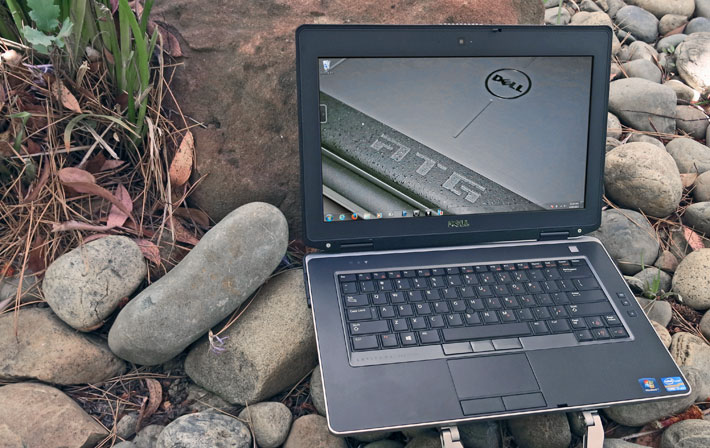
When affixed to a Dell notebook, the letters "ATG" stand for "All Terrain Grade" and at Dell that means semi-rugged. The Dell Latitude E6430 ATG reviewed on this page was introduced as a tech upgrade to the prior E6420 ATG and E6400 ATG. This latest fortified laptop model means Dell has something to offer to customers who want a computer that can handle more abuse than run-of-the-mill consumer notebooks, but without the cost of the full rugged treatment as in Dell's own E6420 XFR. The ATG costs about twice as much as a standard issue Latitude, but only half as much as the big, bad XFR.
How's the Latitude ATG different from regular Latitudes?
So what differentiates the ATG model from a regular Latitude 6430, and what makes it "all terrain grade?" While Dell doesn't publish a lot of ruggedness benchmarks in its specifications, the ATG is third-party tested and certified for durability and reliability according to the MIL-STD 810G test procedures for a variety of harsh environment conditions. However, unlike fully-rugged notebooks that are designed to survive brutal punishment, the emphasis here is on immunity to more minor mishaps that can be addressed with a spill-resistant keyboard, port covers, shock-mounted hard drive and LCD, and a sturdy magnesium base. Below tou can see how the ATG (left) compares to the corresponding standard Latitude E6430 (right).The fortifications do add some weight. While the consumer version weighs just 4.5 pounds, the beefed-up ATG starts at about 6 pounds and our nicely equipped sample hit the scale at 6.8. It has a foot print of 14.1 x 9.75 inches and its wedge profile is 1.3 to 1.5 inches thick, not including the bumpers, handle, and battery bulge. The system has a 14.0-inch 1366 x 768 wide-format display that uses what Dell calls a "Wide View" anti-glare outdoor viewable display (as opposed to the "DirectVue" display enhancements that come with the fully rugged XFR model). A resistive touch screen is available as a US$375 option. Not available is the consumer E6430's optional higher resolution (1600 x 900 pixel) display.
Design, look, and feel
While sharing Dell's "Latitude" brand name with all sorts of business-oriented Dell laptops and even tablets, the ATG is really a different animal. It is nowhere near as extreme as the fully-rugged Latitude XFR, which was designed to do battle with the fully rugged notebooks from the likes of Panasonic and Getac. Instead, the ATG is almost understated, as if its purpose were to get the job done without drawing any attention to its hardened guts and systems.
Ports and connectivity are all around the ATG laptop, an (unprotected) SD Card slot and two speakers. To guard against physical damage, all ports are located behind protective doors. Unlike the fully-rugged XFR's complex sealing doors with spring-loaded levers and a locking slider, the ATG's are just simple flaps that are part of the corner guards. Below are detail shots of the SD Card slot, the RJ45 LAN port, and the HDMI port :

The two pictures below show the right (top) and left (bottom) side of the unit with all protective doors in the open position.
On the right side, from left to right, there is an ExpressCard slot, the media bay (which, in our sample, contained an optical drive), a switch to quickly turn wireless radios on or off 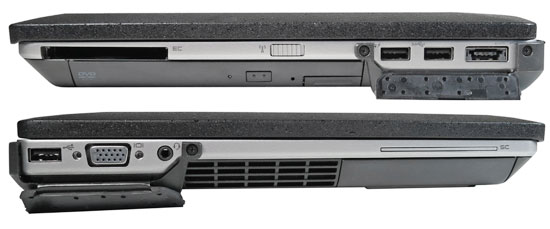 (good idea, but you need to know it's there), and then an I/O block with a powered USB 3.0 connector, a non-powered USB 3.0 connector, and a combination eSATA/USB 2.0 port. eSATA can be used for certain high-speed external SATA data storage devices, but also works as a standard USB port. The I/O block has a protective door.
On the left side, from left to right, are a USB 2.0 port, a standard 15-pin VGA port, and an audio jack in an I/O block with a protective cover. Next to that are the cooling vents for the very non-intrusive fan, then the glide-in caddy for the hard disk or solid state disk. Above that the cutout for the optional Smart Card reader. What's missing is a legacy serial port; these still come in handy. The XFR has one, and the ATG probably should, too.
 A couple of interesting detail are worth mentioning: One is the way the LCD case locks. Consumer laptops often don't even have a lock to secure the LCD case against the lower part of the device, but in rugged and semi-rugged laptops that's a necessity to protect the LCD from breaking should the computer get dropped. However, field personnel may wear gloves and they want to be able to open and close the LCD lid without taking them off. Dell's smart solution is a sturdy spring-loaded latch that automatically snaps closed, and opens with a firm push.
The other is the peculiar ruler thing shown to the right. This is actually a dummy piece that goes into the ExpressCard slot when the slot isn't used for a card. Dell made it a handy little multi-purpose ruler that can be used to quickly convert degrees Fahrenheit into Celsius, inches and common fractions of inches into millimeters, and it also seems to work as a letter opener and more. You don't see this sort of detail very often.
 Also of note are the rear corner guards (see right) that do double-duty by a) providing a good deal of extra protection against scratching, and b) include hinged protective covers for the ATG's interface ports. They are made of tough plastic, snap into place, and are secured with three small screws each. The protective doors provide physical protection, not sealing, and this is one area of the ATG that looks a bit unfinished.
Then, of course, there is the carry handle, something consumer laptops simply don't have. The very solid metal/rubber handle, a US$37.50 extra, definitely makes it easier to tote the ATG around out there in the field. It lends the machine a tough look, but it can also be a bit of a mixed blessing because it tends to get in the way, and it makes access to the SD Card slot difficult.
Keyboard and touch pad
 The Dell ATG's keyboard is full-scale and has 83 keys. The flat but slightly concave keys are black with white letters, numbers and symbols. The keys of our eval unit were backlit (an option) and go, via keyboard control, from off to full-bright in five steps. There is no separate keypad, but keypad functionality is available with the usual number keys assigned to the numbers 7, 8, 9, and the letters uio, jkl, and m. Secondary functions are in small orange labels. The labeling looks crisp and clean, with none of the busy look that happens when manufacturers print too much onto keys. To the right of the keyboard are three rubber push buttons to rise or lower audio volume, or turn it off.
Below the keyboard is the unit's touch pad. It is properly sized and very slightly recessed so fingers sense the perimeter without bumping into it. In front of it are two large rubberized mouse buttons. The touch pad is capacitive, which means it's very quick and responsive to the touch of a finger. The drawback is that it doesn't respond to pressure (like from a stylus) or when wearing gloves.
Unlike the XFR, the ATG also has a trackstick in the middle of the keyboard, and three trackstick buttons. This way, the cursor can be controlled via glove.
Performance: Third generation (Ivy Bridge) Intel Core processors
One of the big advantages of the ATG series is that Dell has quick and unlimited access to the latest technology. So while some of the established rugged and semi-rugged notebooks still come with older Intel processors, Dell's ATG and XFR machines are generally pretty close to the processor technology state-of-the-art. However, Intel's rapid succession of processor generations is trying even for a company the size of Dell, and so, for now, the ATG is still equipped with Intel third generation "Ivy Bridge" processors.Combined with native USB 3.0 and PCIe 3.0 support, 3rd gen-based systems can process higher data loads and provide quicker, richer and more complex visuals. Overall, "Ivy Bridge" offers increased efficiency, lower power consumption, and better graphics performance.
Dell's semi-rugged ATG laptops can be ordered with a choice of four processors. From bottom to top, they are the dual-core 2.7GHz (3.4GHz with turbo boost) Core i5-3340M, 2.9GHz (3.6GHz with turbo boost) Core i5-3380M, 3.0GHz (3.7GHz with turbo boost).
The dual-core versions have a thermal design power of 35 watts, the quad-core chip one of 45 watts, and all are what Intel calls "standard voltage" mobile processors, as opposed to the low voltage and ultra-low voltage versions. For a detailed comparison of these four processors.
A look inside the Dell 6430 ATG
Whereas consumer notebooks usually consists of little more than a plastic case with a motherboard attached, semi-rugged designs are generally more complex, even if it's in subtle ways. There usually is a rigid magnesium or aluminum frame upon which the various components and sub-components are mounted on. The case itself may or may not be part of this rigid framework, but the overall design is almost always intricate and quite involved.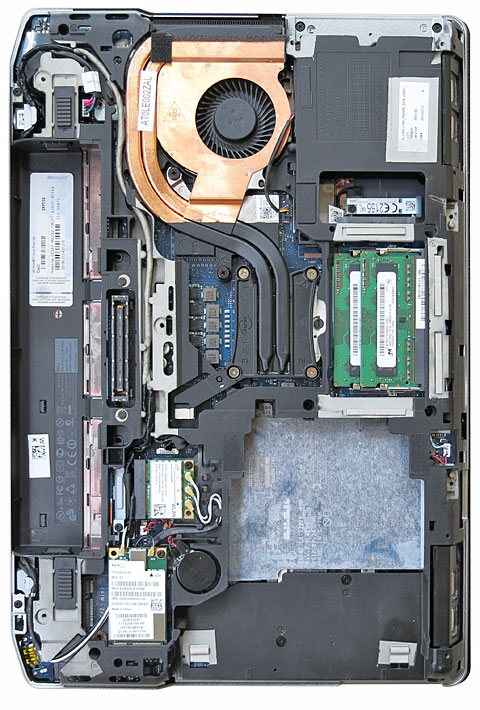 The Dell ATG is no different. We did not disassemble the entire machine, but did remove the purposefully designed magnesium bottom cover to get an idea how this machine is organized, and how easy it is to service it and/or upgrade components.
Unlike most notebooks, the ATG doesn't have any removable doors in its bottom plate to provide access to RAM memory and internal expansion slots. So if you want to replace memory or one of the PCIe modules, or if maintenance becomes necessary, you have to take the entire bottom plate off. That means first removing the two rear corner guards (rubberized plastic), and then undo seven small Philips head screws. The bottom half of the housing then comes off, and there aren't any wires or connectors that connect the two halves to worry about.
The contoured and very light bottom half at first looks like thin plastic, but it's actually very thin magnesium. Here, it also becomes immediately obvious that the ATG is not a water- or dust-proof unit. There is no rubber seal around the perimeter of the housing, and there are several openings for the fan, heat exchanger, optical drive and mass storage.
The picture to the right shows the bottom inside of the ATG after the bottom cover has been removed. As expected, the internal layout is quite complex, with boards and modules mounted on the main board or onto the internal subframe, very precisely fitting into neatly allocated spaces.
Even though the internal layout is complex, components such as RAM memory, WiFi (ours had a Intel Centrino Ultimate-N 6300 half-card), GPS, and other wireless modules, as well as the various antenna blocks, are easily accessible.
The curved copper tubing is part of the ATG's thermal management system. It serves as a conduit from the heat spreader plate sitting on top of the processor and chipset, and moves it to the quiet fan/heat-exchanger unit.  We generally prefer fanless designs for rugged and semi-rugged systems, but even efficient components in this class of machine do generate a lot of heat that must be removed to facilitate longevity and performance under less than ideal thermal circumstances.
Overall, the interior of the ATG reveals careful planning and impressive execution. Note, for example, how some of the antenna wires have their own dedicated guides cast right into the magnesium chassis. That sort of detail adds expense, but also means the wires will never get crimped, adding to reliability.
The image to the right shows the solid state disk installed in our review ATG. It's a 256GB 2.5-inch Samsung SM841 Series that not only contributed to the excellent overall performance numbers of this machine, but is also much less prone to damage than any rotating hard disk can be. The SSD has soft rubber isolators on each side, adding further protection, and it's externally accessible for quick removal upon undoing two small screws, something enterprises and government agencies increasingly demand for security reasons.
For those interested in how the semi-rugged ATG compares inside to the fully-rugged XFR, the picture below shows them side-by-side. Even though the current ATG and XFR models stem from different Latitude generations, overall architecture is remarkably similar with many components found in the same place. The XFR is heavier and sturdier and its inside is sealed, but the ATG benefits from many of the same ruggedness principles and the same meticulous execution.

Docks and cradles
Semi-rugged laptops like the Dell ATG are often used in vehicles and other places where they must be docked and secured. Dell itself offers stands and port replicators that work with both ATG and standard versions of the Latitude 64x0 platform, and there are a number of third party solutions specifically designed for the ATG.Dell 6430 ATG highlights:
- An attractive and overall very competent contender in the semi-rugged laptop market
- Very solid and well-made
- Excellent performance with third generation Intel Core i5 and i7 processors
- Impressive battery life
- Optional nVidia discrete graphics
- Bright display with good outdoor viewability
- Protective bumpers and protective doors for all ports
- Clean, uncluttered backlit keyboard
- Very responsive capacitive touch pad
- Resistive touch screen available
- Reasonable starting price
- "Semi-rugged" means just that
- Capacitive touch pad can't be used with gloves
- Attractive options can quickly boost the price
- Wimpy protective doors
- Otherwise nicely designed handle interferes with SD card slot and doesn't fold out of the way
- Vertical viewing angle limited
- Full ruggedness specs don't seem to be available
|
At aBa-IT, we have inhouse certified technicians who will customize the laptops to your selected RAM & SSD.