Description
100KHz-10GHz RF Power Meter Settable RF Power Attenuation Value CNC Shell 0.96" OLED RF-10000-V2.0
Description:
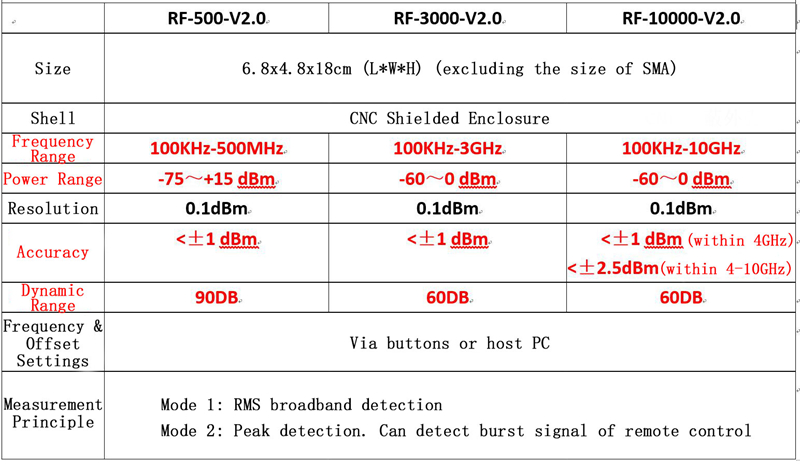
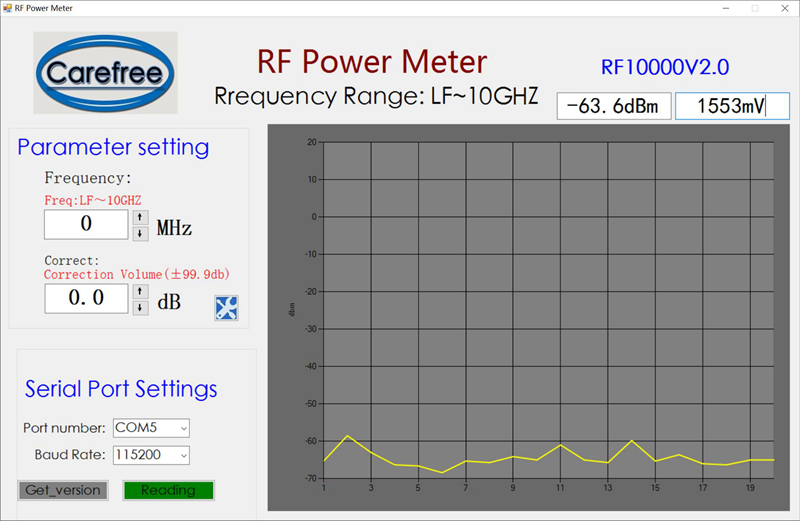
It is a high-performance low-cost portable simple RF power meter. It is designed with 0.96" 128x64 pixel OLED display. It provides 5V power and can be charged via micro-USB. It features compact size, easy application, stable performance, high accuracy, preset offset, wide dynamic range, and fast measurement speed. Working with our software, users can configure the power meter on PC end and make data recording (with curve display) and sharing easier.
Download Host PC Software & Instructions:
https://pan.baidu.com/s/1dF6dHo1 Password: 18bp
Watch Video:
https://pan.baidu.com/s/1806w9PlDbSoVgCBy06oGew Password: iwu3
Applications:
- Calibration of RF instruments
- Detection and maintenance of radio frequency equipment
- Measurement of standing wave ratio of RF circuit (added feedback bridge)
- Measurement of RF circuit return loss
- Interference detection between wireless communications equipment
- RSSI (received signal strength indication) and transmitting power level detection
- Performance evaluation of step attenuators
- Amplifier gain and network attenuation measurements
- Measurement of forward and reflected power in directional couplers
- Power measurement of GSM signals using GMSK modulation
Other Parameters:
- Input Impedance: 50Ω
- Working Voltage: 5VDC (powered by micro-USB)
- Working Current: <50 mA
- Charging Current: 500mA
Package Included:
- 1 x RF Power Meter
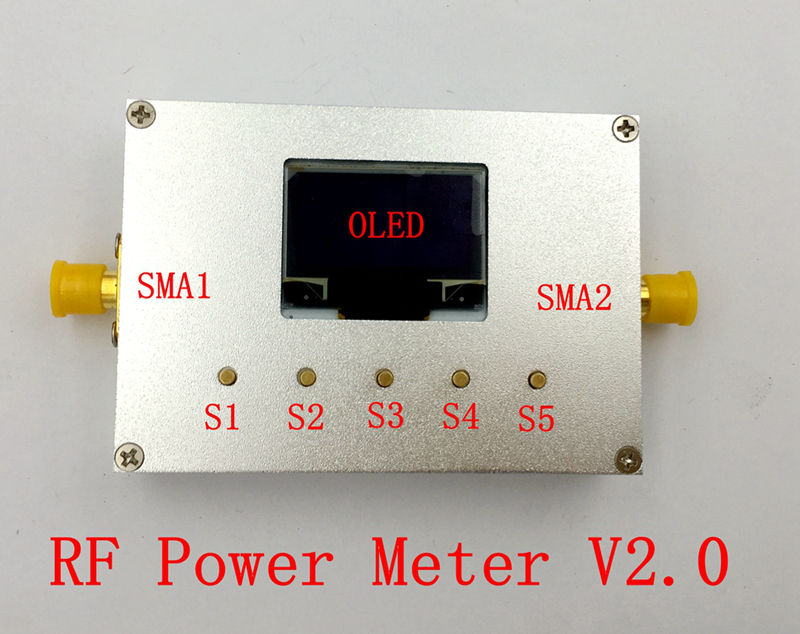
1. Power Supply: Connect to power supply (signal source, computer, power bank, etc.) via micro-USB.
2. Power Switch: It is next to the USB port. Turn the switch to the left to turn it on, and turn it to the right to turn it off.
3. Input: RF signal is connected through the SMA1 interface. SMA2 is the detection voltage output for customers' secondary development.
4. After powering on, press "S3" (OK) button to confirm to initialize the power meter.
5. Press S1 to change the cursor position (move left)
Press S5 to change the cursor position (move right)
Press S2 to change the data of cursor position (plus).
Press S4 to change the data of cursor position (minus).
After entering the system, cursor indicates the selected digit. At this time, the up and down keys can modify the value of the selected digit. When the cursor is at the last (or first) position of the selected item, press the right (or left) button to switch the selected item. When parameters are set, press the middle "S3" (OK) button to make the settings effective.
Note:
- For details on how to connect the power meter to your PC and the software of the host PC, please refer to the instructions mentioned above.
- Offset: Provides two types of offsets, "positive" and "negative". Here are three common situations that require preset offsets:
â The signal is too large. Add an attenuator between your signal source and the power meter. The offset is set to the attenuation value of your attenuator and the sign is "positive".
â¡ The signal is too small. Add an amplifier between your signal source and the power meter. The offset is set to the gain of the amplifier, and the sign is "negative".
⢠Signal has a loss (attenuation) between your signal source and the power meter. The offset is set to the signal's attenuation value and the sign is "positive".
Screenshot of Host Computer:
To Test Greater Power:
- It can work with passive attenuator to measure higher power. Please purchase separately.
Description:
It is a high-performance low-cost portable simple RF power meter. It is designed with 0.96" 128x64 pixel OLED display. It provides 5V power and can be charged via micro-USB. It features compact size, easy application, stable performance, high accuracy, preset offset, wide dynamic range, and fast measurement speed. Working with our software, users can configure the power meter on PC end and make data recording (with curve display) and sharing easier.
Download Host PC Software & Instructions:
https://pan.baidu.com/s/1dF6dHo1 Password: 18bp
Watch Video:
https://pan.baidu.com/s/1806w9PlDbSoVgCBy06oGew Password: iwu3
Applications:
- Calibration of RF instruments
- Detection and maintenance of radio frequency equipment
- Measurement of standing wave ratio of RF circuit (added feedback bridge)
- Measurement of RF circuit return loss
- Interference detection between wireless communications equipment
- RSSI (received signal strength indication) and transmitting power level detection
- Performance evaluation of step attenuators
- Amplifier gain and network attenuation measurements
- Measurement of forward and reflected power in directional couplers
- Power measurement of GSM signals using GMSK modulation
Other Parameters:
- Input Impedance: 50Ω
- Working Voltage: 5VDC (powered by micro-USB)
- Working Current: <50 mA
- Charging Current: 500mA
Package Included:
- 1 x RF Power Meter
1. Power Supply: Connect to power supply (signal source, computer, power bank, etc.) via micro-USB.
2. Power Switch: It is next to the USB port. Turn the switch to the left to turn it on, and turn it to the right to turn it off.
3. Input: RF signal is connected through the SMA1 interface. SMA2 is the detection voltage output for customers' secondary development.
4. After powering on, press "S3" (OK) button to confirm to initialize the power meter.
5. Press S1 to change the cursor position (move left)
Press S5 to change the cursor position (move right)
Press S2 to change the data of cursor position (plus).
Press S4 to change the data of cursor position (minus).
After entering the system, cursor indicates the selected digit. At this time, the up and down keys can modify the value of the selected digit. When the cursor is at the last (or first) position of the selected item, press the right (or left) button to switch the selected item. When parameters are set, press the middle "S3" (OK) button to make the settings effective.
Note:
- For details on how to connect the power meter to your PC and the software of the host PC, please refer to the instructions mentioned above.
- Offset: Provides two types of offsets, "positive" and "negative". Here are three common situations that require preset offsets:
â The signal is too large. Add an attenuator between your signal source and the power meter. The offset is set to the attenuation value of your attenuator and the sign is "positive".
â¡ The signal is too small. Add an amplifier between your signal source and the power meter. The offset is set to the gain of the amplifier, and the sign is "negative".
⢠Signal has a loss (attenuation) between your signal source and the power meter. The offset is set to the signal's attenuation value and the sign is "positive".
Screenshot of Host Computer:
To Test Greater Power:
- It can work with passive attenuator to measure higher power. Please purchase separately.
Payment Terms
1. We accept PayPal,Payoneer,Visa Card,Google pay,Credit card etc.
2. We ship to your eBay or Paypal address. Please make sure your eBay and Paypal address is correct before you pay.
2. We ship to your eBay or Paypal address. Please make sure your eBay and Paypal address is correct before you pay.
Shipping Terms
1. We will process the order within the handling time ,if you have any questions, please contact us via eBay message or email.
2. For remote regions of DHL/FedEx..., extra shipping costs might be charged. Usually it costs about 30USD-50USD. We will contact you if shipping company informed us your address belongs to remote area. Thanks for your understanding.
2. For remote regions of DHL/FedEx..., extra shipping costs might be charged. Usually it costs about 30USD-50USD. We will contact you if shipping company informed us your address belongs to remote area. Thanks for your understanding.
Return Terms
If you receive the item that not satisfied or defective, please do not open case and kindly notify us within 30 days. We will guide you the returning process for replacement or refund.
Custom Duties & Taxes
1. It is buyer's responsibility to cover the import duties, taxes.We do not charge any taxes and fees, and the possible taxes and fees will be collected by the platform or by third parties such as customs and carriers.
2. Please check with your country's customs office and inform us what/how much should declare before shipping.
2. Please check with your country's customs office and inform us what/how much should declare before shipping.
Feedback
1. Please kindly leave us a positive feedback and 5 star DSR if you satisfied with our product and service. Please feel free to contact us firstly if you have any problem with your order, we are responsible and credible seller and will solve the issue it for you asap.
2. If you are dissatisfied for any reason, please don't be quick to leave us neutral or negative feedback. We work hard to make sure EVERY CUSTOMER 100% SATISFIED and resolve any problem for you and always leave positive feedback to all our customers.
2. If you are dissatisfied for any reason, please don't be quick to leave us neutral or negative feedback. We work hard to make sure EVERY CUSTOMER 100% SATISFIED and resolve any problem for you and always leave positive feedback to all our customers.