| Title: |
315/433.92MHz DC9V Countdown Remote Control Switch 1Ch RF Manual
Transmitter And Receiver Module Water Pump Pumping Remote Control
|
||
|
Countdown Wireless
Remote Control
Switch:
|
Transmitter Frequency:315/433.92MHz(Others Can Be Customized)
Transmitter Working Voltage:DC9V
Transmitter Working Current:<18mA
Transmitter Standby Current:0uA
Transmitter Transmit Power:18dBm
Control Distance:1000-3000m
Receiver Working Voltage:AC100-240V
Receiver Max.Load Current:≤30A
Receiver Standby Current :<10mA
Receiver Sensitivity : -105dBm
Modulation Mode:ASK
Working Temperature:-20-70℃
Working Mode:Latency Mode
Size:130*86.6*45mm(With Shell)
Application Field:Water Pump Pumping Control,Remote Switch, Home Anti-Theft Alarm, Industrial Control
|
||
| Remote Control: |
Frequency:315/433.92MHz(Others Can Be Customized)
Working Voltage:DC9V
Working Current:<18mA
Standby Current:0uA
Transmit Power:18dBm
Control Distance:1000-3000m
Modulation Mode:ASK
Working Temperature:-20-70℃
Size:153*42*25mm
Application Field:Industrial, Home Appliances, Security Equipment, Road Gates, Etc
Coding Way:Learning Code (Customizable)
|
||
| Function Description: |
(1)Key Description:
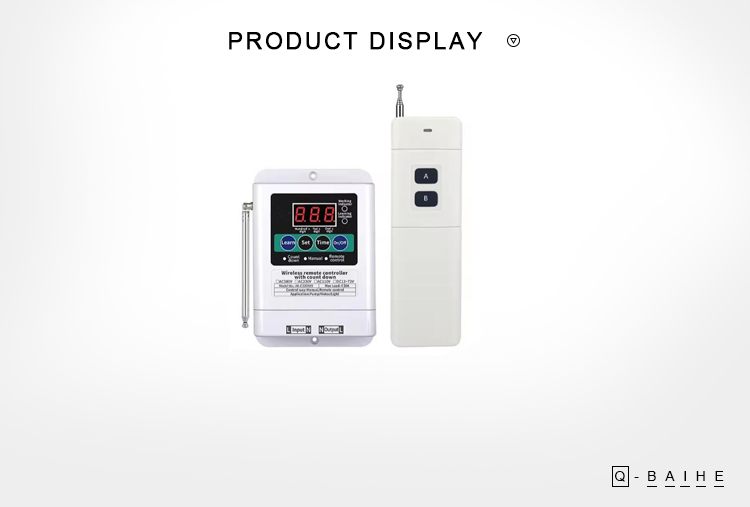
Learning Key: Press this key to learn the code and the indicator light will light up, indicating that it has entered the learning code state.
Setting Key: Press this key to set the delay time of ones digit, tens digit, hundreds digit.
Time Key: Press this key to adjust the delay time in ones digit, tens digit, hundreds digit.
On/Off Key: Press this key once, the switch starts to work, and press this key again, the switch stops working.
(2)Learning Methods:
Press the learning key until the learning indicator light is on, and then press the “A” button on the remote control, the learning indicator light flashes 3 times, indicating that the learning code is successful.
This controller can learn at most 20 sets of remote control codes, and the earliest learned remote control codes will be automatically cleared after more than 20 sets.
(3) Delay Setting Description:
Press the setting key to select the ones digit/tens digit/hundreds digit, when you select ones digit, tens digit or hundreds digit, the LED digital screen will flash. After selecting the digit, press the time key to increase the number of the digital.
After adjusting the time, press the setting key to exit the delay setting. ( The delay time is in minutes, and can be set from 1 to 999 minutes, and the number of ones digit, tens digit, hundreds digit is increased repeatedly from 0 to 9.)
(eg. If you want to set 12 minutes, press the setting key once, and the ones digit will flash, then press the time key to adjust the ones digit to 2, press the setting button again, the tens digit will flash, press the time key to adjust the tens digit to 1, and then press the setting key again to exit the delay setting. At this time, the delay time is 12 minutes, and the device will
automatically turn off after 12 minutes.)
(4) Manual Control Operation:
After setting the delay time, press the On/Off key once, the receiver starts to work, when the delay time returns to “0” on the LED digital screen, the receiver stops working.
(5) Remote Control Operation:
After setting the delay time and learning the remote control, press the remote control “A” button once, the receiver starts to work, and when the delay time returns to “0” on the LED digital screen , the receiver stops working. If press the “B” button on the remote control during the delay time, the receiver also stops working.
(6)Clearing Code:
Press and hold the learning key for 5 seconds, the learning indicator light flashes, indicating that the clearing code is successful.
|
||
| Packing: | 1x Countdown Wireless Remote Control Switch | ||

On Apr 19, 2024 at 00:37:43 PDT, seller added the following information: