1x 3 In 1 Car Digital Clock With Temperature Battery Voltage Display Accessories


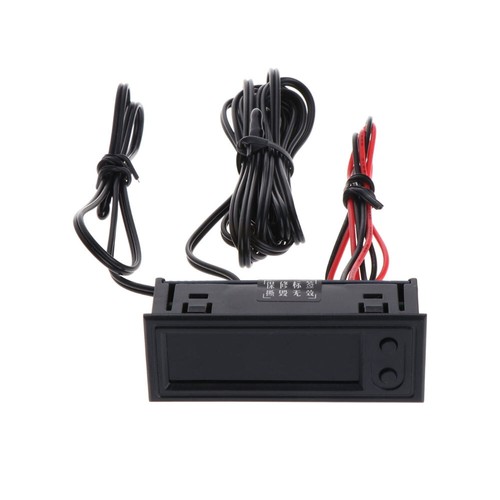
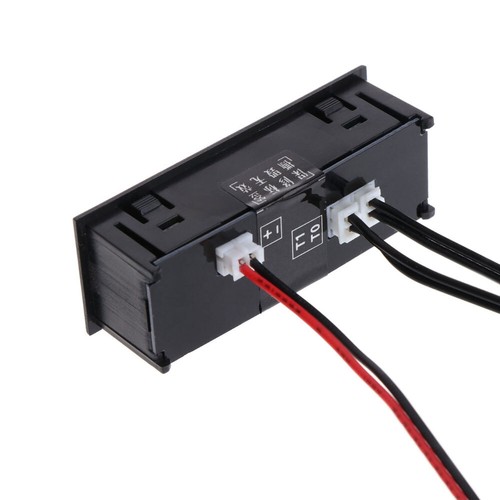


Multi-functional electronic clock module, set time, inside and outside temperature, voltage as one. You can display a single item, or you can cycle through the items alternately and customize the item to be displayed. this chip is a temperature compensated clock chip, time accurate. Standard 0.3 m +1.5 m module with two waterproof probes, temperature range -35 ~ 120 degrees. With brightness adjustment, 3 brightness adjustable. And automatic brightness function, which can be dark at night, brighten during the day.
Specifications:
1, working voltage: DC 5.0 ~ 28V
2, frame size: 22 * 58 mm
3, Installation hole size: 19.5 * 56 mm
4, Voltage display range: 5.0 ~ 28V
5, temperature display range: -35 ~ 120 ℃ (Two temperature sensors, 0.3 meters +1.5 meters)
6, power lead length: 28CM
How to use:
UP the key:
Under normal display, pressing this key will switch between the six display states of [Time] → [Date] → [Temperature 1] → [Temperature 2] → [Voltage] → [Alternating Cycle Display]. (Note: The display items and switching interval time in alternate cycle display mode can be customized by "dd" and "dF" parameters respectively. See the following table
Under the key:
Under normal display status, press this key to enter the setting of time date year parameter. Press the key, "points" began to flash, press the button to adjust the value. After adjusting, press the key again, "hour "starts flashing, press the key to adjust the value. And then press the key to enter the date adjustment [Note that the middle of the colon is not lit]," day "began to flash, press the key after the tune" month "began to flash, tune and then press the key" year "start Flashes, press the key to adjust the parameters into the extended set, see the following" code significance and role of the table "
The significance of the code, please refer to the following
1.0.0u
Voltage measurement error correction, a positive number increases, a negative number decreases. For example, the actual supply voltage is 12.0V, but the table shows 11.9V, it is adjusted to 0.1u.
2.Ac
Temperature ① error calibration parameters. Positive number increases, negative number decreases, the unit is degree, the adjustment range is -5 ~ 5. For example, if you think the displayed temperature is 1 degree higher than the actual temperature, then set Ac: -1, so the electronic clock is automatically reduced by 1 degree and displayed.
(Note: If you do not have a standard thermometer for reference, it is recommended to keep this as Ac: 0)
Temperature ② error calibration parameters. Positive number increases, negative number decreases, the unit is degree, the adjustment range is -5 ~ 5. For example, if you think the displayed temperature is 1 degree higher than the actual temperature, set it to AC : -1, so that the electronic clock is automatically subtracted by 1 degree and displayed again.
(Note: If you do not have a standard thermometer for reference, it is recommended to keep this as AC: 0)
3.dd
Custom cycle shows the display item
[dd: 0] time + temperature 1 + temperature 2+ voltage
[Dd: 1] time + temperature 1 + temperature 2
[Dd: 2] time + temperature 1 + voltage
[Dd: 3] time + voltage
4.Df
Switch the time interval in custom cycle display, the unit is second, the adjustment range is 1 ~ 9. For example, dF: 3, the switching interval is about 3 seconds to switch the display item once. (Please do not set to " 0 ")
5.LL
Display brightness level, the adjustment range is 1 ~ 3, LL: 1 is the darkest, LL: 3 is the brightest.
6.AL
Auto brightness control switch, AL: 0 to turn off the automatic brightness control, AL: 1 to turn on the automatic brightness control. When set to AL: 1, the electronic clock will change the brightness to level 1 after 19:00 everyday and change this level to level 3 every day after 07:00 am.
Note:
After adjusting the AL option, press "Down" again to return to the normal display state, all parameters and time settings can be saved.
Package include:
1pc DIY Multifunction Clock Temperature Voltage Monitor Panel Meter
Precautions:
1. All pictures have been professionally corrected, but due to different ambient light and different display device settings, there may be some deviations in the pictures and items you see, please understand.
2. The data is measured manually, there may be some deviation, but it does not affect the use.


Multi-functional electronic clock module, set time, inside and outside temperature, voltage as one. You can display a single item, or you can cycle through the items alternately and customize the item to be displayed. this chip is a temperature compensated clock chip, time accurate. Standard 0.3 m +1.5 m module with two waterproof probes, temperature range -35 ~ 120 degrees. With brightness adjustment, 3 brightness adjustable. And automatic brightness function, which can be dark at night, brighten during the day.
Specifications:
1, working voltage: DC 5.0 ~ 28V
2, frame size: 22 * 58 mm
3, Installation hole size: 19.5 * 56 mm
4, Voltage display range: 5.0 ~ 28V
5, temperature display range: -35 ~ 120 ℃ (Two temperature sensors, 0.3 meters +1.5 meters)
6, power lead length: 28CM
How to use:
UP the key:
Under normal display, pressing this key will switch between the six display states of [Time] → [Date] → [Temperature 1] → [Temperature 2] → [Voltage] → [Alternating Cycle Display]. (Note: The display items and switching interval time in alternate cycle display mode can be customized by "dd" and "dF" parameters respectively. See the following table
Under the key:
Under normal display status, press this key to enter the setting of time date year parameter. Press the key, "points" began to flash, press the button to adjust the value. After adjusting, press the key again, "hour "starts flashing, press the key to adjust the value. And then press the key to enter the date adjustment [Note that the middle of the colon is not lit]," day "began to flash, press the key after the tune" month "began to flash, tune and then press the key" year "start Flashes, press the key to adjust the parameters into the extended set, see the following" code significance and role of the table "
The significance of the code, please refer to the following
1.0.0u
Voltage measurement error correction, a positive number increases, a negative number decreases. For example, the actual supply voltage is 12.0V, but the table shows 11.9V, it is adjusted to 0.1u.
2.Ac
Temperature ① error calibration parameters. Positive number increases, negative number decreases, the unit is degree, the adjustment range is -5 ~ 5. For example, if you think the displayed temperature is 1 degree higher than the actual temperature, then set Ac: -1, so the electronic clock is automatically reduced by 1 degree and displayed.
(Note: If you do not have a standard thermometer for reference, it is recommended to keep this as Ac: 0)
Temperature ② error calibration parameters. Positive number increases, negative number decreases, the unit is degree, the adjustment range is -5 ~ 5. For example, if you think the displayed temperature is 1 degree higher than the actual temperature, set it to AC : -1, so that the electronic clock is automatically subtracted by 1 degree and displayed again.
(Note: If you do not have a standard thermometer for reference, it is recommended to keep this as AC: 0)
3.dd
Custom cycle shows the display item
[dd: 0] time + temperature 1 + temperature 2+ voltage
[Dd: 1] time + temperature 1 + temperature 2
[Dd: 2] time + temperature 1 + voltage
[Dd: 3] time + voltage
4.Df
Switch the time interval in custom cycle display, the unit is second, the adjustment range is 1 ~ 9. For example, dF: 3, the switching interval is about 3 seconds to switch the display item once. (Please do not set to " 0 ")
5.LL
Display brightness level, the adjustment range is 1 ~ 3, LL: 1 is the darkest, LL: 3 is the brightest.
6.AL
Auto brightness control switch, AL: 0 to turn off the automatic brightness control, AL: 1 to turn on the automatic brightness control. When set to AL: 1, the electronic clock will change the brightness to level 1 after 19:00 everyday and change this level to level 3 every day after 07:00 am.
Note:
After adjusting the AL option, press "Down" again to return to the normal display state, all parameters and time settings can be saved.
Package include:
1pc DIY Multifunction Clock Temperature Voltage Monitor Panel Meter
Precautions:
1. All pictures have been professionally corrected, but due to different ambient light and different display device settings, there may be some deviations in the pictures and items you see, please understand.
2. The data is measured manually, there may be some deviation, but it does not affect the use.