COB LED Strip Lights with Dual Wireless PIR Motion Sensors – 24V Motion Activated Under Cabinet & Stair Lighting
Upgrade your indoor lighting with COB LED Strip Lights featuring dual portable wireless PIR motion sensors. Designed for convenient, hands-free illumination, this motion-activated LED light is ideal for kitchens, bedrooms, wardrobes, closets, cabinets, corridors, hallways, staircases, and other indoor spaces.
The 320 LEDs/m COB technology delivers bright, smooth, and continuous illumination with a modern appearance. The two portable wireless PIR sensor switches can be installed wherever needed, providing flexible motion-activated lighting without requiring a traditional wall switch.
Key Features
- High-Brightness COB LED Technology – 320 LEDs per meter provide smooth and uniform lighting.
- Dual Wireless PIR Motion Sensors – Includes 2 portable wireless motion sensor switches for convenient control from different locations.
- Motion Activated LED Lighting – Automatically detects movement within approximately 1–3 meters.
- Portable Wireless Sensor – Built-in 450mA battery allows the sensor switches to be installed in convenient locations.
- Up to 10M Wireless RF Distance – Wireless communication distance between the PIR sensor and RF receiver is up to 10 meters.
- DC 24V LED Strip – Provides efficient low-voltage lighting for indoor applications.
- Multiple Length Options – Available in 1M, 3M, 5M, and 10M lengths.
- Multiple Light Colors – Choose Warm White, Natural White, or Cool White according to your lighting needs.
- Easy Installation – Suitable for cabinets, wardrobes, kitchens, stairs, corridors, bedrooms, closets, and more.
- 3M Adhesive Installation – The flexible strip can be conveniently mounted using the included adhesive.
- Hands-Free Operation – Ideal for areas where you need automatic lighting without touching a switch.
Specifications
- Product Name: COB LED Strip Lights
- LED Type: COB
- LED Quantity: 320 LEDs/M
- Output Voltage: DC 24V
- Input Voltage: AC 100–240V
- Available Lengths: 1M / 3M / 5M / 10M
- Light Colors: Warm White / Natural White / Cool White
- Color Temperature: 3000K / 4000K / 6500K
- PIR Detection Range: Approx. 1–3M
- Wireless RF Distance: Up to 10M
- Motion Sensor: Portable Wireless PIR Motion Sensor
- Sensor Battery: Built-in 450mA Battery
- Power Adapter: EU 220V Plug / US 110V Plug
Package Includes
- 1 × COB LED Strip Light
- 1 × Power Supply
- 1 × RF Receiver
- 2 × Portable Wireless PIR Motion Sensor Switches with Built-in Battery
Ideal Applications
Perfect for under cabinet lighting, kitchen lighting, wardrobe lighting, closet lighting, bedroom lighting, stair lighting, hallway lighting, corridor lighting, pantry lighting, furniture lighting, and indoor accent lighting.
The wireless PIR sensors make this LED strip especially useful for night-time stairways, closets, wardrobes, kitchens, cabinets, and dark corridors, providing automatic illumination when movement is detected.
Installation & Pairing
The wireless PIR sensors can be paired with the RF receiver using the included code-matching function.
Method 1: When the receiving host is powered on, within 8 seconds, press and hold the code-matching button on the back of the wireless sensor switch until the LED strip flashes once. Pairing is complete.
Method 2: After the receiving host has been powered on for more than 8 seconds, press the code-matching button on the receiving host first. Then press and hold the code-matching button on the back of the wireless sensor switch until the LED strip flashes once.
Repeat the pairing process to connect the second wireless PIR sensor switch.
1. Connect the 24V power supply to the receiving host and led strip

2. When the "receiving host" is powered on, within 8 seconds, press and hold the code matching key on the back of the "wireless sensor switch" until the output LED light strip flashes once, and the pairing is completed.

3. If the "receiving host" is powered on, after 8 seconds, first press the code matching key on the "receiving host", then press and hold the pair code key on the back of the "wireless sensor switch" until the LED light strip flashes once, and the pairing is completed.
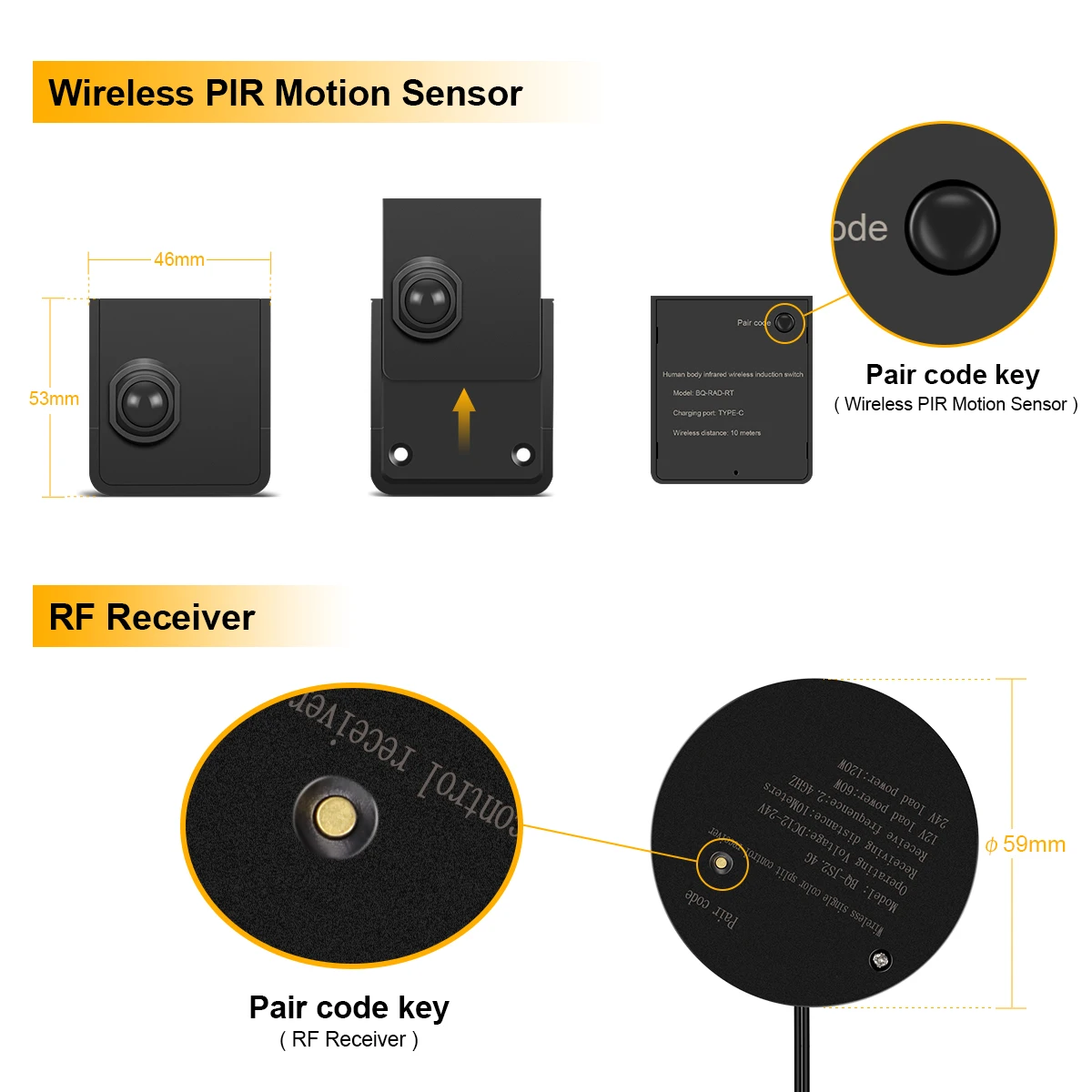
4. Repeat the above steps when connect the second or more wireless sensor switches


