Key Parameters:
- Image Sensor: 1/4-inch CMOS
- Image Pixel: 0.3MP
- Lens focus: 4.3mm
- Vision Angle: 70°
- Pixel Size: 5.6μm * 5.6μm
- Output Format: Standard JPEG/M-JPEG
- White balance: automatic
- Exposure: Automatic
- Gain: Automatic
- Shutter Type: Electronic Rolling Shutter (ERS)
- SNR: 45DB
- Dynamic range: 60DB
- Maximum analog gain: 16DB
- Maximum Frame Rate: 30 Fps at 640*480
- Scan Mode: Progressive
- Vision Distance: 0-15M
- Optional Image Resolution: Default VGA (640*480); QVGA (320*240)
- Optional Night Version Infrared Fill Light
- Optional Baud Rate: Default 115200; 9600, 19200, 38400, 57600
- Working Current: 100Ma
- Power Consumption: 500mW
- Working Voltage: 3.3-5V DC (Recommend 5V)
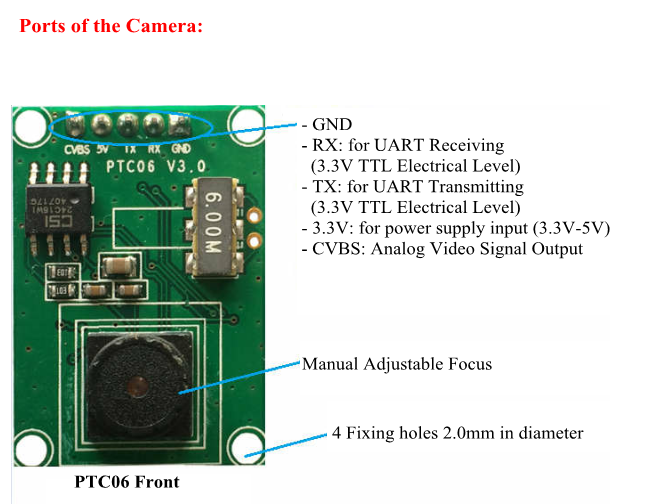
- Communications Ports: TTL Level UART Interface (TX, RX, GND)
- Operating Temperature: -30âto +70â
- Module Weight: 5g
Package Included:
- 1 x VC0703 3.3V-5v Camera Module TTL/UART Only (Unfished)
- 1 x Cable
Note: Please note that self-assembly is needed. Thank you!
Attention:
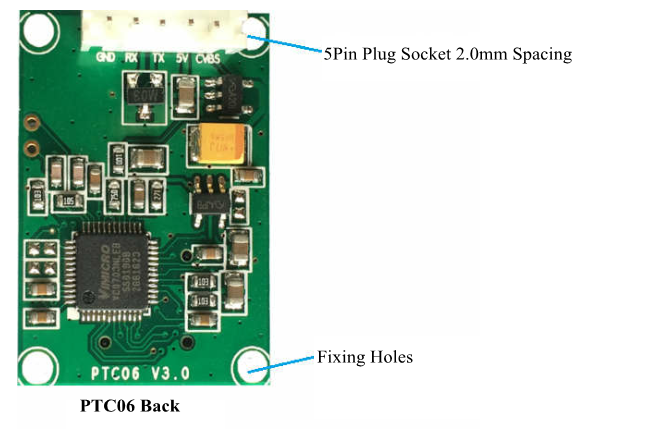
- For reading static pictures serial-control camera is connected via GND, RX, TX, and VCC.
- For analog video output, the CVBS port should be connected.
- TX and RX are the signals of 3.3V TTL Electric Level.
- When you use 5V to power the camera, the working current is around 100mA. So we recommend that a controlled switch to control the power supply.
- When it is used for the first time, please receive and send command after 2.5s.
Communications Protocol for the Camera (The numbers of command is hexadecimal)
1. Command to Reset: 56 00 26 00; Return: 76 00 26 00
2. Command to Take Photos: 56 00 36 01 00; Return: 76 00 36 00 00
3. Command to Read the Length of Photos: 56 00 34 01 00; Return: 76 00 34 00 04 00 00 XX YY
XX YY ---data lengthï¼XX for higher byteï¼YY for low byte
4. Command to Read the Data of Photos: 56 00 32 0C 00 0A 00 00 XX XX 00 00 YY YY 00 FF
Return: 76 00 32 00 00 FF D8…FF D9 76 00 32 00 00
00 00 XX XX ------start address(default: 00 00ï¼
00 00 YY YY ------data lengthï¼higher one firstly then lower byteï¼
5. Command to Clear Photo Cache: 56 00 36 01 02; Return: 76 00 36 00 00
6. Command to Set Compression Ratio of Photos: 56 00 31 05 01 01 12 04 XX; Return: 76 00 31 00 00
XX recommend 36 ï¼range:00 to FFï¼
7. Command to Set the Size of Photos:ï¼default: 640*480ï¼
56 00 31 05 04 01 00 19 11 ï¼320*240); Return: 76 00 31 00 00
56 00 31 05 04 01 00 19 00 ï¼640*480ï¼
56 00 31 05 04 01 00 19 22 (160*120)
8. Command to Modify the Serial Buad Rate (Temporary):56 00 24 03 01 XX YY; Return: 76 00 24 00 00
XX YY Rate
AE C8 9600
56 E4 19200
2A F2 38400
1C 4C 57600
0D A6 115200
Attention:
- Default baud rate: 115200
- With the baud rate modified, it will be 115200 when it is powered on again.
9. Command to Modify the Serial Baud Rate (temporary):56 00 31 06 04 02 00 08 XX YY; Return: 76 00 31 00
XX YY Rate
AE C8 9600
56 E4 19200
2A F2 38400
1C 4C 57600
0D A6 115200
Attention: After modifying the initial baud rate of the serial port, you need to reset or re-power it once, and the new setting will take effect.
Steps to Take Photos with PTC06 Camera:
- Step 1: Power on
- Step 2: No Operation within 2.5s
- Step 3: Set Command to Change the Size of Picture (If it is needed to change the size, please carry out Step 4: Command to Reset)
- Step 4: Command to Reset (Only carried out after Step 3)
- Step 5: Set Command of Compression Rate for Photos
- Step 6: Send Command to Take Photos
- Step 7: Send Command to Read the Length of Photos
- Step 8: Send Command to Read the Data of Photos
- Step 9: Send Command to Clear Cache
- Step 10: Take Photo again please Return to Step 6.
2. Avoiding some unnecessary trouble, please check with your country's customs office to inform us what we should declare its value before shipping.
