Must read before purchase (important!)
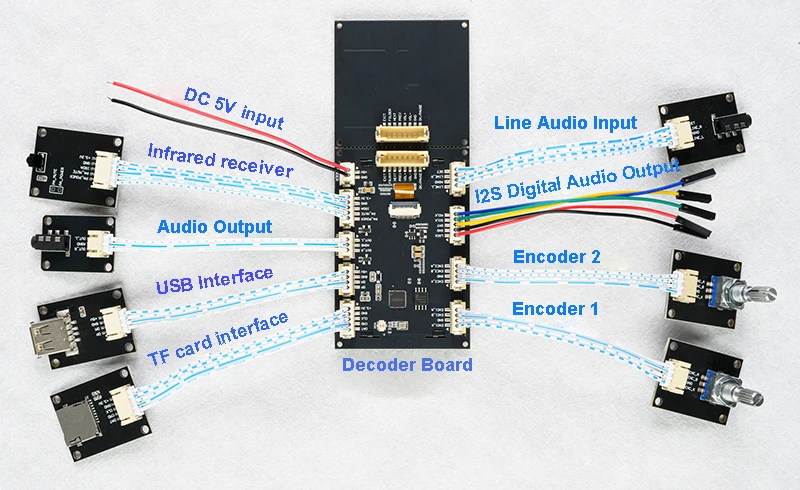
1:This product is a decoder board motherboard + interface board split design. The motherboard integrates the key operation function and display, but not directly connected to the peripheral but through the 2.0mm pitch cable lead to the corresponding interface board, interface board installed on the corresponding socket and peripheral plug (such as LINE socket, USB socket, TF card socket).
2: The decoder board supply voltage of 4.5-5V, it is recommended to use the LM7805 such linear voltage regulator chip regulator out of the power supply, so as to avoid too high a voltage burned off the decoder board or too low a voltage abnormalities, can not be used with 3.7V lithium-ion power supply, because of the 3.7V battery voltage relative to this decoder board on the low side and the voltage is not stable.
3:Purchase this decoder board no decoder board motherboard wiring diagrams, PCB diagrams, source programs and other information all can provide information and instructions are placed in the Baidu.com disk link as well as this page, there is no other information that can be provided.
4: Buy this product does not provide DIY modification of the technical guidance services, need to buy back to modify the speaker buyers, please evaluate their own can not modify and then buy.
Product Description
KCX TFT2.8 PLAYER is a multifunctional hi-fi stereo audio decoder board which integrates Bluetooth audio decoding, TF card, U disk music file decoding, computer USB sound card and LINE input. The board uses a 2.8-inch 320X240 pixel IPS color screen to display playback status and decoding related information. It also supports analog audio and digital audio (I2S) output. Support decoding file format MP3/WAV/WMA/FLAC/APE when playing U disk/TF card in music mode, support parsing 1rc lyrics file to realize synchronous display of lyrics with lyrics file, and display 32 segments of real-time dynamic spectrum without lyrics file. Bluetooth mode supports SBC/AAC audio transmission protocol, supports Bluetooth lyrics song title and other ID3 information display, while supporting the spectrum display.LINE mode supports stereo line audio input, supports the left and right channel envelope map display + spectrum display.USB sound card mode supports envelope map + spectrum display. The built-in equalizer is preset with 7 EQ scenes + 1 custom EQ scene, which can be well matched with the speakers and personal listening preferences to select and adjust to their own sound effects. This product supports Simplified Chinese, Traditional Chinese and English display. For more information about product details, please see the description on this page ....
Product Information
Specification
Model No.:KCX_TFT2.8_PLAYERV2.
Product weight:46g (only the motherboard, not including accessories)
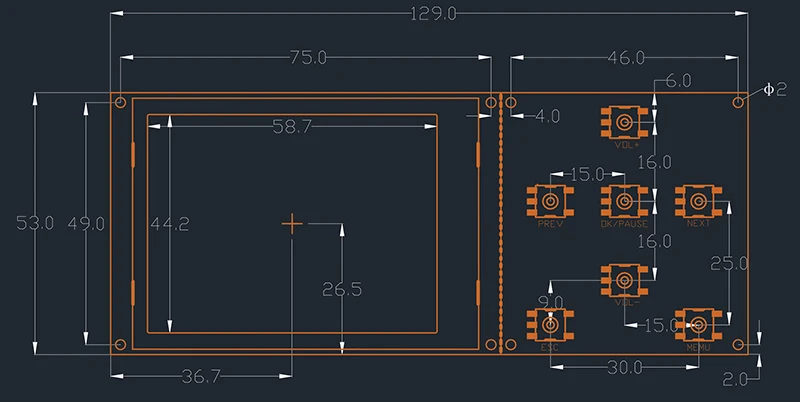
Dimension:12.9*5.8*1.1cm
Screen size:2.8 inch
Screen Pixel:320*240
Bluetooth Name:Bluetooth Audio(user can change)
Bluetooth version:V5.3+BR+EDR
Bluetooth Receiving Distance:about 10 meters
Audio DAC hardware bit width: 24 bit
Number of output audio channels: 2 channels
Output Audio Signal Level:<2.4Vp-p
Audio output signal-to-noise ratio: SNR>104db
Audio output signal power: <50mw (can support direct push headphones, such as the need to push the speaker requires an external amplifier)
Operating voltage: 4.5-5.0V (need to be regulated power supply)
Operating current:30-150mA(only the motherboard working current, different states of power consumption is not the same, does not include peripheral current)
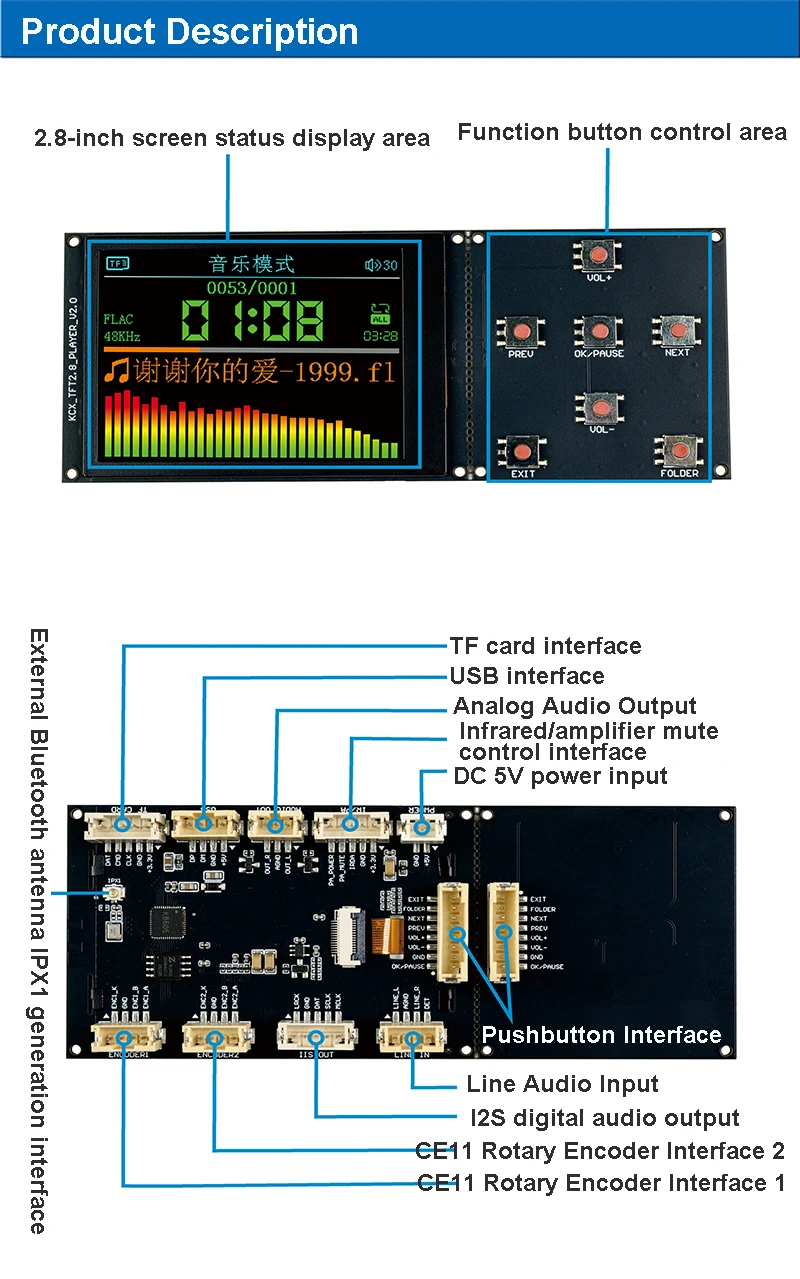
Button Function Description
VOL+ button:Volume up/select upward.
V0L- button: volume down/down selection
0K/PAUSE button: confirm/pause/play, in the playback of U disk/TF card state long press 1 second to switch the cycle mode ALL (all cycle), 0NE (single song cycle), FOL (folder cycle), RAN (random play)
PREV button: previous song/left selection
NEXT button: previous song/select to right
EXIT button:Exit page
FOLDER button: short press to call up the file directory preview page under the state of playing U disk/TF card.
CE11 Extended Encoder Knob Function Description
Encoder Knob 1:Rotate left/right to switch up/down song, press down for exit page function.
Encoder Knob 2:Rotate left/right to adjust volume up/down/up/down selection, press down for confirm/play/pause function.
Enclosure function description
1:POWER (DC power input interface) GND terminal for the negative pole, +5V terminal for the positive pole.
2:IR/PA (infrared, amplifier control interface)
+3.3V, GND, IRDA corresponds to the three lines connected to the infrared receiver head, PA MUTE for the control of the amplifier mute (this port player sound output 3.3V high level without sound output OV low level), PAPOWER for the control of the amplifier power supply, power-on output 3.3V high level, power-off output low level (note that the output port of the high and low output current is only 20mA, can not be directly with the load). 20mA, not directly with load).
2: AUDIO OUT (analog audio output port) 0UTL for the left channel, AGND for the audio ground, 0UTR for the right channel.
3: USB (USB interface) USB enclosure +5V, GND, USB DM, USB DP were connected to the USB enclosure corresponding to the four lines, for music mode read U disk or USB sound card mode connected to the computer.
4: SD CARD (SD/TF card enclosure) SD/TF card enclosure, +3.3V, GND, SD CLK, SD CMD, SD DAT were connected to the SD/TF card holder corresponding pins (note that the card holder's CD and SD CLK enclosure should be connected to a 3.3K resistor to do the card insertion detection, or else the detection of the card is not inserted).
5:ENCODER1 (CE11 rotary encoder interface 1)
CE11 rotary encoder interface, external CE11 rotary encoder, ENC1AGND, ENC1 B, ENC1 K are connected to the encoder's A-phase, ground, B-phase, keys. (This encoder is used for volume adjustment (rotary), pause playback (down-press), loop mode (long-press) control of the extended function)
6:ENCODER2 (CE11 rotary encoder enclosure 2)
CE11 rotary encoder interface, external CE11 rotary encoder, ENC2A, GND, ENC2 B, ENC2 K were connected to the encoder's A-phase, ground, B-phase, key this encoder is used for up and down the curve (rotary), return (press short press), file preview menu (long press) control of the extended function.
7:I2S OUT (digital audio output port) LRCK: frame clock, fixed output and sampling rate of the same frequency clock signal because the output sampling rate is 48KHz so the signal is fixed to 48KHz.GND: ground
DAT: 32-bit serial digital audio data stream SCLK: serial clock, some places also called bit clock BLCK, here fixed output H3.072MHz signal (SCLK frequency = the number of channels * number of sampling bits * sampling rate that is, 2 * 32 * 48000 = 3.072MHz) MCLK: Master Clock (this line is not necessary to connect the signal line, there are some DAC decoder internal self-below the clock source does not need to connect this line). MCLK: master clock (this signal line is not necessary to connect, some DAC decoders have their own internal clock source, you do not need to connect this line), this signal output 256 times the sampling rate of the clock signal, that is: 48000 * 256 = 12.228MHz Note: the I2S interface signal protocol specifications are as follows
Mode:master Data format:I2S Sampling rate:48KHz Number of sampling bits:32(24 valid bits, the lower 8 bits are fixed as 0)
8:LINE IN (Line Input Interface)
DET for the channel insertion detection terminal, this port comes with 10K pull-up, audio line inserted into this port to pull the port to a low level, the audio line is pulled out to return to a high level so as to determine the insertion of the audio line state (need to be used with the detection port audio interface, such as the audio interface does not insert the detection can be left unconnected).LINER, AGND, LINE L are respectively the right channel input, the audio ground, left channel input (line input interface for connecting computers, cell phones, MP3 players, CD players and other equipment headphones or line output interface, do not connect to the speaker signal output port of the amplifier).
9: key interface, respectively, corresponding to the key EXIT, FOLDER, NEXT, PREVVOL+, VOL-, GND, OK, the key is connected to the light touch self-resetting button, low-level trigger is valid. (This interface has been connected with the keypad board without connecting the wires, if you need to break the keypad board and decoder board to use before you need to connect the wires.
10:IPX1(Bluetooth external antenna interface)
This port is reserved for the bluetooth IPX1 generation RF antenna interface, used to plug the external bluetooth antenna, when the product is used in the product with a metal casing inside, because the bluetooth RF signal is not able to penetrate the metal, so you need to external bluetooth antenna to the outside of the chassis to receive bluetooth signals, when using an external antenna, be sure to disconnect the board to connect to the board antenna of the 0R resistor, external antenna to select the 2.4G frequency band! IPX1 generation interface Bluetooth antenna can be (change the external antenna, please download the Baidu.com disk information "change the external 2.4G Bluetooth antenna instructions.pdf"). (Note: Bluetooth external antenna is not mandatory, you need to choose the appropriate size and length of the line according to the shape of their own products, can not be done uniformly, need to provide their own, the purchase of this product does not include Bluetooth external antenna)
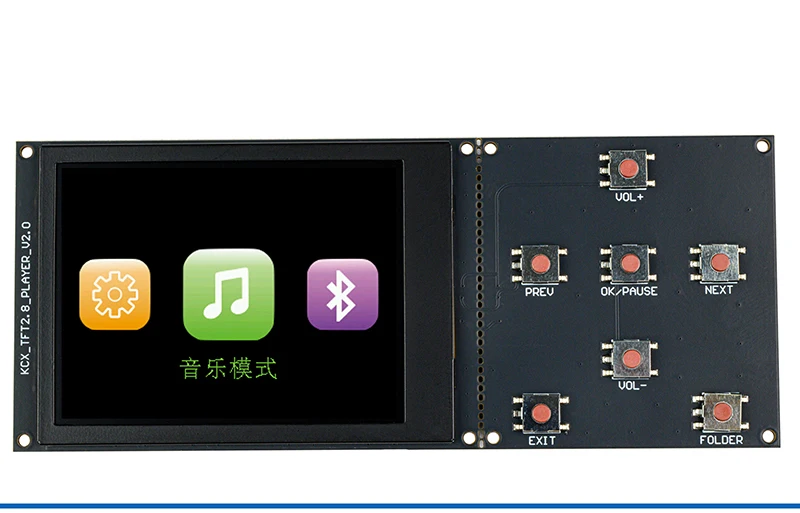
1:Mode Selection Main Interface(You can select "Music Mode", "Bluetooth Mode", "Line Input", "PC Mode", "System Settings", "System Settings", etc). ", "System Settings")
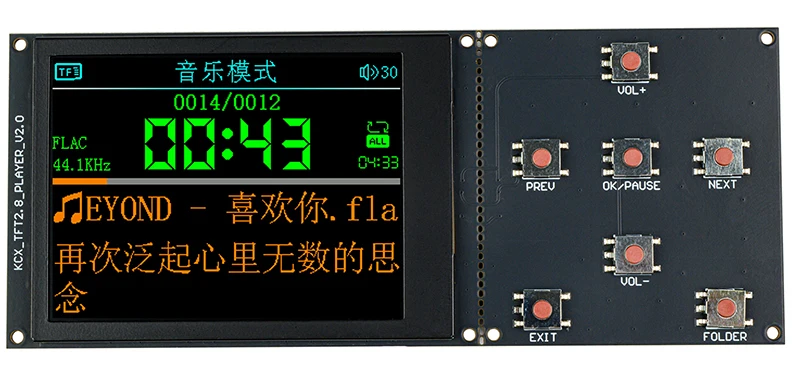
2:Music playback interface (with lyrics display and without lyrics display 2 states) Note: Spectrum area current music without corresponding .lrc lyrics file display spectrum, with 1rc lyrics file display lyrics, the following is with lyrics and without lyrics two states.
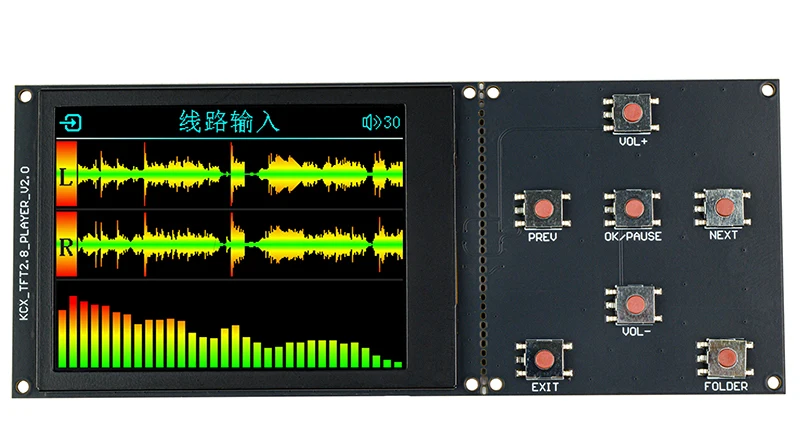
3. Line Input Interface (Real-time display of L/R channel envelope and spectrum graphs on the line input interface)
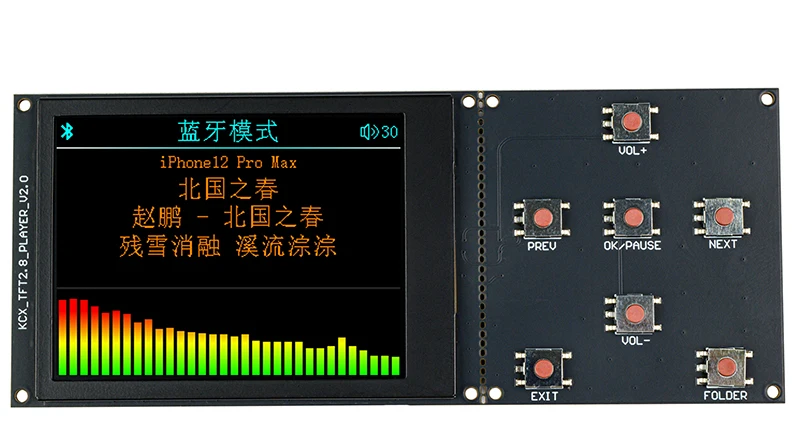
4. Bluetooth Audio Playback Interface (Displays song name and album name; lyrics sync function requires mobile player app support)
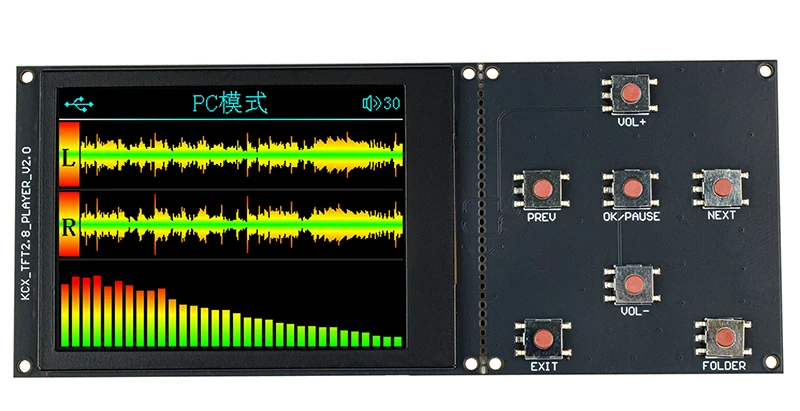
5. PC Mode Interface (USB Sound Card Mode for Computer)
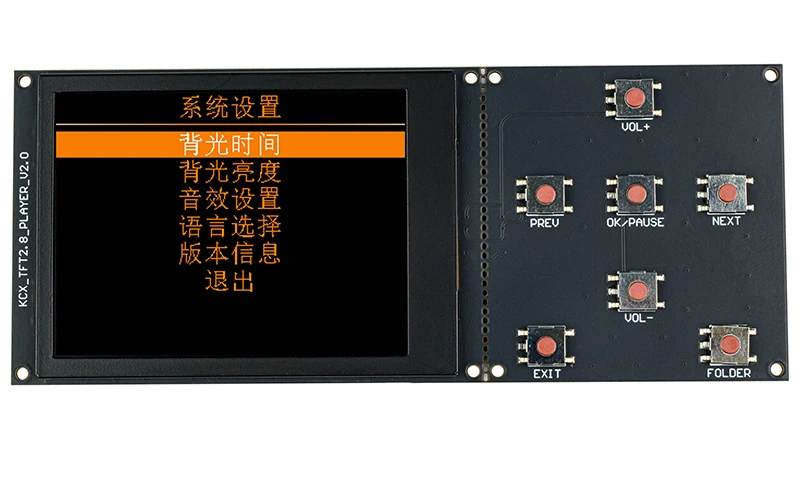
6. System Settings Interface
Supports English Menu
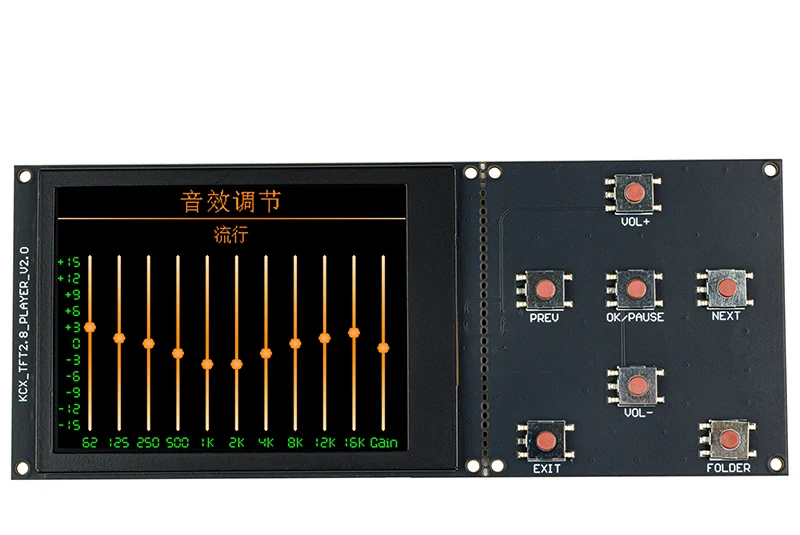
7. Sound Effects Adjustment Interface
Note: This product features 7 preset sound effects - "Normal", "Rock", "Pop", "Classical", "Jazz", "Country", "Bass Boost" - plus 1 customizable sound effect. For custom EQ adjustments, please refer to the "Custom Sound Effect Configuration Guide.pdf" in the Baidu Netdisk resources.
Important Notes
Strictly follow the wiring diagram when making connections. Do not insert ribbon cables randomly to avoid damage.
This decoder board requires a stable 5V DC power supply. Using voltages higher than 5V or lower than 4.5V may cause damage.
Keep ribbon cables between interface board and main board as short as possible (≤20cm). Excessive length may cause signal degradation and affect stability - especially for high-speed interfaces like USB and TF card slots.
Frequently Asked Questions (FAQ)
Q: What file systems does this product support for USB/TF cards?
A: Supports FAT12, FAT16, FAT32, and exFAT file systems. NTFS is not supported. If the drive isn't recognized, reformat it to a compatible file system.
Q: What is the maximum supported capacity for USB/TF cards?
A: Up to 64GB, but avoid storing excessive files on the drive.
Q: Why is USB/TF card detection slow?
A: Use genuine USB/TF cards (avoid counterfeit/"expanded" cards). Too many files/folders will slow detection. Try reformatting the drive.
Q: Some FLAC/WAV files won't play
A: This decoder only supports specific FLAC/WAV formats (see "Supported Decoding Formats" for bitrate details). Convert unsupported files to compatible formats.
Q: Playback stutters with high-bitrate WAV/FLAC or slow folder navigation
A: Caused by insufficient USB drive speed. Solutions:
Convert files to 16-bit/44.1kHz or lower bitrates
Use a TF card instead (typically faster than USB drives)
Q: Regular background noise interference
A: Caused by high power supply ripple. Use a low-noise 5V regulated power supply.
Q: Audio input/output specifications?
A:
Input: ≤2.4Vp-p (compatible with headphone/LINE outputs)
Output: ≤2.4Vp-p (can drive headphones or amplifier inputs). Note: Output power is too low to directly drive speakers.
Q: Is the I2S interface compatible with my DAC?
A: Verify your DAC supports this board's I2S specifications (data format, bit width, mode, etc.).
Q: Can I2S and analog audio output simultaneously?
A: Yes, this decoder supports simultaneous I2S and analog output.
Q: How to use AP_MUTE and AP_POWER amplifier control pins?
A:
AP_MUTE: Outputs 0V (low) during playback, 3.3V (high) when idle
AP_POWER: Outputs 0V (low) when powered off
WARNING:
Max output current: 20mA
Do not apply >3.3V to these pins
For >3.3V logic amplifiers, use transistor/relay driver circuits
Leave unconnected if unsure
Q: Which Bluetooth codecs are supported (SBC/AAC)?
A: Codec selection is auto-negotiated with your phone (typically highest quality available). Some phones require enabling AAC in Bluetooth settings.
Q: How to enable lyrics sync for USB/TF playback?
A: Place an LRC-format lyrics file (same name as audio file) in the same directory.
Q: Why don’t Bluetooth lyrics sync?
A: Lyrics are transmitted from your phone’s music app. Enable "Bluetooth lyrics" in the app settings (e.g., KuGou Music: My > Settings > Lock Screen/Bluetooth Lyrics).
Q: Can I customize the Bluetooth name/startup screen?
A: Yes, refer to the provided documentation for instructions.
Q: Is the 8-pin keypad connector required?
A: Only needed if the keypad is physically separated from the main board. The default integrated design requires no cable.
Q: Can I use only encoders or only buttons for control?
A: Yes, the board supports independent use of either control method.
Q: Is there a schematic for the interface board?
A: Yes, the interface board schematic is available.
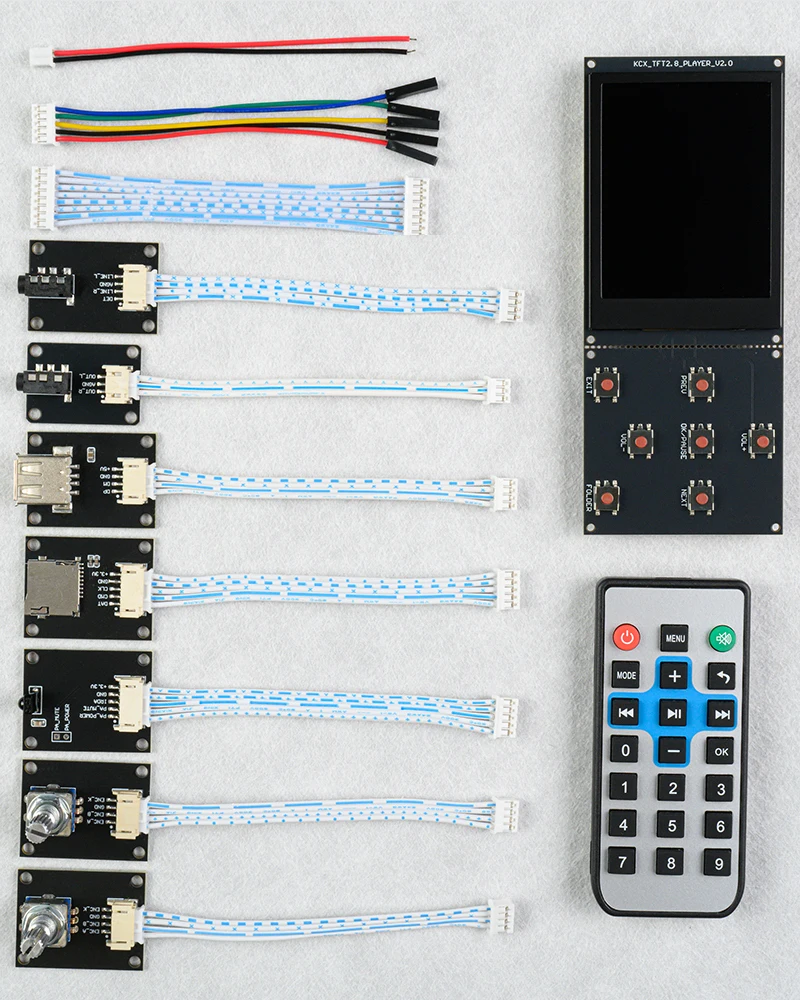
Packing List
2Pin/2.0mm Single-Ended Power Cable ×1
5Pin/2.0mm to Dupont Female I2S Connection Cable ×1
8Pin/2.0mm Keypad Connection Cable ×1
4Pin/2.0mm LINE Interface Board + Connection Cable ×1 Set
3Pin/2.0mm Audio Output Interface Board + Connection Cable ×1 Set
USB Interface Board + Connection Cable ×1 Set
TF Card Interface Board + Connection Cable ×1 Set
IR (Infrared) Interface Board + Connection Cable ×1 Set
Encoder Interface Board + Connection Cable ×2 Sets
Main Decoder Board ×1
Remote Control ×1
(Note: All included cables are 10cm in length with PH2.0 connector spacing specification.)