


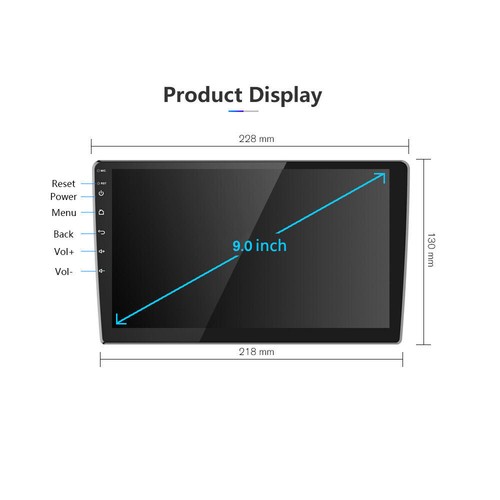
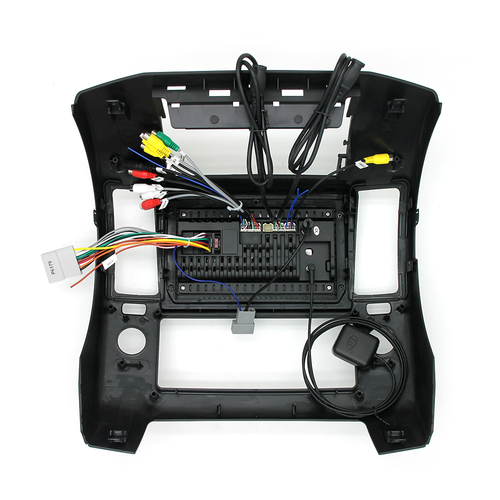


Description
>> Compatible vehicle models and years of construction:
FOR NISSAN NAVARA D40 2006-2012

Dask Kit Features:
- Designed And Contoured To Match Factory Dashboard
- High-Grade ABS Plastic Structure
- Factory Style Texture Design
- Quick And Easy Installation
- Quality Crafted To Factory's Rigid Specification
- High Quality, ABS Plastic Molded Connector For The Perfect Fit
- Plugs Into The Factory Harness Without Cutting Any Wires
- Includes ISO Extention Trim Ring
- All Necessary Hardware Included
- Showing A Gapless Fit Between The Dash And The Kit
Kit Includes:
- Radio Housing ×1
- Accessories ×1
Package Includes :
1 x Android Car Stereo
1 x Power Cable
1 x GPS Antenna
2 x USB Cable
1 x RCA Cable
1 x AHD Camera
1 x User Manual
Note:
- Vehicle Compatibility Chart May Vary Depending On Vehicle Options, Production Dates, And Install Application. Please Inquire Before Purchase.
- Wire Harness Does Not Work On Vehicles With Premium Factory Sound System.
- Wiring Harness Is NOT Compatible With Premium BOSE, Amplified Sound Systems And Onstar.
- Please Verify Your Vehicle's Original Sound System Specifications Before Purchasing Your Harness.
- Different configurations have different wiring and parts.
Product Description

- Wired and Wireless Carplay
- Connect your phone to the android car stereo via Bluetooth or USB data cable.
- Turn on the app 'Zlink5'.
- Wait for a moment. Connection succeeded.
- Wired and Wireless Android Auto
- Install the app 'Android Auto' on your phone.
- Connect your phone to the android car stereo via Bluetooth or USB data cable.
- Turn on the app 'Zlink5'.
- Wired and Wireless Mirror Link
- Turn on phone's hot spot
- Connect the car radio wifi to your phone's hot spot
- Turn on the app "zlink5" on the unit, follow indications to operate.
- For Iphone, please turn on the 'scrennmirror' on the control center. For Android phone, download the app on your phone to connect to the radio.

- GPS Navigation
- Double din android car radio with built-in offline application named "HereWego", you can download Worldwide Offline Map.
- With wifi/hotspot connected, you also can get access to online maps. This unit is compatible with most of navigation apps in Play Store, such as Map, Sygic, Navitel IGO, etc.
- Built-in WiFi
- Built-in WiFi supports to surf the web or download various apps.
- Split Screen
- As a mobile phone, two software can be displayed on the screen at the same time. For example, you can play music while navigating.


