Newest 220V input volatge Timer Board Time Contro Board Power Supply for coin acceptor coin selector, pump water, washing machine, massage chair
Description:
*Newest version of software
*This is used for power supply time control
*Can be used with a coin acceptor or other devices that can output pulse signals.and you can set up for what values to start your machine
*Suitable for any kinds of automatic control devices such as gaming machines, massage chairs, shoe polishers, washing machines, chargers, dryers, and PCs.
Features:
(1) Controls electrical devices ( TV, Massage chair..) power.
(2) Suitable for public place location and most of electric device control,
for example:PCs,washing machines,dryers,massage chairs,chargers,etc.
(3) AC 1250W/DC 500W electrical relay capacity.
(4) Digital timer: rate adjustable by owner through three simple push button switch.
(5) The time can be set by seconds or by minutes.
maximum time : there are 2 version of software
•99:00 (minutes:seconds) or •99:00 (hours:minutes)
(6) Control time by seconds-minutes or minutes-hours.
(7) Accumulate time when signal inputs.
(8) Timer control board with coin acceptor operates with 12V DC power.and has
the LED to show the Time left.
(9) Input Volatg: 220V(Please DO NOT USE FOR 110V INPUT POWER)
Connection:
1: Connect to coin acceptor or bill acceptor:
RED:+DC12V WHITE: signal input BLACK: GND BLUE: counter
2: Connect to counter:
BLACK: GND RED:+DC12V
WHITE: signal output
3: Input power: neutral and live of to power supply
4: Output power: neutral and live of to device
5: Display for time and setting
6: Button STOP/START
7: Button START for operating model:01:02
Note: Voltage for No.3 and No.4 IS 220V

Voltage checking:

Setting:
GIVEN TIME and VALUE: User can get extra free time when the amount reach the value you have set up during the working time.
---------------------------------------------------------------------------------------------------------------------
If the function of GIVEN TIME is not needed, please skip step 5-step 7 by press button S4.
- Please press button "S4", and then please use button "S1" and button "S2" to set up VALUE
- Please press button "S4", and then use button "S1" and "S2" to set up TIME for FIRST 2 NUMBER (00:--
- Please press button "S4", and then use button "S1" and "S2" to set up TIME for LAST 2 NUMBER (--:00
- Please press button "S4", and then use button "S1" and "S2" to set up VALUE OF GIVEN TIME
- Please press button "S4". Use button "S1" and "S2" to set up GIVEN TIME for FIRST 2 NUMBER (00:--
- Please press button "S4". Use button "S1" and "S2" to set up GIVEN TIME for LAST 2 NUMBER. (--:00
- Please press button "S4". Use button "S1" and "S2" to set up TIME for WARNING SOUND
1. Please hold on button "S1" and "S2" to get into MODE SETTING.
2. Please use button "S1" and button "S2" to set up CODE for FIRST MODE.
3. Please press button "S4" after setting.
4. Please repeat step 2 and step 3 for setting rest mode.
Code instroduction:
Operating Mode
01:01: Time counts down without pressing button
01:02: Time counts down by pressing button
TIME TYPE
02:03: MINUTE: SECOND
02:04: HOUR: MINUTE
-----------------------------------------------------------------------------------------------------------------
MEMORY MODE
03:05: Continue counting time after power off and on
03:06: Reset time and value after power off and on
-----------------------------------------------------------------------------------------------------------------
TIME for RESET AUTOMATICALLY
04:??: 1-30 minutes are adjustable.
Description: Time and value will be reset automatically if user does not choose any function after the
user inserts coins.
DEFAULT
Operating Mode: 01:01 Time Type: 02:03 Memory Mode: 03:06
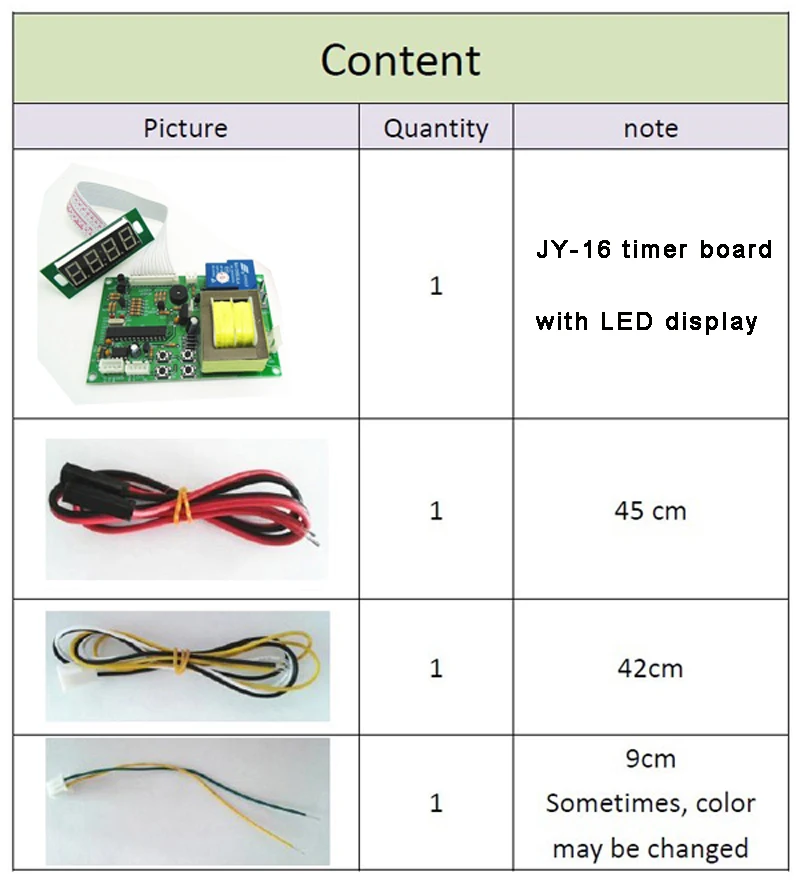
This Listing Including:
One pcs JY-16 220V Input Timer Board
Items you may also interested in:


|


