Compatible Vehicles:
Toyota Camry 2000-2003


Dask Kit Features:
Designed And Contoured To Match Factory Dashboard
High-Grade ABS Plastic Structure
Factory Style Texture Design
Quick And Easy Installation
Quality Crafted To Factory's Rigid Specification
High Quality, ABS Plastic Molded Connector For The Perfect Fit
Plugs Into The Factory Harness Without Cutting Any Wires
Includes ISO Extention Trim Ring
All Necessary Hardware Included
Showing A Gapless Fit Between The Dash And The Kit
Note:
1.Vehicle Compatibility Chart May Vary Depending On Vehicle Options,
Production Dates, And Install Application. Please Inquire Before
Purchase.
2.Wire Harness Does Not Work On Vehicles With Premium Factory Sound System.
3. Wiring Harness Is NOT Compatible With Premium BOSE, Amplified Sound Systems And Onstar.
4. Please Verify Your Vehicle's Original Sound System Specifications Before Purchasing Your Harness.
Features:
9 inch 2.5D tempered glass double din car radio.
Double USB adapter input.
Build-in Wifi, Bluetooth 4.0, FM radio receiver.
Support multi-language:up to 40 national languages.
Support steering wheel control, and rear view camera.
IOS/Android mirror link: IOS one-way( iPhone 5-7); Android two-way ( Android 4.0~8.0).
Support file manager: You can download, install and delete over thousands of android apps.
Driving recorder: You can choose a recorder, and the car has playback, the evidence can be retained.
|
|

|
|
|
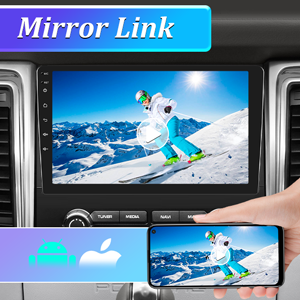
Mirror Link
Project the phone to the car monitor.
Dual system mirror link: IOS/Android mirror link
IOS one-way: IOS supports one-way projection of mobile phones to the machine
Android two-way: Android supports two-way connection of mobile phones
|
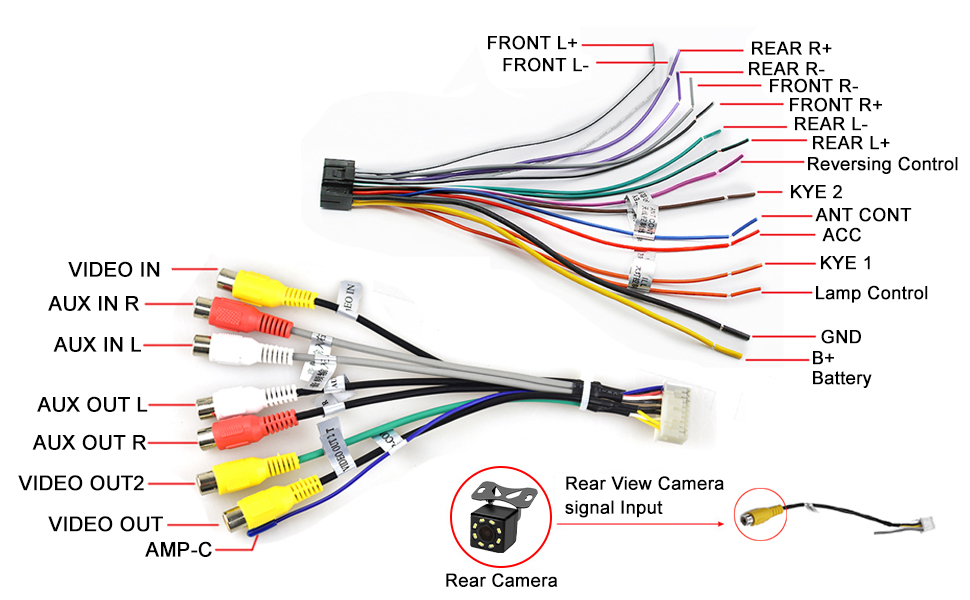
Reversing Video Input
How to connect the rear view camera?
Camera's power cable: red and black --- Red connect to reverse light positive, black to reverse light negative.
RCA cable: yellow port ---- Insert into CAMIN port (yellow) on the radio.
rigger cable: cable named "reversing control" on the radio backside
harness, according to the wiring diagram label on machine bottom ---
Connect this cable to reverse light positive wire of the car.
|
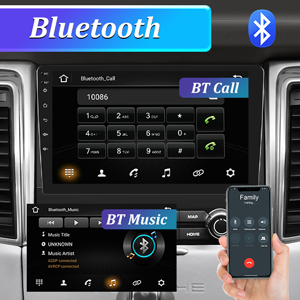
Bluetooth
1.Open the phone settings interface, open the Bluetooth in the
Bluetooth function, search for Bluetooth devices, find the player's
Bluetooth model to be paired.
2.If you need a pairing code, enter 0000; if not, try 1234 or 123456.
|
|

|

|
|
|
FM Radio
Why can't search FM?
1. No radio antenna inserted;
2. Please check if the radio antenna is plugged in. Please insert more antennas several times to make it well contacted;
3. The signal of your location is not good. Please go to a better place to test again
4. The radio antenna on the car is broken/no effect; please replace the radio antenna and test again.
|
GPS Navigation
Why the GPS cannot locate?
1.GPS antenna not inserted Insert a GPS antenna.
2.May be in multiple GPS signal shielding areas Test the car remotely to see if GPS signal recovery has been restored.
|
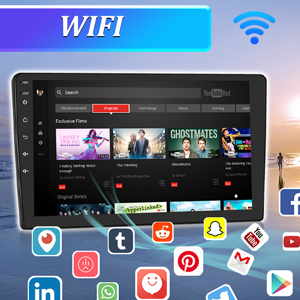
WIFI Connection Method
1. Turn on the mobile phone hotspot.
2. Turn on the product’s wifi.
3. Click on the mobile phone’s hotspot to connect. Just enter the password of your mobile hotspot.
|
FAQ:
1. Why can't I turn on the car radio?
1.1 Please check the voltage of the car radio: 12V
1.2 When testing this car radio, you can combine the red wire and the yellow wire to connect to the positive pole of the power supply, and the black wire to the negative pole of the power supply.
1.3 Replace the same type of insurance test car radio.
Note: Please be sure to use our power cord to connect to our car radio, and not directly plug the original car plug into our machine.
2. Why does the car radio display "No Signal" when reversing?
Please check if the camera cable is properly connected to the car radio.
Note: The video port of the rear camera must be plugged into the "CAMIN" port of the car radio.
3. Why does the camera display "!" when I use USB to watch video, it says "Can't watch video while driving"?
Please turn off the "Video Warning" function in the settings.
4. Why can't I find FM?
4.1: The radio antenna is not inserted;
4.2: Please check whether the radio antenna is plugged in, please plug in the antenna several times to make it contact well;
4.3: The signal at your location is not good. Please go to a better place to test again
4.4: The radio antenna on the car is broken/no effect; please replace the radio antenna and retest.
5. Why can't I connect to the Bluetooth of the car radio?
5.1. Open the phone settings interface, turn on Bluetooth in the Bluetooth function, search for Bluetooth devices, and find the Bluetooth model of the player to be paired; if you need a pairing code, please enter 0000; if not, please try 1234 or 123456.
5.2. Please try to use other mobile phones to test this function.
All methods are correct, and Bluetooth still cannot be used, please unplug the plug on the back of the player and plug it in after 3 minutes.