

10.1 Inch Wall Planner Digital Calendar & Chore Chart,Smart Touchscreen Interactive Display for Family Schedules,Hearth Display Digital Calendar, Digital Photo Frame Share Moments from Anywhere
Description
| Item model number | ZN-DP1002 |
| Color | White |
| Resolution | 1080p |
| Product Dimensions | 7 x 9 x 0.99 inches |
| Compatible Devices | Smartphone |
| Item Weight | 2.59 pounds |
| Manufacturer | akimart |
| Screen Size | 10.1 Inches |
| Brand | akimart |
| Size | 10.1 inch Black |
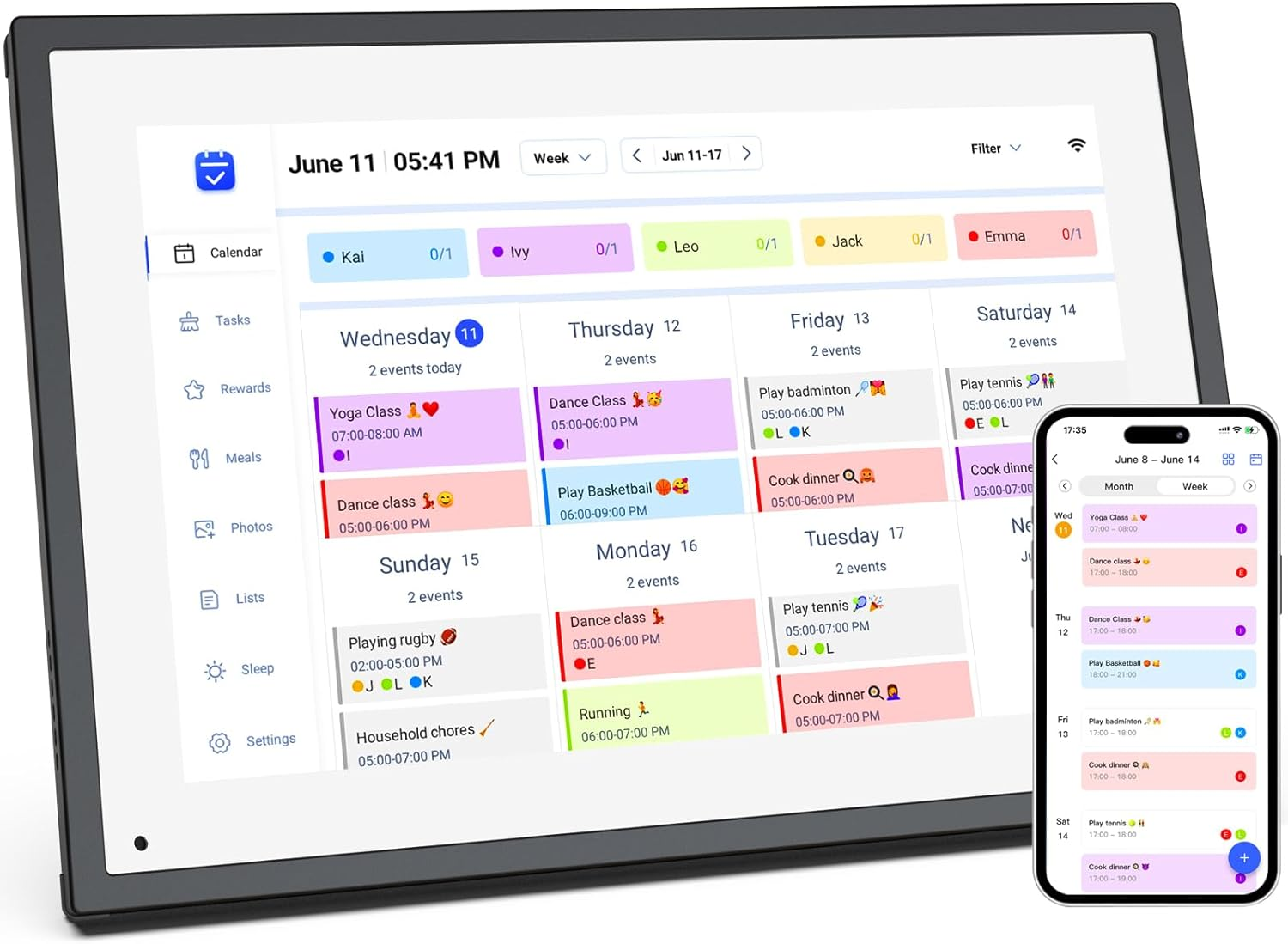
- 【All-In-One Digital Calendar】: WiFi digital calendar + planner touchscreen display + digital picture frame that will get the whole family organized and running smoothly. It’s never been easier to keep the whole family informed by assigning each member their own color and chores. (NOTE : Can Not Wall Mount)
- 【Versatile Family Assistant】: This versatile digital calendar planner goes beyond a calendar; it helps you create meal plans, access recipes, and watch cooking tutorials. With touch screen, you can easily access smart home apps to control your existing devices. It also serves as a digital picture frame to showcase cherished family memories.
- 【Easy Setup & Use】: Simply plug it in, connect to Wi-Fi, and sync your calendars – all your events will automatically populate and sync. Synchronize with the internet time servers to ensure the utmost accuracy.Add events or chores directly on the device or use the free to download mobile app. Compatible with Google Calendar, iCloud Calendar, Outlook Calendar, Cozi, and Yahoo.
- 【Chores Chart & Dinner Planner】: Easily add, edit, and track chores to promote independence with an interactive Chore Chart. Especially children, to develop healthy habits with an interactive chore chart. Display your family dinner plans to keep everyone informed and eliminate the daily "What's for dinner?" question.
- 【Built-in Digital Picture Frame】: Supports sending Photos & Videos by Fr-ee App, sharing wonderful moments with your family & loved ones from anywhere. All your precious and cherished moments can be displayed on the digital photo frame instead of just being locked inside your phone.
- 【Say Goodbye to Family Chaos】: Our smart calendar digital wall is your ideal solution to reduce stress and keep everyone organized effortlessly. Transform your home into a hub of harmony and productivity. While also serving as a beautiful digital photo frame to relive your most cherished moments. Perfect for organizing busy family lives or for gifting!
Product description
Operation Video
-
How to set and bind your calendar
1.Set up Digital Calendar. 2.Scan the code to download the eCalendar App on your phone.
3.Set up your email address to generate a code. 4.Digital Calendar input code to bind your phone.
5.Start using your Digital Calendar
The video showcases the product in use.The video guides you through product setup.The video compares multiple products.The video shows the product being unpacked.10.1 inch Wall Planner Digital Calendar
Merchant Video -
How to Add Chores
Digital Calendar Add Chores
1.Click on the "+" to add Chores 2.Name chores, set date and time 3.Add members and assign chores, or assign chores to already added members
App add Chores to syn to Digital Calendar
1.Click Chores 2.Add new members 3.Click "+" to enter chores name, set the date and time 4.After saving, it can be syn to Digital Calendar
The video showcases the product in use.The video guides you through product setup.The video compares multiple products.The video shows the product being unpacked.10.1 inch Wall Planner Digital Calendar
Merchant Video -
iCloud schedule sync to Digital Calendar
1.Click “Sync” 2.Select Email Account 3.Click “iCloud” 4.Copy email address
5.Open calendar 6.Click “Calendar” and select "Public Calendar"
7.Click “Share link” 8.Click "email” 9.Paste email address to the sender and send email
10.iCloud schedule Sync to Digital Calendar
The video showcases the product in use.The video guides you through product setup.The video compares multiple products.The video shows the product being unpacked.10.1 inch Wall Planner Digital Calendar
Merchant Video -
Google schedule sync to Digital Calendar
1.Click “Sync” 2.Click “sync New Calender” 3.Click “Google”
4.Select “Two way sync” 5.Enter email number 6.Select language, click continue
7.Select email, click "sync calendar"
The video showcases the product in use.The video guides you through product setup.The video compares multiple products.The video shows the product being unpacked.10.1 inch Wall Planner Digital Calendar
Merchant Video -
How to add lists and events
How to add lists
1.Click on the list 2.Add list 3.Name the list and add event 4.Click on it after completing the task
How to add events
1.Click "+" to enter the event 2.Set the start time and end time 3.Add members
The video showcases the product in use.The video guides you through product setup.The video compares multiple products.The video shows the product being unpacked.10.1 inch Wall Planner Digital Calendar
Merchant Video -
How to send photos
1.Click “Photos”
2.Click image icon
3.Select the connected Digital Calendar and click “Pick from Gallery”
4.Select image, confirm and send
The video showcases the product in use.The video guides you through product setup.The video compares multiple products.The video shows the product being unpacked.10.1 inch Wall Planner Digital Calendar
Merchant Video
ABOUT US
We offer the best prices around on high quality products. Our E-store includes media such as books, movies, music and games while offering electronics, toys, sporting apparel, clothing, tools, general home, garden items and more.
SHIPPING
We are always working hard to ensure your package arrives as soon as possible. Please understand that some factors like weather, high postal traffic, and the performance of shipping companies are outside of our control.
We offer free shipping to the lower 48 states and ship within 2 business days of payment, usually sooner. We do not accept P.O. Boxes. Please provide a physical address.
For shipping outside of the continental USA, we only use eBay's Global Shipping Program.The item is shipped to KY and then sent to the rest of the world. International customers are responsible for all duties and taxes. Continue to check out in order to calculate costs for shipping the item to your country. Messages regarding eBay's Global Shipping Program MUST be directed at eBay EXCLUSIVELY.
RETURNS
We offer a 30-Day Return Policy on items which you are not completely satisfied with. You have the option for a full-refund or an exchange of the item. No returns are available on items shipped outside of the USA.
PAYMENT
We accept PayPal.
CONTACT US
This page content is yet to come
Please ad us to your favorite seller and visit again later
Thank You
CUSTOMER SATISFACTION
We try our very best to make sure every customer is completely satisfied. If there's a problem, message us! We're happy to help.