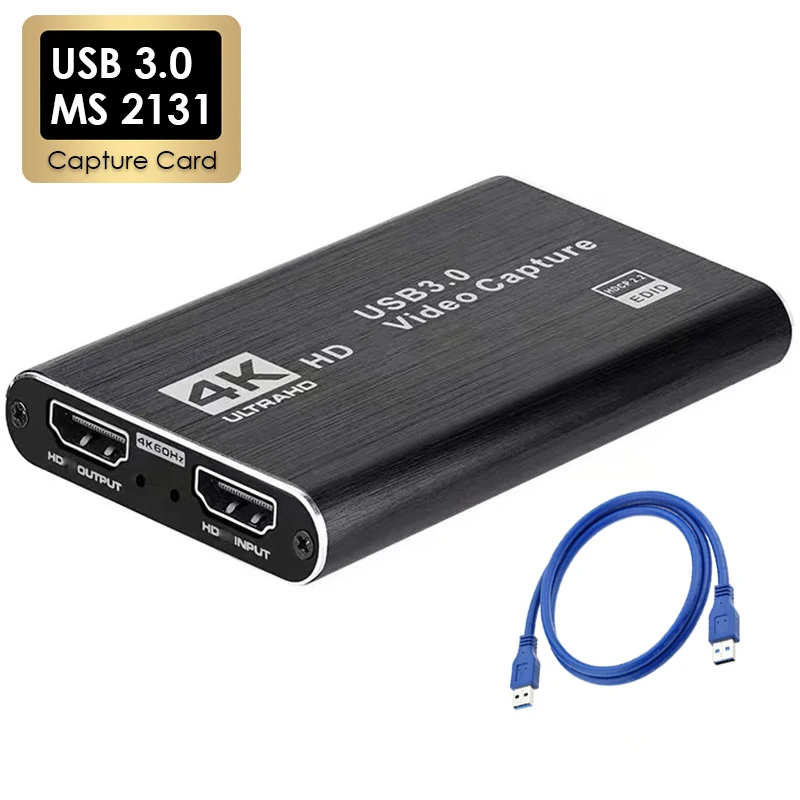
4K USB 3.0 Video Capture Card HDMI-compatible 1080P 60Hz HD Video Recorder Grabber For PS4 OBS Game Recording Live Streaming
Features:
1. It can capture single HDMI-compatible video signal;
2. The recorded video signal can reach 1080p / 60Hz, HDTV input supports 4K/60Hz;
3. Support MJPEG and YUY2;
4.Support UAC & UVC agreement, support 48 KHz PCM audio sampling rate;
5. Some win7 need to install the driver;
6. Compatible with Windows 7, 8, 8.1, 10 or later, Linux OS, Mac OS operating systems;
7. USB3.0, 300 ~ 350MB / s bandwidth, compatible with USB 2.0 (40MB / s bandwidth);
8. Can automatically detect the input video format, and automatically adjust to the set output size and frame rate;
9. Can automatically detect the input audio format and convert it to 48KHz PCM audio;
10. 2 collection rods can be used on a PC;
11. Support online firmware upgrade to better improve product compatibility;
12. The picture quality is clearer, the RGB color range is 0 ~ 255, the delay is better;
13. Support all third-party player software compatible with UVC and UAC protocols;
Computer system requirements:
Windows® 10 / Windows 8.1 / Windows 7 (SP1);
Desktop computer: Intel® Core ™ i5-3400 + NVIDIA® GeForce® GT630 or above;
Notebook: Intel Core i7-U 2.0Ghz + NVIDIA GeForce GT735 or above;
Mac: i5 quad-core or above, video card compatible with DirectX 10, sound card, 4GB DDR3 or more
4 GB RAM (8 GB recommended);
Mobile phone system requirements:
Android phone (supported by newer phones);
Only supports USB2, not USB3. (The reason is that android UVC driver does not support USB3);
If it is a USB Android phone, you need to force the pure USB2 cable into the USB2 mode to use
Interface Introduction:
1. Signal indicator: When the device captures video normally, the indicator lights up.
2. Power indicator: When the device is connected to the USB port of the computer, this indicator lights.
3. HDTV input: This slot is where the HDTV output source such as camera, camcorder, game box, IPTV box, etc. is connected.
4. USB3.0 output: This slot is where you connect the USB3.0 input of a computer or laptop.