
Easy to Use - Only 4 Steps Needed

Turn on the MiniPrinter

Install a T02 Thermal Paper Roll

Put the Holder with Paper Back to the Machine
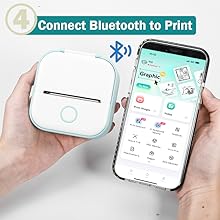
Connect Bluetooth in APP


T02 Mini Sticker Printer Introduction
- Printer Lid Button: press here to open the thermal printer lid.
- Reset Button: reset the mini printer when there is issue you can't solve.
- Charging Port: fast and stable charging for T02 portable printer.
- Indicator Light: the light is red when no enough power/green and flashes when charging.
- Paper Holder: use it to avoid printing alignment issue.
- ON/OFF: remember to turn the bluetooth printer off after every use.
- Rubber Roller: clean it regularly with a cotton stick wet by alcohol to improve printing quality.


Usage Notice
- Please connect Bluetooth from APP.
- No paper alert: take the paper roll out, then long press the power button for 10 seconds until you see green light flashes 2 times. After that, put that paper into the machine again to print normally.
- The printed content is easy to shift without the paper holder.
Birthday/Christmas Gift Combo
For Children/Kids/Women/Girls
T02 sticker printer comes with 3 rolls of printing papers which are all put inside a delicate gift box. Pick it up for your love.
Tips for Better Printing:
- Charge the machine regularly. When the power is low, the printouts will be blurred.
- Moisten a cotton swab with alcohol, and gently wipe the print head regularly to clean dust.
- Select high-pixel pictures to print instead of blurred pictures.
- Reduce the noise of pictures before printing for better effects.
On Jan 3, 2025 at 18:53:20 PST, seller added the following information: