RCA S-Video To USB DVR Adapter Digital MPEG Video Recorder
This USB video audio capture device turns your PC into a full-featured video
player and digital video recorder.
This USB hardware/software bundle provides users a cost-efficient solution for using computer to import the video footage from video equipment to PC so they can edit or digitize the imported video footage into files or disc for backup or collection.
It is designed mainly for the following 3 purposes:
- Record: Capture your video from camcorder, VCR, or DVD player
- Edit: Trim, add or merge video scenes plus optional transition effects between video clips
- Burn: Burn your works into DVD, VCD, or SVCD or convert the videos into MPEG or WMV format that you can play them from digital media player, smart phone, computer or other mobile devices.
This video grabber hardware/software bundle provides users of all levels with simple tool for creating high impact multimedia content for visual aide, presentation, training or streaming.
 |
Expand PC With Audio Video Inputs
Most of the laptop or desktop PCs do not have video inputs. By installing this USB
video audio capture device
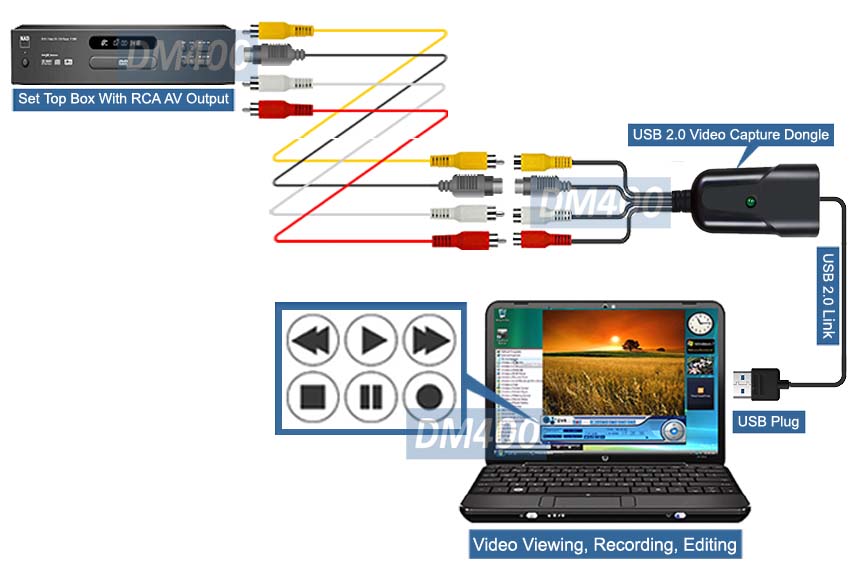
to your PC, you can instantly expand your computer with a standard RCA video input and s-video input.
So video/audio output from home A/V device such as VCR/DVD player, camcorder, CCTV camera or game console can be sent to computer for real time display and recording.
 |
Plug And Play Setup - No Driver Needed
Simply plug and play with absolutely no driver
installation needed for all Windows OS. The easiest model for PC users of all
levels. It will become ready for use in 1 minute !
 |
Premium Digital Video Recording Software
This USB video frame grabber package is bundled with full-featured DVR software for recording video audio feeds
and saving the recorded content into the hard drive for playback or further video production.
Various video formats are available for recording session. The supported video output formats from recording includes the popular MPEG1,MPEG2, MPEG4, VCD/CD and DVD formats in both NTSC and PAL output standard.
Users can have the option to choose between 6-level recording/encoding speed (Fastest/Fast/Normal/Good/Very Good/Excellent) and the maximum DVD video recording resolution can be up to 720x480 pixels at 30 fps.
 |
Support Snapshot Function
This DVR software also supports still image capturing to take a snapshot at any favorite video theme. The image files can be in JPG, PNG, GIF or BMP format.
 |
Digitize Your Analog Video Collection
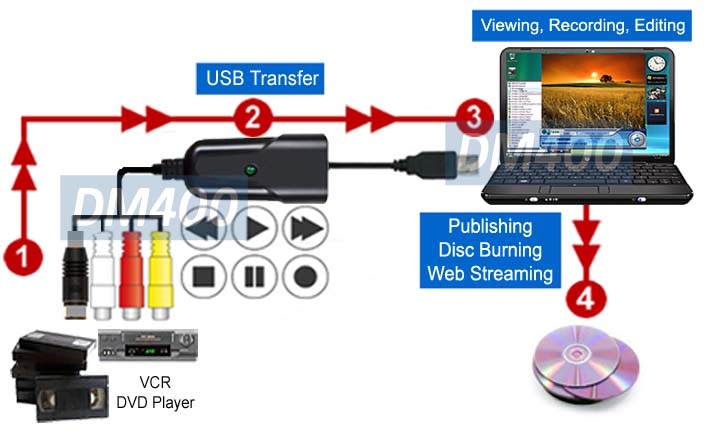
This USB A/V adapter helps digitize all your VHS tapes and other analog video
contents into digital formats.
Before your tapes get worn out and no longer viewable, you can convert your collection into digital files for storage, DVD disc production or further video editing via 3rd party software.
This USB A/V adapter helps user create high impact multimedia content by adding the captured video feeds or image files to PowerPoint or other multimedia authoring application or upload your saved video feed to YouTube or other web video server for broadcasting on the internet.
 |
Full-Function Video/Audio Editor
The editor function of the video software allows users to assemble various components together with captured video feeds for creating new video clips.
Once all of the videos are captured, users can start editing the recorded videos. Editing video clips are very easy with drag-and-drop feature.
During the edit phase, users can edit the recorded video footage by trimming out scene, cutting movies into multiple scenes, adding scenes with transition effects between each scene or combining multiple scenes into one continuous clip.
The video work after editing can be saved in MPEG1, MPEG2, DV-AVI, VCD, DVD and WMV format.
 |
 |
 |
Disc Authoring And Production Tool
The DVD authoring function in the software helps users create professional DVD video discs. Users can capture, edit, and author the multimedia project.
The authoring function is mainly used for making discs that contain scene selection with menus and chapters before burning your content to VCD or DVD disc.
 |
Universal Video Standards Support
This unit automatically detects NTSC, SECAM, PAL and PAL/60 video formats with
selectable NTSC/PAL output for worldwide compatibility.

- Fast and easy DVR adapter for expanding PC with RCA, S-Video and stereo L/R audio inputs.
- Plug and play setup. No driver installation needed for users of all levels.
- Advanced PC-based digital video recorder for recording feeds from home A/V devices such as cable box, satellite receiver, DVD/VCR player, game console, CCTV camera, etc. and store the recorded content into the hard drive for playback or further DVD production.
- The easy-to-use video software bundle helps users for creating high impact multimedia content for great visual aide, presentation, training or streaming.
- Supports software video editing function with drag-and-drop feature.
- Users can edit the recorded video footage by trimming out scene, cutting movies into multiple scenes, adding scenes with transition effects between each scene or combining multiple scenes into one continuous clip.
- Supports MPEG1, MPEG2, DV-AVI, VCD, DVD, WMV format output in file.
- Supports direct disc production in selectable VCD, SVCD and DVD format.
- Supports DVD authoring function for create professional DVD video discs with menus and chapters.
- Supports high quality video recording resolution: NTSC 720x480 at 30fps or PAL 720x576 at 25fps.
- Supports Win11, Win10, Windows 8/8.1, Win7, Vista and XP.
- Supports all NTSC and PAL inputs.

- Device Interface: USB 2.0
- Audio/Video Inputs:
- Composite RCA video input x1
- S-Video input x 1
- Stereo RCA L/R x 1
- Max Video Capture Resolution: NTSC: 720x480 pixels at 30 fps or PAL: 720x576 pixels at 25 fps
- Video System Support: NTSC and PAL
- Video Recording Format Support:
- DV-AVI
- MPEG1, MPEG2
- VCD, SVCD, DVD
- WMV (Windows Media Format)
- Operation System Support: Win11, Win10, Win8/8.1(32/64-bit), Win7(32-64-bit), Vista(32/64-bit) and XP.

- USB DVR adapter unit
- User manual
- Video software CD disc