Flight Switch Panel Professional Simulation Switch Controller
Message Us
  • Authorised
    Logitech Reseller

  • Free delivery
    in Australia

  • Genuine
    Australian stock

  • Full Australian
    warranty

Flight Switch Panel Professional Simulation Switch Controller

Product Description

Multiple In-Cockpit Controls

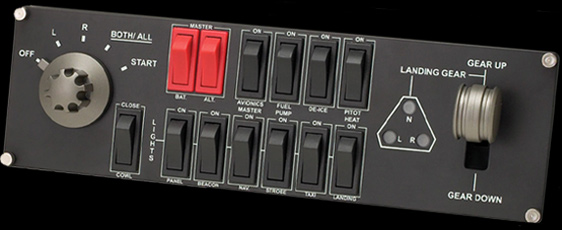
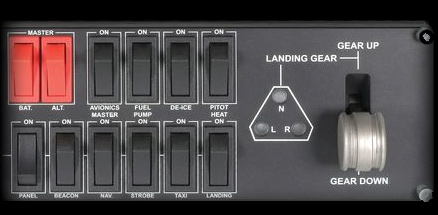
Saitek's Professional Flight Switch Panel is ideal for expanding the number of controls in your flight simulator setup. Attach it to your Logitech G Flight Yoke, place it atop your desk, or even mount it to your own custom cockpit setup. Control your landing gear and lights, engine power and other important aircraft functions, all from one compact unit.

Features

Five-Position Magneto Dial

Ignites Your Engines

Flight Switch Panel accommodates a wide range of different aircraft and features a five-setting rotary switch that individually controls the magnetos in your plane's ignition system. The 'R' and 'L' positions activate their respective magneto in each engine, 'BOTH/ALL' activates every magneto, and moving to 'START' engages the starter. Once engaged, the engines and magnetos turn, working in unison to fire at exactly the right time in the ignition process.

Realistic Landing Gear Control

With LED Indicators

Bring your plane's landing gear up or down with a satisfying click of an actual control lever. Convenient LEDs provide visual indication of real-time gear status from FSX and Prepar3D. Now you can see the exact state of your landing gear with a mere glance at the Switch Panel.

Fully Customizable for All Flying Conditions

Modular and Interchangeable

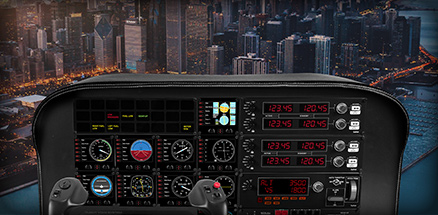
The Logitech G range of panels can be situated one on top of another or side-by-side. Want the Radio Panel above the Multi Panel? Done. Want your Switch Panel to the left of your Yoke? Go for it. Easy-to-use mounting brackets provide the means to arrange your flight simulation setup in a configuration only limited by your imagination.

Photo for illustration purposes only (Every item is sold seperatly)

Simple Installation

Plug-and-Play All the Way

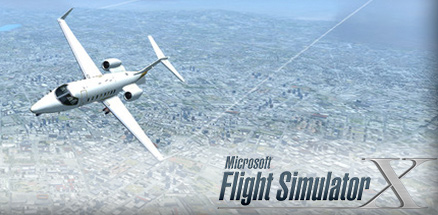
Your panel works with Windows 7, 8.1 and 10 and, following the quick installation of a small plug-in from the support page, is compatible with your favorite flight simulation software for PCs including FSX - Flight Simulator X, X-Plane 10, and Prepar3D® 2.2.

Visit the support site from Logitech official site


Learn to Fly an MD80

Simulate the Actual Aircraft with This Kit (All items purchased seperatly)

For a quick simulation configuration to get you in the pilot’s seat of an MD80 twin-engine commercial jetliner, this bundle is the recipe:

  • 1 Flight Yoke System  (Sold seperatly)
  • 2 Flight Instrument Panels (Sold seperatly)
  • 1 Flight Switch Panel
  • 1 Flight Radio Panel (Sold seperatly)
  • 1 Flight Multi Panel (Sold seperatly)


Specifications

Part Number
Black: 945-000030
Warranty Information
2-Year Limited Hardware Warranty
System Requirements
Windows® 10, Windows 8.1, Windows 7
1-USB 2.0 Port
Internet connection for optional software download
Packaging Content
Flight Switch Panel
Flight Switch Panel brackets
User documentation
Physical Specifications
Flight Switch Panel:
Length: 28.2 cm
Width: 6.3 cm
Height: 8.4 cm
Weight (w/o bracket): 369 g
Weight: 549 g
Cable Length (Power/Charging): 1.8 m

Flight Switch Bracket:
Length: 28.2 cm
Width: 8 cm
Height: 8 cm
Controller Specifications
Connection Type: USB
USB Protocol: USB 2.0
USB Speed: Full Speed
Indicator LIghts (LED): Yes
LCD Display: No
USB Ports (Built-in): No
Backlighting: No
  • Game Compatibility


Compatible with most major simulation software and games, including:

  • Flight Simulator X
  • Prepar3D® 2.2+
  • X-Plane 10

How much is Shipping?

Shipping is FREE, Australia wide

Do you ship internationally?

Sorry we do not ship internationally, we only ship to Australia

How do you ship items?

We use Startrack to process shipments.

How long will it take before my order ships?

You should expect to receive your order in 7-10 business days. We aim to deliver faster than this, so you may receive your product sooner.

Some of our Super Bargains may take slightly longer to process due to high order volumes. This could add up to 4 days to the expected delivery time. Please keep in mind that we do not process orders on weekends or public holidays

Can I pick up my order?

Sorry, we do not provide pick up facilities.

Is tracking available for my order?

Yes, all orders are shipped with a tracking number and can be tracked on the Startrack website. All items require a signature for delivery.

What are your delivery times?

Deliveries are made Monday to Friday, 9am - 5pm. Please note that we cannot schedule deliveries with our drivers, as we cannot control freight once it has left our premises.

if you are not home, a card will be left in your letterbox, advising that your item will be available for pickup either at your local Australia Post Office, or local Startrack depot.

Can I return an item?

Yes, there are certain situations in which we allow returns, for example : Faulty items, incorrect item sent.

Faulty items MUST be reported to us via ebay messages

How do I request a return?

Returns are only possible when an RMA number or a Logitech Incident number has been provided to you.

If you have a faulty item:

Please message us via eBay Messages us via eBay messages and indicate your order number/eBay item number/eBay User ID as well as the details of the item that you received in error. We will then advise you on how a replacement will be sent.

Please note we MUST have provided you an RA/Incident number for you to return an item.

If you change your mind:

Please choose your item carefully as we do not accept returns just because you changed your mind.

You may contact us via:


eBay Contact form: Click here


Send your item back to
Logitechshop
PO BOX 4943
NORTH ROCKS NSW 2151

Make sure you have contacted us via eBay messages before returning any items. Refer to our Returns Policy for full details.

Copyright © 2026 Fluidtek Information Technology Pty Ltd T/A LOGITECHSHOP